



Most reconciliation nightmares don't start in the accounting software. They start six weeks earlier, when someone typed a client name three different ways across three invoices, tagged one project as "consulting" and another as "advisory," and left the payment method blank because the form didn't require it.
By the time that data hits QuickBooks or Xero, the damage is baked in. You only discover it during month-end close, or worse, during an audit when you have four hours to explain why "ACME Corp" and "Acme Corporation Inc." are sitting as two separate customers with two separate balances.
Invoice data governance for small businesses sounds like enterprise-speak. It really comes down to one boring question: does every invoice carry the same clean, predictable set of fields, named the same way, so it exports cleanly and reconciles without someone babysitting it? Get that right and you save yourself the recurring cost of cleanup work. Get it wrong and the mess compounds quietly until it's a multi-day project to untangle.
Why the mess forms in the first place
The pattern that shows up across nearly every small business: invoicing starts casual and stays casual long after the business outgrew casual.
In year one, you're sending maybe 10–15 invoices a month. You know every client by memory. If something looks off, you fix it in thirty seconds. There's no schema because there doesn't need to be one — you are the schema.
Then you hire a contractor, add a second service line, start taking payments through two processors instead of one, and bring on a part-time bookkeeper who wasn't around for the first two years of accumulated tribal knowledge. Now four people are creating invoices, each with slightly different habits. One person abbreviates, one spells things out, one uses PO numbers, one doesn't. Nobody's technically wrong — there's just no agreed standard.
The financial data doesn't break loudly. It degrades. A common version of this: a design studio doing roughly $40k–$50k a month across 60–80 invoices realizes at tax time that their "revenue by service" report is useless. The same work got tagged as "web," "website," "web design," and "site build" depending on who wrote it. There's no single number to hand the accountant. Someone spends a weekend re-tagging historical invoices by hand.
That weekend is the cost of having no governance. And it recurs.
What actually breaks as you scale
Invoice data problems are nearly invisible below a certain volume and nearly unavoidable above it. A few specific things break, roughly in this order:
Stop chasing payments and start automating your billing.
Billoly empowers you to create, send, and track invoices effortlessly while maintaining professional client relationships.
- Customizable invoice templates
- Automated payment reminders
- Real-time payment tracking
No credit card required
Customer records fragment. Duplicate customers are the single most common reconciliation killer. "John Smith," "John Smith Consulting," and "J. Smith LLC" become three entities. Payments land against one, invoices sit under another, and your aging report lies to you.
Category drift sets in. Without a fixed tag list, categories multiply. Ten invoices become fifteen categories. Reports become noise.
Export formatting diverges from what your accounting tool expects. QuickBooks wants specific column headers. Xero wants a specific date format and a particular way of handling tax. A CSV that imported cleanly last quarter throws 40 errors this quarter because someone changed how dates were entered.
Audit trails get thin. When a client disputes a charge or a tax authority asks for backup, you need the invoice, the payment, and the link between them — fast. Fragmented data makes that a scavenger hunt. This is exactly the kind of thing that separates businesses that can make invoices audit-ready with a clean retention and export process from businesses that dread every records request.
The through-line: none of these are accounting problems. They're data entry standard problems that only surface in accounting.
The minimal schema (resist the urge to add more)
The mistake most people make when they finally decide to "get organized" is building a 30-field monster nobody will actually fill out. The fields you need to reconcile cleanly and survive an audit is a short list.
| Field | Why it exists | Format rule |
|---|---|---|
invoice_id | Unique, never reused | Sequential, no gaps (e.g. INV-2025-0412) |
customer_id | The anti-duplicate field | One canonical ID per client, ever |
customer_name | Display name | Match legal/registered name exactly |
issue_date | Aging + tax period | ISO YYYY-MM-DD |
due_date | Collections trigger | ISO YYYY-MM-DD |
currency | Prevents FX confusion | ISO code (USD, GBP) |
line_description | What was sold | Plain text, no internal codes |
line_amount | Pre-tax value | Number, 2 decimals |
tax_code | Reconciles to tax reports | From a fixed list, never freeform |
total_amount | Invoice face value | Number, 2 decimals |
payment_status | Reconciliation anchor | draft / sent / partial / paid / void |
payment_method | Matches deposits | From a fixed list |
category_tag | Reporting dimension | From a fixed taxonomy (below) |
Thirteen fields. The discipline isn't in having more fields — it's in enforcing the format rules. The customer_id being canonical and permanent is worth more than any other single decision on this list. It's the one field that prevents the duplicate-customer disaster.
One note on invoice_id: keep it strictly sequential with no gaps. Auditors read gaps as deleted invoices or hidden revenue. Voids should be marked void, not deleted, so the sequence stays intact.
A tagging taxonomy that doesn't multiply
Tags are where good intentions go to die. Someone starts with five clean categories and eighteen months later there are forty, because everyone invented a tag whenever the existing ones didn't quite fit.
The fix is a two-level fixed taxonomy. Level one is a short list of buckets that almost never changes. Level two is a controlled set of sub-tags under each. Nobody creates new tags on the fly — new tags go through one person, once a quarter.
-
- Revenue type
retainer,project,hourly,reimbursable,product -
- Service line
design,dev,strategy,support -
- Client segment
smb,enterprise,nonprofit
The rule that makes this survive: a tag is only worth having if it maps to a decision or a report. If you can't name the report a tag feeds, delete the tag. Most tag sprawl is tags nobody ever actually runs a report on.
Reimbursables deserve their own tag because they distort revenue if mixed in with real income — they're pass-through costs, not margin. If you invoice these regularly, the way you present reimbursables and tax items on invoices clearly matters as much for your internal reporting as it does for your client's understanding.
Export policy: the part everyone skips
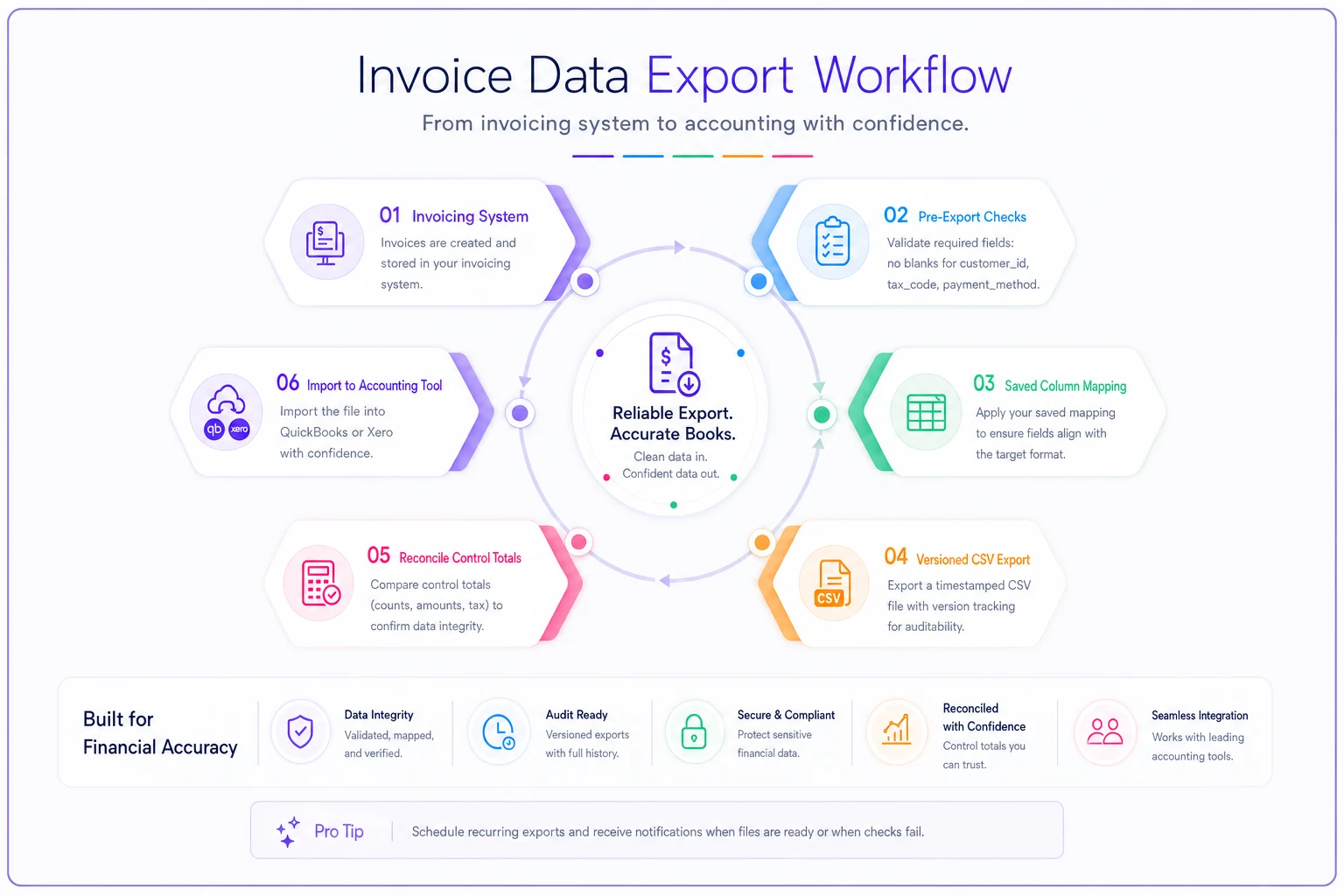
A schema is only half the job. The other half is a written export policy — a short document that says exactly how data leaves your invoicing system and enters QuickBooks, Xero, or a CSV for your accountant. Not "we export sometimes." An actual repeatable procedure.
-
Freeze the period. No editing invoices dated in a period you've already exported. Late edits are the number one cause of numbers that don't tie out between two systems.
-
Run a pre-export check. Confirm zero blank
customerid,taxcode, orpayment_methodfields. These three blanks cause the most import failures. -
Map columns to the target tool's template. Use a saved mapping (see below) so the same fields land in the same columns every time.
-
Export as a dated, versioned file.
export2025-11v1.csv. Never overwrite. If you re-export after a correction, it becomesv2. -
Reconcile control totals. Sum
total_amountin your source and confirm it matches the imported total before trusting anything downstream. -
Archive the export file alongside the reconciliation confirmation. That pairing is your audit backup.
Step 5 is the one people skip and regret. A single control-total check catches almost every silent import error — dropped rows, misread decimals, a currency mix-up — in about thirty seconds.
Always run the control-total check before importing to catch dropped rows or currency issues quickly.
A compact export workflow helps make the process repeatable.
QuickBooks and Xero mapping cheatsheet
| Your schema field | QuickBooks CSV | Xero CSV |
|---|---|---|
customer_name | Customer | ContactName |
invoice_id | Invoice No | InvoiceNumber |
issue_date | Invoice Date | InvoiceDate |
due_date | Due Date | DueDate |
line_description | Item Description | Description |
line_amount | Amount | UnitAmount |
tax_code | Tax Code | TaxType |
total_amount | (derived) | (derived) |
Two gotchas worth memorizing. Xero is strict about date format and will reject or silently misread ambiguous dates — keep everything ISO or match its regional setting exactly. QuickBooks online imports fail loudly on unknown tax codes, so your fixed tax_code list has to match what's already configured in the account, not what you wish it was called.
A real scenario
A small marketing consultancy — three people, roughly $55k–$65k monthly, billing a mix of retainers and project work — was spending most of a day every month on close. The bookkeeper's actual job that day was reconciling two payment processors against QuickBooks and untangling duplicate customers.
The root cause wasn't the bookkeeper. Invoices were being created in two places (the founder used one tool, the ops person used another), customer names were typed freehand, and there was no fixed tax code list, so TAX, Taxable, and Sales Tax all appeared across invoices. About one in six invoices needed a manual touch during close.
They didn't buy new software. They wrote a one-page schema, built a single canonical customer list, locked the tag taxonomy to roughly a dozen values, and adopted the six-step export process above. The first month was rough — cleaning historical duplicates took most of a weekend. After that, month-end close dropped from most of a day to around ninety minutes, and the "which of these three ACMEs is real" question just stopped coming up.
Revenue didn't change. What changed was the recurring tax on their own data — hours spent fixing avoidable mistakes that nobody was tracking as a cost.
When this level of governance actually makes sense
Not every business needs a formal schema.
-
- You need this if more than one person creates invoices, you use more than one payment method or processor, you run reports by service line or client type, or you've ever spent a weekend cleaning up historical data.
-
- This is overkill if you're a solo freelancer sending fewer than ~15 invoices a month, all through one tool, with one payment method. A canonical customer list and consistent tax codes is plenty — don't build a governance framework for a business that fits in your head.
-
- Who should NOT do this yet a brand-new business still figuring out what it sells. Locking a taxonomy before you know your real service lines just means re-doing it. Wait until your categories have stabilized for a couple of quarters.
The signal that you've crossed the threshold is simple: the first time you can't answer a basic financial question without manual cleanup, you needed governance a month ago.
How this connects to the rest of your operation
Invoice data isn't a standalone thing. Clean fields feed collections — accurate duedate and paymentstatus are what make automated reminders trustworthy. They feed cash flow forecasting. They feed the handoffs across a team. If several people touch invoicing, the schema only holds when it's paired with clear ownership, which is really a workflow question — the kind covered in an operational invoicing playbook that assigns roles, triggers, and escalation checklists.
The practical version of governance is just this: one person owns the taxonomy, everyone follows the same field rules, and exports run the same way every time. Modern invoicing platforms help by enforcing the boring parts automatically — required fields that can't be left blank, fixed dropdowns for tax codes and tags instead of free text, canonical customer records that prevent duplicates at entry. The point isn't the tool. The point is moving the discipline from someone remembering to the system enforcing, so clean data becomes the default instead of a monthly cleanup project.
Where to start this week
You don't need to overhaul anything. Start with the two fields that cause the most pain:
-
- Build one canonical customer list. Merge duplicates. Assign a permanent ID to each client.
-
- Lock your tax codes and category tags to a fixed list, and put one person in charge of changes.
Those two moves eliminate the majority of reconciliation friction most small businesses deal with.
The full schema and export policy are worth building out as you grow, but the customer list and the fixed taxonomy are the ones that pay off almost immediately — usually the very next time you close a month.
Ready to streamline your billing process?
Join 5,000+ businesses using Billoly to reduce billing delays, automate payments, and grow revenue efficiently.