



Most small teams treat invoicing like a hot potato. Someone creates it, someone else approves it, maybe a third person sends it, and everyone hopes nothing falls through the cracks. What starts as "we'll figure it out as we go" becomes a mess of Slack messages, forgotten approvals, and clients wondering why they got billed twice for the same project.
The real problem isn't the invoices themselves. It's that nobody owns the whole process. Marketing agencies lose track of campaign add-ons. Consulting firms forget to bill for that extra strategy session. Construction companies miss change orders. Everyone's doing their part, but nobody's watching the system.
Small business teams need clear handoffs, automatic triggers, and a way to escalate problems before they become disasters. Not another invoicing tool, but a playbook for how humans actually coordinate around getting paid.
The coordination tax nobody talks about
Small teams pay a hidden tax on every invoice. Not in dollars, but in the mental overhead of figuring out who does what, when, and what happens if they don't.
Take a typical scenario. Your project manager wraps up a website redesign. They need to create an invoice, but first they check if the client pre-paid any portion. That means digging through emails or asking accounting. Then they need the final project hours from the developer. Another Slack message. Marketing wants to add a note about the next phase proposal. More back-and-forth.
By the time the invoice goes out, four people have touched it, three conversations happened, and two days passed. Multiply that by twenty invoices a month, and you're looking at serious operational drag.
This feels normal. Teams assume coordination overhead is just the cost of doing business. But the ones that grow smoothly have turned invoicing from a multi-person scramble into a predictable system. They don't have better software. They have better handoffs.
Role clarity beats role flexibility
Small teams love flexibility. "We all wear many hats" sounds great until nobody knows which hat to wear for invoicing. The fix isn't rigid job descriptions – it's clarity about who owns each step.
Stop chasing payments and start automating your billing.
Billoly empowers you to create, send, and track invoices effortlessly while maintaining professional client relationships.
- Customizable invoice templates
- Automated payment reminders
- Real-time payment tracking
No credit card required
The Originator (usually the person closest to the work)
-
Creates the initial invoice
-
Adds project details, hours, or deliverables
-
Flags any special circumstances
-
Passes to Reviewer within 24 hours of project completion
The Reviewer (someone with client context but not doing the work)
-
Checks accuracy against contracts or quotes
-
Verifies all billable items are included
-
Confirms client-specific requirements (PO numbers, billing contacts)
-
Approves or kicks back within one business day
The Sender (whoever manages client relationships or accounting)
-
Final formatting check
-
Sends through appropriate channel
-
Tracks payment status
-
Initiates follow-up sequence
Small teams usually balk at this structure. Too formal for a five-person shop. But clear roles create more flexibility. When someone's out sick or swamped, anyone can step into a defined role. Without the structure, invoices sit in limbo because "I thought Sarah was handling that."
You're not assigning permanent positions. You're defining steps that someone must own for each invoice. A freelance designer might be all three roles for their clients. A small agency might rotate based on workload. The structure adapts to your team; the clarity remains constant.
Trigger-based handoffs (not timeline-based)
Most invoicing advice tells you to bill on specific dates. "Invoice on the 1st and 15th" or "Send all invoices Friday afternoon." This works until real life happens.
A client wants their invoice immediately after project completion for their own month-end processing. Another needs 45-day terms starting from milestone approval, not delivery. A rush project finishes on the 3rd but your billing date isn't until the 15th. Now you're managing exceptions instead of a system.
Better approach: trigger-based handoffs. Each step happens when something specific occurs, not when the calendar says so.
Project completion trigger:
-
Developer marks project "complete" in task manager
-
Automatically notifies originator to create invoice
-
24-hour timer starts for invoice creation
-
Escalates to team lead if not done
Approval trigger:
-
Invoice amount over $5,000 requires second approval
-
System flags for reviewer
-
4-hour response window during business hours
-
Auto-approves if no response (risky but sometimes necessary)
Client readiness trigger:
-
Client confirms receipt of deliverables
-
Unlocks invoicing workflow
-
Prevents billing before client acknowledgment
-
Reduces disputes significantly
Payment terms trigger:
-
NET30 clients get invoice immediately
-
NET45 clients get 15-day delay
-
Prepay clients get reminder for next period
-
Each client type follows different workflow
The combinations matter. A rush project for a NET45 client triggers immediate invoice creation but delayed sending. A retainer client hitting their hours cap triggers both an overage invoice and a renewal discussion. The system responds to reality, not arbitrary schedules.
Templates that capture institutional knowledge
Every small team has that one person who remembers everything. They know Client A needs purchase orders on every invoice. Client B wants line items grouped by department. Client C pays faster with shorter descriptions.
When that person leaves or takes vacation, chaos follows. The fix isn't better documentation – nobody reads documentation. The fix is encoding knowledge into templates that enforce good practices.
| Template Type | Key Components | Update Frequency |
|---|---|---|
| Client-specific | Billing contact, PO requirements, description style, payment history | After each client interaction |
| Service-based | Standard deliverables, common add-ons, red flags | Monthly review |
| Escalation rules | Thresholds, approval chains, timeline triggers | Quarterly assessment |
Client quirks template:
-
[Client Name] Invoice Requirements
-
Billing contact
[specific email, not info@]
-
CC required
[Y/N and who]
-
PO required
[Y/N and where to find]
-
Description style
[technical/simple/executive]
-
Grouping preference
[by date/project/department]
-
Supporting docs
[timesheets/receipts/progress reports]
-
Payment history
[fast/normal/always late]
Service-specific template:
-
[Service Type] Standard Inclusions
-
Base deliverables
[list]
-
Common add-ons
[list with typical prices]
-
Never bill for
[internal meetings/revisions under X]
-
Always bill for
[rush delivery/after-hours support]
-
Typical red flags
[scope creep items to watch]
Templates aren't just about consistency. They preserve the expensive lessons your team already learned. That client who disputed a $50 line item for three months? Their template now requires explicit pre-approval for any additions. The project type that always runs over budget? Its template includes buffer line items from the start.
The reporting cadence that actually matters
Small teams either over-report or under-report on invoicing. They check nothing until problems explode, or they generate reports nobody reads. Monitor three things on a predictable schedule.
Weekly: The pipeline check
Every Monday, quick scan of:
-
Invoices created but not sent (why are they stuck?)
-
Invoices sent but not viewed (delivery problems?)
-
Invoices viewed but unpaid over 15 days (follow-up needed?)
Takes ten minutes. Catches problems before they compound. Run it Monday so you can act during the week.
Biweekly: The accuracy audit
Every other Thursday, spot-check:
-
Three random invoices for correctness
-
Compare against project records
-
Check if all billable work was captured
-
Note any patterns in what gets missed
This isn't about perfection. It's about catching systematic problems. If you're consistently missing certain billable items, that's a process problem, not a person problem.
Monthly: The relationship review
First week of the month, examine:
-
Average time from work completion to invoice sent
-
Payment velocity by client
-
Dispute/revision rate
-
Team bottlenecks in the workflow
Look for trends, not absolute numbers. Is payment slowing down? Are certain project types causing more disputes? Is one team member consistently the bottleneck?
Keep it lightweight. No complex dashboards or hour-long reviews. Each check has a specific purpose and clear action items. If nothing needs fixing, move on. If patterns emerge, you catch them before they become expensive problems.
Invoicing escalation workflow visualization
A compact visualization helps teams follow the escalation path quickly.
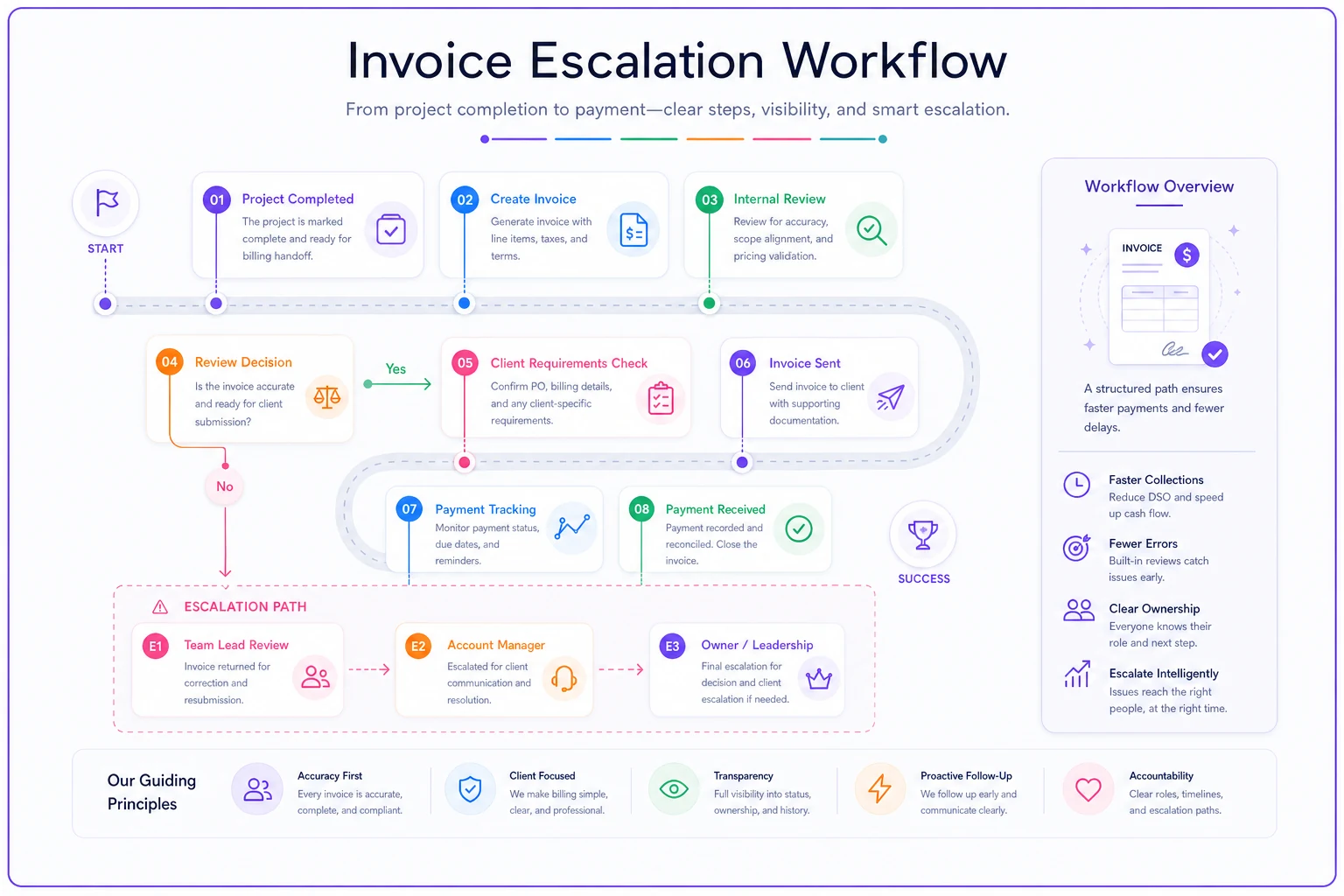
[Project Complete] → [Invoice Created] → [Review Required?] → [Approved] → [Client Requirements Check] → [Invoice Sent] → [Payment Tracking] ↓ [Escalation Trigger] → [Team Lead Review] → [Account Manager] → [Owner/Leadership]
When escalation paths prevent invoice disasters
The most expensive invoice problems aren't the ones that go wrong – they're the ones that go wrong slowly while everyone watches. A client questions a charge, nobody responds quickly, it becomes a dispute, then a relationship issue, then a lost client.
Escalation isn't about hierarchy. It's about speed and clarity when normal processes break.
Level 1: Operational hiccup (handle within team)
-
Invoice stuck in approval over 48 hours
-
Basic question about line items
-
Standard payment delay (under 15 days)
-
Minor template adjustment needed
Action: Team lead reviews and resolves within one business day
Level 2: Client relationship risk (needs immediate attention)
-
Client disputes charge
-
Payment over 30 days late
-
Scope creep affecting invoice accuracy
-
Repeated confusion about billing
Action: Account manager or owner involvement within 4 hours
Level 3: Business impact event (all hands)
-
Client threatening non-payment
-
Potential legal issue
-
Pattern of systematic billing errors
-
Major client considering termination
Action: Owner involvement immediately, full team briefing within 24 hours
The escalation path works for opportunities too. That client who always pays early? Escalate to leadership as a potential case study or referral source. The invoice that revealed a new service opportunity? Flag for business development.
What makes escalation work is removing judgment from the process. Nobody has to decide if something is "bad enough" to escalate. Hit the trigger, follow the path. This removes the hesitation that lets small problems become big ones.
What breaks when you grow (and how to prevent it)
The invoicing system that works for three people falls apart at eight. What changes isn't the volume – it's the complexity. More people means more handoffs. More clients means more exceptions. More services means more variations.
The verbal agreement problem. At three people, "just check with me before sending invoices over $10k" works fine. At eight people, nobody remembers who to check with, what the threshold is, or if it's still even required. Senior people end up micromanaging small invoices while junior people send massive bills without review.
The institutional knowledge crisis. Your longest team member quits. They were the only one who knew that Client X always disputes travel charges unless pre-approved, or that Client Y needs invoices split between two cost centers. Six months of payment delays and client frustration follow.
The exception explosion. What started as "we'll handle special cases as they come up" becomes every invoice being a special case. The mental overhead of remembering every client's unique requirements crushes productivity.
Prevention isn't about building a complex system. It's about documenting decisions as you make them. Client wants a weird invoice format? Add it to their template immediately. New service type needs special handling? Create the workflow now, not after it causes problems.
The teams that scale smoothly treat every invoice exception as a chance to improve the system. Not through meetings or process documents, but by immediately encoding the fix into templates, triggers, or checklists that enforce the new standard.
Building your minimal-overhead playbook
Week 1-2: Define roles and handoffs
Map your current invoice flow. Who touches each invoice? Where does it get stuck? Assign the three basic roles (originator, reviewer, sender) even if people wear multiple hats. Create a simple handoff protocol – even just "mark complete in Slack" beats nothing.
Week 3-4: Implement triggers
Pick your top three bottlenecks. Create specific triggers to prevent them. Invoice creation delays? Trigger from project completion. Approval bottlenecks? Auto-escalate after 24 hours. Payment delays? Trigger follow-up sequences. Start simple, add complexity only when needed.
Week 5-6: Build templates
Document your top five clients' requirements. Create service-specific templates for your most common offerings. Include the weird stuff – that's what causes problems. Make templates enforceable, not suggestions.
Week 7-8: Establish reporting rhythm
Run the weekly pipeline check. Takes ten minutes, catches problems early. Add the biweekly accuracy audit once the weekly check is habit. Monthly review comes last – you need data to review first.
Week 9-10: Test escalation paths
Simulate problems. What happens if someone disputes a charge? If payment is 30 days late? If you discover systematic billing errors? Run the scenarios, fix the gaps. Better to find problems in testing than with real clients.
Week 11-12: Refine and automate
Look for repetitive manual work. Invoice creation from project data? Automate it. Payment follow-ups? Automate them. Approval routing? Definitely automate. This is where AI-powered operational software makes sense – not to replace human judgment, but to eliminate human busywork.
The compound effect of systematic invoicing
A clean invoicing system doesn't just get you paid faster. It changes how your entire operation runs.
When invoicing is predictable, project managers close projects properly because they know it triggers billing. When templates capture requirements, client service improves because nothing gets forgotten. When escalation paths are clear, problems get solved before relationships suffer.
Teams that run systematic invoicing operate differently. They document decisions. They think in workflows. They prevent problems instead of fighting fires. The discipline required for good invoicing spreads to other operations.
This isn't about perfection or complexity. A simple system, consistently followed, beats elaborate processes that nobody uses. Start with basic role clarity. Add triggers as you find bottlenecks. Build templates as you learn client quirks.
The goal isn't to eliminate all human involvement in invoicing. It's to eliminate the confusion, delays, and errors that make invoicing painful. When the system handles the predictable parts, humans can focus on the exceptions that actually need judgment.
Most small teams can implement this entire playbook in under three months. The ones that do typically see payment times drop by 10-15 days, dispute rates cut in half, and invoicing stops being a source of operational stress.
The difference between teams that scale smoothly and teams that hit walls isn't talent or tools. It's systems. And invoicing – boring as it seems – is where most teams learn whether they can build systems that grow with them.
Your internal invoicing system might seem like overkill today. But the habits you build around invoicing become the foundation for every other operational system you create. Start simple, stay consistent, and let the system earn its complexity through real problems, not theoretical ones.
Ready to streamline your billing process?
Join 5,000+ businesses using Billoly to reduce billing delays, automate payments, and grow revenue efficiently.