



A friend called me last month, panicked. His accountant needed three years of invoices for a tax audit, and he had maybe 60% of them scattered between QuickBooks, email attachments, and a folder on his desktop called "2022 stuff maybe." The audit cost him $14,000 in penalties—not because he didn't pay taxes, but because he couldn't prove he did the work.
Most small businesses discover their invoice system is broken during the worst possible moment
A friend called me last month, panicked. His accountant needed three years of invoices for a tax audit, and he had maybe 60% of them scattered between QuickBooks, email attachments, and a folder on his desktop called "2022 stuff maybe." The audit cost him $14,000 in penalties—not because he didn't pay taxes, but because he couldn't prove he did the work.
This happens constantly. Small businesses build their invoice systems backwards, starting with whatever tool makes creating invoices easiest, then scrambling to piece together records when someone official comes asking questions.
The gap between "getting paid" and "audit-ready invoicing" is where most small businesses bleed money they don't even know they're losing. It's not dramatic—just a slow operational failure that shows up as rejected expense claims, delayed tax refunds, lost contracts requiring proof of work history, and compliance penalties that eat entire quarters of profit.
Why invoice management breaks differently at every scale
When you're solo or have two employees, invoice problems feel manageable. You remember who owes what. You can manually export PDFs when needed. But somewhere around invoice #500, the system starts breaking in ways you don't notice until much later.
Stop chasing payments and start automating your billing.
Billoly empowers you to create, send, and track invoices effortlessly while maintaining professional client relationships.
- Customizable invoice templates
- Automated payment reminders
- Real-time payment tracking
No credit card required
The operational breakdown happens in predictable stages. First, you lose track of invoice numbers. Then you can't match payments to invoices. Export formats stop being consistent. Retention becomes "keep everything forever" because you don't know what's required.
Invoice management sits at the intersection of multiple compliance requirements. Tax authorities want one thing, industry regulations want another, contract disputes need something else. A small construction company learned this when simultaneously dealing with a warranty claim (needed five years of project invoices), a tax audit (three years of all invoices), and a client bankruptcy (proof of outstanding invoices with proper documentation). Three different retention periods, three different required fields, zero unified system to handle it.
The financial impact compounds. A marketing consultant discovered this when applying for a business loan. The bank wanted two years of invoice history showing consistent revenue. She had the revenue—bank statements proved that—but matching deposits to specific invoices? Impossible. Her "system" was sending invoices from three different tools depending on the client, storing some in Dropbox, others in email, with no consistent numbering. The loan denial cost her a $40,000 contract she needed the capital to fulfill.
Missing invoice fields create problems you can't fix retroactively
Most businesses think invoice compliance means including a tax number and calling it done. But audit-ready invoicing involves fields that only matter when someone challenges your records—which is exactly when you can't add them.
Sequential numbering gaps trigger red flags. Auditors flag non-sequential invoice numbers as potential hidden revenue. A freelance designer thought she was being organized using project codes as invoice numbers (WEB-001, LOGO-001). During an audit, she had to prove why WEB-003 existed but not WEB-002, turning a routine review into a detailed investigation.
Missing project descriptions become nightmares during disputes. Generic line items like "consulting services" or "monthly retainer" create problems. A software contractor lost a $25,000 collection case because his invoices said "development work" without specifying deliverables. The client claimed the work was never completed. Without detailed descriptions on the original invoices, he had no proof.
Payment terms matter more than you think. "Net 30" isn't enough when dealing with international clients or specific industries. A manufacturing supplier discovered this when a client interpreted "Net 30" as 30 business days, not calendar days, citing industry standard. The dispute over 50 late invoices took months to resolve.
Regulatory identifiers hurt you later when absent. Beyond basic tax numbers, certain industries require license numbers, permit references, or certification codes on every invoice. An HVAC contractor faced $8,200 in penalties when auditors found two years of invoices missing required EPA certification numbers, even though he was properly certified the entire time.
These fields seem unnecessary when business is smooth. You only discover their importance during audits, disputes, or compliance reviews—exactly when you can't fix them.
Building export workflows that actually work under pressure
The phrase "can you send me all invoices from last year" shouldn't trigger panic, but it does for most small businesses. The problem isn't storing invoices—everyone keeps them somewhere. It's that "somewhere" is usually five different places with three different formats and no consistent naming.
Format consistency across time becomes critical. Your invoicing tool from 2021 might export PDFs differently than your 2023 system. A boutique agency discovered this when their client required all invoices in a specific PDF/A format for long-term archival. Three years of invoices needed manual conversion because each year used different software with different export capabilities.
Bulk operations expose every weakness. Exporting 10 invoices is easy. Exporting 1,000 tests every weak point in your system. File naming conventions break down. Folder structures become unwieldy. Metadata gets lost. A property management company tried exporting three years of invoices for a refinancing application. The process took two weeks because their system could only export 50 at a time, with manual downloading required for each batch.
Searchability often conflicts with security requirements. Making invoices searchable (OCR PDFs, indexed storage) sometimes conflicts with security requirements (encryption, access controls). A healthcare consultant learned this after implementing "military-grade encryption" on all invoices, then discovering they couldn't search for specific patient projects during a compliance audit.
Cross-system synchronization creates archaeology projects. When invoices live in your accounting software, but attachments live in cloud storage, and payment records live in your bank—export becomes a multi-system archaeology project. A creative agency spent 40 hours preparing for acquisition due diligence because invoice data was spread across FreshBooks, Google Drive, Stripe, and PayPal, with no consistent linking between systems.
The solution isn't picking better software—it's designing workflows that assume every invoice will need exporting multiple times, in different formats, for different purposes, years after creation.
Retention rules that scale with business reality
"Keep everything for seven years" is the advice everyone gives, but it's both overkill and underkill depending on your situation. Overkill because storing everything forever creates its own problems. Underkill because some documents need longer retention, while seven years of the wrong format is worthless.
A landscape company followed the seven-year rule religiously, backing up everything to external drives each year. When sued by a client over a retaining wall failure, they discovered their backups were corrupted PDFs—readable enough to see invoice totals, but missing the detailed work descriptions that would have proved proper installation. Seven years of useless records.
Active operational records (0-18 months): These need instant access for disputes, payment follow-ups, and current tax periods. Keeping these in your main system makes sense, but they need regular verification that exports work and data is complete.
Compliance archive (18 months - 3 years): Most tax audits focus here. These records need to be complete but don't need instant access. Archive doesn't mean "dump everything in cold storage." You still need to be able to bulk export, search by client, and prove completeness.
Legal protection (3-7 years): Contract disputes, warranty claims, and some regulatory requirements reach back this far. But not every invoice needs seven-year retention. A consultant keeping seven years of coffee shop receipts is wasting resources that could secure critical project documentation.
Extended requirements (7+ years): Real estate transactions, major construction projects, anything with long-term warranties or potential environmental impact—these might need decade-plus retention. But it's specific invoices, not everything.
Retention isn't just about time—it's about maintaining usability. An invoice from five years ago needs to be as export-ready as one from last week, with all supporting documentation intact and searchable.
Jurisdiction complications nobody mentions
The advice to "check your local requirements" is useless when your clients span multiple states or countries. A freelance writer based in Texas, with clients in California and Canada, discovered she was following Texas retention rules (4 years) when California required 7 years for one client type, and Canada wanted different fields entirely on invoices for tax purposes.
Multi-jurisdiction complexity shows up in unexpected ways. Field requirements shift by location. New York wants one thing on construction invoices, Florida wants another. A remote contractor working across state lines ended up maintaining three invoice templates, but forgot to track which client got which version.
Retention triggers vary wildly. Some jurisdictions count from invoice date, others from payment date, others from tax filing date. A consulting firm discovered they'd been deleting invoices after seven years from creation date, but their state counted from payment date. Several "deleted" invoices were still within the retention window.
Currency and tax complexity matters for international invoicing. Different countries require different tax breakdowns, some want reverse-charge mechanisms noted, others need specific harmonized codes. A software company selling globally learned this after incorrectly formatting EU invoices for two years, triggering VAT audits in three countries simultaneously.
Building flexibility into your system from the start makes more sense than trying to meet every possible requirement. When every invoice contains maximum fields and documentation, you can extract what each jurisdiction needs rather than scrambling to add information later.
The hidden cost of audit-triggered reconstruction
When someone says "audit," most small businesses think about finding receipts. The reality is much worse: reconstructing entire operational histories from fragments while your business continues running. Every hour spent rebuilding invoice records is an hour not generating revenue.
Reconstruction gets expensive because you're not just finding documents—you're proving their authenticity, explaining gaps, and demonstrating that your current chaos is complete chaos, not selective presentation. Auditors assume missing documents are hidden income. Inconsistent formats suggest manipulation. Gaps in numbering trigger deeper investigation.
Reconstruction happens when you can least afford it: during acquisition talks (need clean books to maximize valuation), while applying for loans (need proof of steady revenue), fighting payment disputes (need documentation of work completed), or responding to audits (need everything, immediately).
Each scenario has time pressure and financial stakes that make manual reconstruction devastating. A small manufacturing shop faced this during a sales tax audit. The state wanted to verify that out-of-state sales were properly exempted. Simple enough, except their invoices didn't consistently indicate shipping addresses versus billing addresses. Proving where products were delivered meant cross-referencing invoices with shipping records, customer emails, and sometimes even GPS logs from delivery trucks.
Three months of reconstruction for what should have been a standard field on every invoice. They spent approximately $18,000 in staff time rebuilding records, plus $6,200 in accounting fees, to avoid $9,000 in potential penalties. They would have been better off paying the fine, except that triggered increased scrutiny for future years.
Manual systems hit a ceiling around 50 monthly invoices
There's a specific point where manual invoice management transforms from "annoying but manageable" to "actively destroying value." That point sits around 40-60 monthly invoices, depending on complexity.
Below this threshold, you can remember most transactions. You know that Dave always pays late, that the Johnson project had three phases, that you offered a discount in March for early payment. Your brain serves as the metadata layer that makes a simple system work.
The ceiling isn't really about invoice volume—it's about working memory limits colliding with business complexity. At 50 monthly invoices, assuming even distribution, you're creating 2-3 invoices per business day. Add payment tracking, late payment follow-ups, client questions, export requests, and record-keeping, and invoice management becomes a part-time job.
Businesses usually get pushed over the edge by a combination of factors hitting simultaneously: growing from 45 to 55 monthly invoices (crossing the complexity threshold), adding a new service line with different pricing structures, bringing on a contractor who needs access to some invoice data, getting asked for historical reports you've never generated before, or facing your first real audit or major dispute.
A personal trainer managed 30 monthly client invoices through Word templates and email for three years without major issues. When she expanded to 60 clients, the system collapsed within two months. Not dramatically—just death by a thousand cuts. Forgotten follow-ups on late payments. Duplicate invoice numbers. Can't remember if someone already paid when they claim they did.
By the time you realize manual systems are failing, you're too busy fighting fires to implement better processes. So you patch and pray, making the eventual transition even more painful.
Building an audit-ready system with small business constraints
Perfect invoice management systems are built for companies with dedicated accounting departments. Small businesses need something different—systems that are resilient despite irregular maintenance, clear enough for occasional users, and robust enough for unexpected audits.
Start with maximum fields, reduce when sending. It's easier to hide fields than add them later. Create invoices with every possible field, then use templates to show only what each client needs. A construction company started including permit numbers, insurance references, and completion certificates on every invoice—hidden from client view but searchable in their records.
Build numbering systems that tell stories. INV-2024-001 is sequential but says nothing. LA-2024-WEB-001 tells you: landscape architecture division, 2024, website project, first invoice. When an auditor asks about missing numbers, you can explain that LA-2024-DESIGN series exists but LA-2024-MAINT might not, because you didn't have maintenance contracts that year.
Create defensive documentation habits. Every invoice should be able to stand alone as proof of work. Instead of "monthly retainer," write "March 2024 social media management per contract dated 01/15/2024, including 20 posts, 3 campaigns, and monthly analytics report." It takes 30 seconds more but saves hours during disputes.
Implement verification checkpoints. Monthly: verify all invoices are in the system. Quarterly: export everything and confirm readability. Annually: practice a mock audit, pulling random invoices from two years ago and confirming you have all supporting documentation.
Use folder structures that assume chaos. Instead of organizing by client (who might have multiple projects) or date (which spreads related documents), organize by "audit units"—complete packages of related documents. Project-based businesses might use project codes. Subscription businesses might use client-year combinations.
Minimum viable invoice fields:
-
Sequential invoice number (with explainable gaps)
-
Full business name and address (not just "John")
-
Clear service description (not just "work performed")
-
Service/delivery dates (not just invoice date)
-
Payment terms and method
-
Tax identification numbers (both parties)
-
Subtotal, tax breakdown, and total amounts
That's it. Everything else is optimization. Start there, add complexity only when you have capacity to maintain it long-term. The goal is building a system that works even when you're overwhelmed, understaffed, or dealing with emergencies—because that's exactly when you need it most.
The workflow automation opportunity most businesses miss
Most businesses automate invoice creation but ignore the operational workflows that actually consume time. Creating an invoice takes two minutes. Managing its lifecycle—from creation through payment to compliant storage—takes hours spread across months.
| Activity | Time Per Instance |
|---|---|
| Creating invoices | 3 minutes each |
| Following up on payments | 15 minutes per late invoice |
| Answering client questions | 10 minutes per query |
| Finding historical invoices | 8 minutes per request |
| Preparing monthly reports | 2 hours |
| Quarterly export and backup | 3 hours |
| Annual audit preparation | 40+ hours |
They were optimizing the smallest time component while ignoring the operational overhead.
-
Add it to the appropriate retention schedule
-
Tag it with searchable metadata
-
Create audit trails for any modifications
-
Schedule payment follow-ups
-
Update project tracking
-
Prepare export packages
-
Archive supporting documentation
This is where AI-powered operational software starts making a massive difference. Instead of managing ten different manual processes, triggered at different times, with different requirements, you build unified workflows that handle the entire invoice lifecycle. The invoice becomes not just a payment request but a fully-documented operational record, ready for any future requirement.
This visual shows the invoice lifecycle workflow for automation.
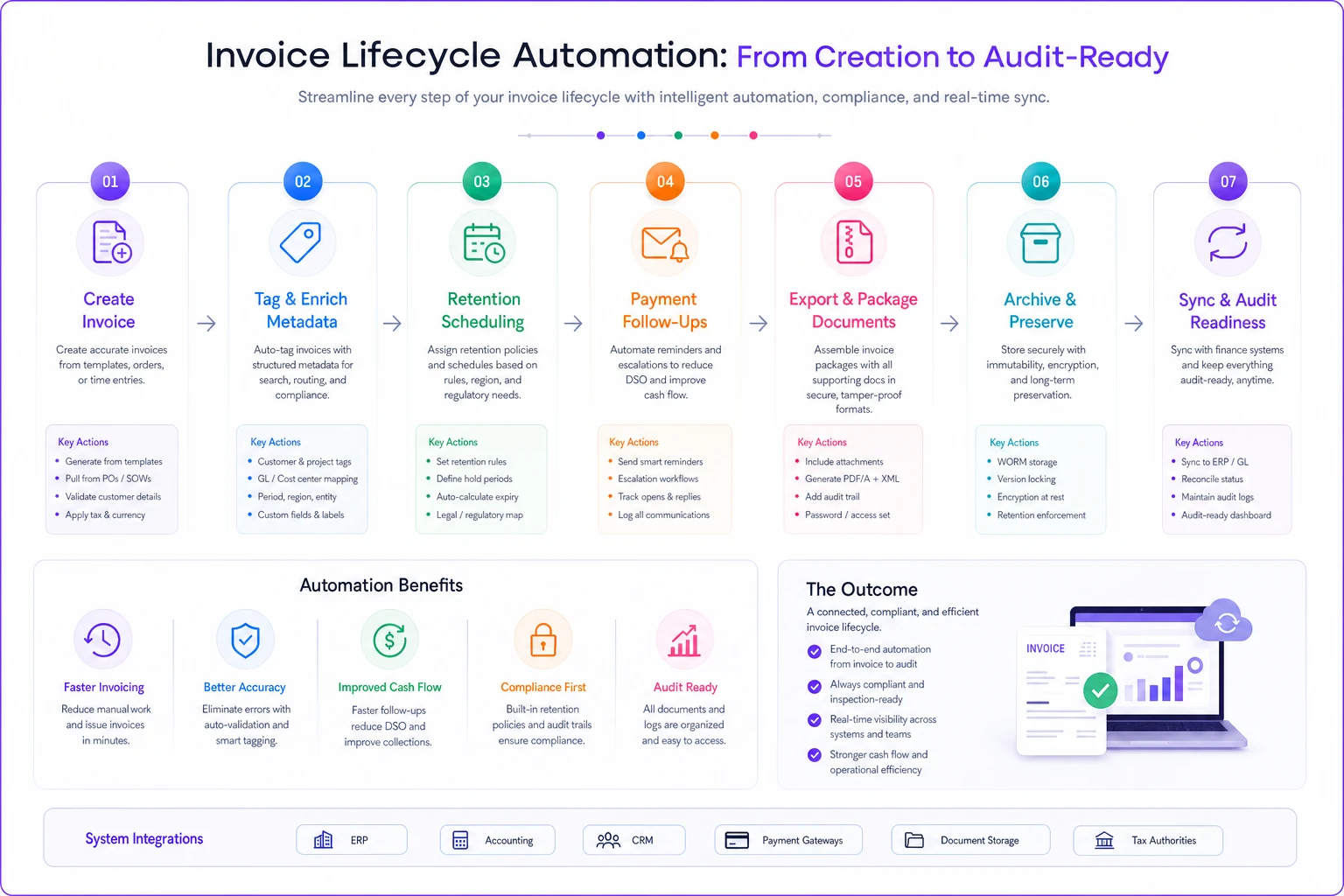
The impact shows up in unexpected ways. That marketing agency reduced their quarterly export process from 3 hours to 15 minutes. They also discovered patterns in their payment delays they'd never noticed—certain client types consistently paid late, but only for specific service categories. Adjusting payment terms for those specific combinations improved cash flow by roughly $4,300 monthly without losing any clients.
That's it. Everything else is optimization. Start there, add complexity only when you have capacity to maintain it long-term. The goal is building a system that works even when you're overwhelmed, understaffed, or dealing with emergencies—because that's exactly when you need it most.
Ready to streamline your billing process?
Join 5,000+ businesses using Billoly to reduce billing delays, automate payments, and grow revenue efficiently.