


Most billing delays don't come from clients who won't pay. They come from clients who can't figure out how to pay quickly, or who hit a small friction point and set the whole thing aside. A confusing pay link, a receipt that doesn't match their PO, a dispute they can't articulate without emailing you three times — each of those adds days. Stack them across a dozen invoices and you've quietly built a cash flow problem that no reminder sequence fully fixes.
The fix isn't better collections. It's better design — the actual fields, buttons, receipt layouts, and intake forms your client touches. This is the customer billing experience, and it's the part most small businesses never intentionally build. They inherit whatever their invoicing tool spits out and hope it's fine.
It's usually not fine. So here's how to rebuild it, surface by surface, in a way that reduces back-and-forth and gets money moving faster.
Where the experience actually breaks
Before touching design, it helps to know where friction hides. Across small service businesses and freelancers, the same failure points keep showing up.
The pay link asks for too much or too little. Either it demands a login the client doesn't have, or it's so bare they're not sure it's legitimate. The receipt doesn't carry the client's own reference numbers, so their AP person can't match it to a PO and it sits in a "needs research" pile. Disputes arrive as vague emails — "this doesn't look right" gives you nothing to act on, so you spend two days extracting details that a short form could have captured in thirty seconds. And the client has no idea what happens next. No confirmation, no "you're all set," no expected timeline. Uncertainty makes people cautious, and cautious people pay slowly.
None of these are dramatic. That's kind of the point. They're small enough to ignore individually and expensive enough collectively to matter. A typical example: an invoice for around $4,800 that would've paid in three days instead takes eleven because the client's finance team couldn't match the receipt to their internal order number. Nobody was upset. It just sat there.
The portal: fewer fields, smarter defaults
The single biggest mistake on billing portals is treating them like a form to be filled out instead of a task to be completed. Every field you add is a chance for someone to stop.
Stop chasing payments and start automating your billing.
Billoly empowers you to create, send, and track invoices effortlessly while maintaining professional client relationships.
- Customizable invoice templates
- Automated payment reminders
- Real-time payment tracking
No credit card required
Here's a lean set of fields that covers most B2B and freelance situations without overwhelming anyone:
| Field | Required? | Why it earns its spot |
|---|---|---|
| Invoice number (pre-filled) | Yes | Client should never type this. Pre-fill from the link. |
| Amount due (pre-filled, editable only for partial) | Yes | Editable only if you allow partial payments. |
| Client PO / reference number | Optional but prominent | This is what makes reconciliation painless on their side. |
| Payment method selector | Yes | Show low-cost options first (ACH/bank transfer before card). |
| Email for receipt (pre-filled) | Yes | Confirm, don't re-collect. |
| "Add a note" field | Optional | Catches "paying half now" or "using new card" context. |
| Dispute / "something's wrong" link | Always visible | Reroutes friction into structured intake instead of email. |
Notice what's not there: no forced account creation, no address re-entry, no marketing checkbox. Every removed field is faster payment.
The prominent PO field deserves its own mention. When a client can attach their own reference number at the moment of payment, that number flows into your receipt and your books, and their AP team can match everything instantly. It's a two-second addition for them that saves both sides a follow-up email later.
When a client can attach their own reference number at the moment of payment, that number flows into your receipt and your books, and their AP team can match everything instantly.
Copyable portal spec (drop into your tool or brief a developer)
-
Portal
Pay Invoice #{{invoice_no}}
-
Header
Business name + logo + "Secure payment"
-
Line 1
Amount due (large, bold): {{amount_due}} {{currency}}
-
Line 2
Due date + status chip (e.g. "Due in 4 days")
-
Field
Your PO / reference (optional) [text]
-
Selector
Payment method
-
○ Bank transfer (no fee) [default]
-
○ Card (2.9% + $0.30)
-
Field
Notes (optional) [textarea]
-
Button (primary)
Pay {{amount_due}}
-
Link (secondary)
Something wrong with this invoice?
-
Footer
Contact + "You'll get a receipt at {{email}}"
Small detail that matters: showing the card fee next to the card option nudges more clients toward the cheaper rail without you having to argue about it. Design does the persuading.
Receipts and pay-links: make them do the reconciliation work
A receipt is not a thank-you note. It's a data object that two accounting systems need to agree on. If your receipt only shows "Paid: $4,800 — thanks!" you've thrown away the most useful moment to prevent future confusion.
A good receipt carries structured fields both sides can act on. Here's a receipt payload schema worth adopting — whether your tool exposes it as JSON, a PDF footer, or both:
{ "receiptid": "RCPT-2025-0417", "invoicenumber": "INV-1183", "clientporeference": "PO-88231", "amountpaid": 4800.00, "currency": "USD", "paymentmethod": "ACH", "paymentdate": "2025-04-17", "remainingbalance": 0.00, "taxbreakdown": [ { "label": "State tax", "amount": 0.00 } ], "lineitemssummary": "Design retainer — April", "businesstaxid": "XX-XXXXXXX", "status": "paidin_full" }
The three fields most receipts skip — clientporeference, remainingbalance, and status — are the ones that stop questions before they start. A client who sees remainingbalance: 0.00 and status: paidinfull doesn't email asking if they still owe anything. A partial payer who sees the remaining balance knows exactly what's left without doing math.
-
One link, one invoice. Don't bundle multiple invoices behind a single link unless the client explicitly wants that. Bundling creates "which one did I pay?" confusion.
-
Links shouldn't expire silently. If a link expires, the landing page should say so and offer a one-click refresh, not throw a dead error.
-
The link should survive forwarding. AP teams forward these constantly. If the link breaks when it lands in a different inbox, you've lost a day.
If you want the deeper logic behind how wording and layout influence payment speed, that's covered separately in payment psychology and the nudges that shorten payment times — the design principles here pair directly with those.
Structured dispute intake: turn "this looks wrong" into accounting-ready data
This is the surface almost everyone gets wrong. Most disputes arrive as free-text email, which means someone on your side has to interrogate the client to figure out what's actually being contested. That interrogation is the delay.
Replace the "email us" escape hatch with a short structured form that captures exactly what your accounting process needs. The trick is asking questions whose answers map directly to fields in your books, so a dispute doesn't require re-typing anything later.
A dispute intake form that populates accounting fields
-
What's the issue? (single-select → maps to dispute_type) ○ Wrong amount ○ Wrong line item / service not received ○ Duplicate invoice ○ PO mismatch ○ Tax / rate issue ○ Other
-
Which line item(s)? (multi-select from invoice → maps to disputedlineids)
-
Amount you believe is correct
[number → maps to clientproposedamount]
-
Your PO / reference
[text → maps to clientporeference]
-
Details
[textarea → maps to dispute_notes]
-
Attach supporting doc (optional) [file]
When this form submits, every answer lands in a predictable field. disputetype lets you route automatically — a "duplicate invoice" goes straight to a quick verification, while a "service not received" goes to whoever owns delivery. clientproposed_amount gives your bookkeeper a concrete number to reconcile against instead of a vague complaint.
The operational win here is easy to miss: structured intake converts a four-email, multi-day dispute into a single form submission you can resolve in one pass. And because the fields already match your accounting schema, resolving it doesn't create a second round of manual data entry.
When disputes do escalate into genuine payment recovery situations, the intake data becomes the foundation for the conversation — the scripts and concession templates in recovering unpaid invoices without losing clients work far better when you already know exactly what's being contested.
The message sequence: reduce queries before they happen
Half the "where's my receipt / do I still owe / what's this charge" emails come from silence. People fill informational gaps with worry, and worried clients email you. The fix is a short, predictable sequence of messages tied to events, not just dates.
-
On invoice send "Here's invoice #1183 for April. Pay in two clicks here. Bank transfer is free; card adds a small fee. Need something changed? Flag it here." (The dispute link is included on purpose.)
-
On pay-link open, no payment after 48h "Looks like you opened the invoice — anything blocking payment? Reply or use the 'something wrong' link and we'll sort it fast."
-
On payment received "Payment received — you're all set. Receipt with your PO reference attached. Balance: $0." (Kills the 'did it go through' email.)
-
On partial payment "Got your partial payment of $2,400. Remaining balance $2,400, due [date]. Here's the link for the rest."
-
On dispute submitted "We've got your dispute on invoice #1183 (wrong amount). We'll review and respond by [date]. No further action needed from you right now."
That "no further action needed from you right now" line does a disproportionate amount of work. It tells the client the ball is in your court, which stops the anxious follow-ups.
The event-triggered logic here is a design choice, not a cadence choice. If you want to think through timing, tone, and escalation more rigorously, the framework in automated reminder sequences that increase recovery covers the escalation side — what we're doing here is upstream of that, preventing the need for escalation by closing information gaps early.
A real scenario
A two-person branding studio was invoicing roughly $30k–$35k a month across maybe 15–20 active clients. Their average time-to-pay hovered around 22 days, and a good chunk of the delay traced back to two things: receipts that didn't carry client PO numbers, and disputes that arrived as vague emails along the lines of "can you explain the third line?"
They changed three surfaces, nothing else. They added a prominent PO field to the pay page, put that PO number onto every receipt, and replaced their "email us with questions" line with a five-field dispute form. No new pricing, no new collections effort.
Within about two months, average time-to-pay dropped to roughly 14 days. Dispute emails didn't disappear, but they arrived pre-structured, so resolution went from a few days of back-and-forth to same-day in most cases. The owner's own summary was less about the numbers and more about the quiet: "I stopped getting the 'did my payment go through' emails almost entirely." That silence was the receipt design doing its job.
When this is worth building — and when it isn't
This makes sense when you invoice B2B clients with AP teams or POs, where reconciliation friction is real, or when you're already spending meaningful time answering "status of my payment" emails and vague disputes. If you're handling roughly 10 or more invoices a month, small per-invoice delays compound fast enough that the build is worth it.
It's lower priority if you bill a handful of long-term clients who pay on autopay anyway, or if your payments are almost all card-on-file subscriptions with no manual pay step — the pay-link surface barely exists in that model.
Who should not over-engineer this: a brand-new freelancer with three clients. Building elaborate dispute intake for three invoices a month is solving a problem you don't have yet. Start with a clean receipt that carries a reference number and a clear "you're paid" confirmation. Add the structured dispute form when disputes actually become a recurring time sink.
Implementation checklist
Use this to audit your current billing surfaces:
-
[ ] Pay link pre-fills invoice number and amount (client types nothing they shouldn't have to)
-
[ ] No forced account creation to pay
-
[ ] Prominent optional PO / reference field on the pay page
-
[ ] Low-cost payment method shown first, with card fee displayed
-
[ ] Receipt includes
clientporeference,remaining_balance, andstatus -
[ ] One pay-link per invoice; expired links offer a refresh, not a dead end
-
[ ] "Something wrong?" link routes to a structured form, not open email
-
[ ] Dispute form fields map directly to your accounting fields
-
[ ] Payment-received message confirms $0 balance explicitly
-
[ ] Dispute-received message says "no further action needed right now"
[ ] Dispute-received message says "no further action needed right now"
The connective tissue
These surfaces aren't separate features — they're one system passing the same data forward. The PO number a client enters on the pay page shows up on the receipt, matches their AP records, and pre-populates the dispute form if something goes sideways. The status field on the receipt kills the confirmation email. The structured dispute form feeds your books without re-entry. Each surface hands clean data to the next one, which is exactly why the whole thing speeds payment instead of just relocating the friction.
A quick diagram helps see the flow between pay page, receipt, and dispute intake.
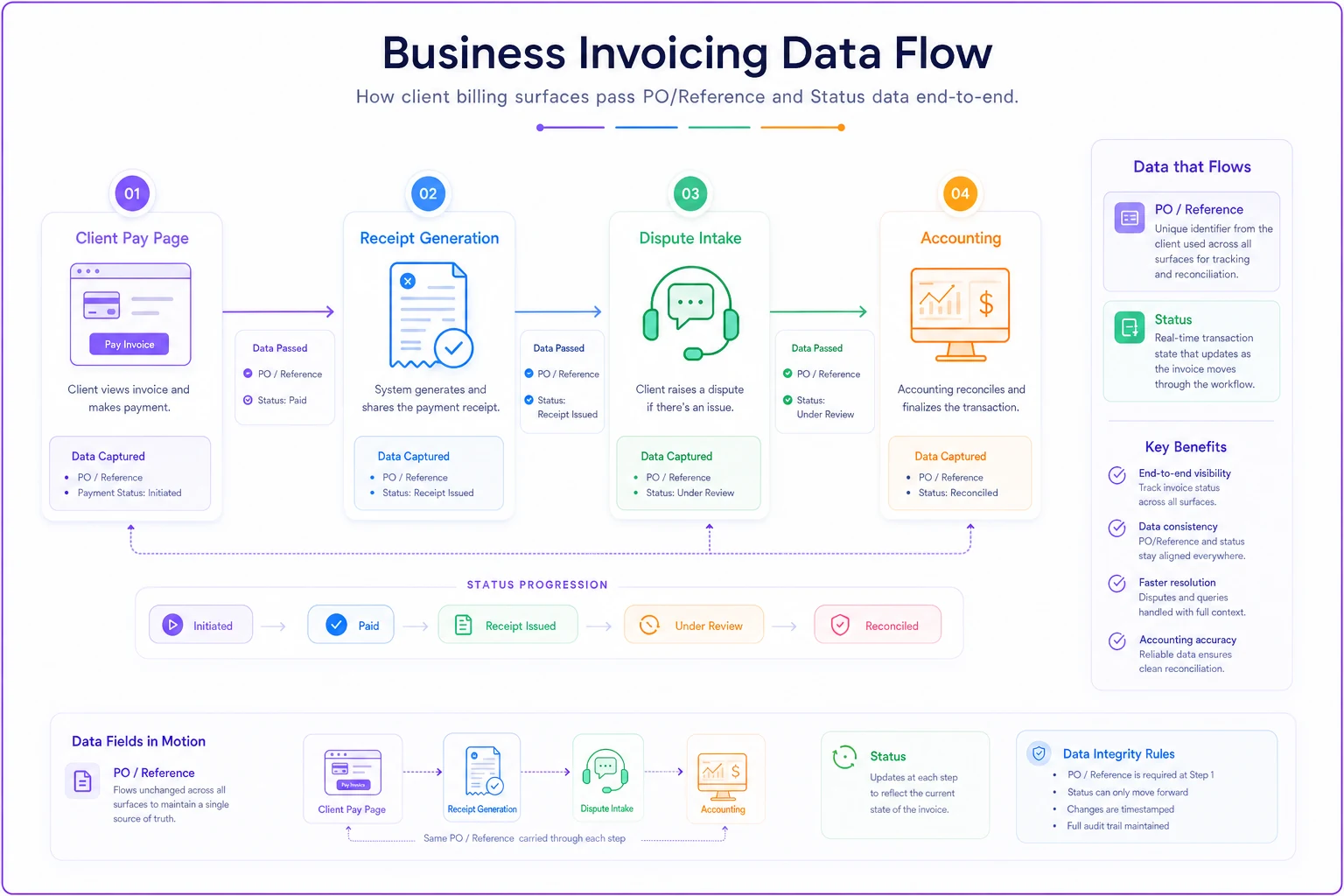
Each surface hands clean data to the next one, which is exactly why the whole thing speeds payment instead of just relocating the friction.
Most small businesses design invoices carefully and then ignore everything the client actually touches afterward — the link, the receipt, the moment something goes wrong. That's backwards. The invoice announces the debt; the billing experience determines how fast it gets paid. Build the surfaces the client interacts with as deliberately as you build the invoice itself, and a surprising amount of your collections work simply stops being necessary.
Ready to streamline your billing process?
Join 5,000+ businesses using Billoly to reduce billing delays, automate payments, and grow revenue efficiently.