

There's this specific moment when an unpaid invoice transforms from "oversight" to "problem account." It usually hits somewhere between day 30 and day 47, depending on your business. Miss that window, and your recovery odds drop from around 85% to maybe 40%.
The 47-day window that determines if you'll ever get paid
Running collections for a commercial cleaning company taught me this the hard way. We had $280,000 outstanding across 60 accounts. The pattern became obvious once we dug into the data: invoices reaching day 50 unpaid almost never recovered without lawyers getting involved. But invoices we caught at day 35? Those usually just needed the right nudge.
The challenge isn't knowing this window exists—it's building an automated invoice reminders cadence that catches accounts before they cross that psychological barrier where paying becomes a bigger decision than ignoring you.
Why Tuesday at 2:47 PM beats Monday at 9 AM
Payment timing breaks down into three distinct windows. Missing them is like throwing reminders into the void.
Stop chasing payments and start automating your billing.
Billoly empowers you to create, send, and track invoices effortlessly while maintaining professional client relationships.
- Customizable invoice templates
- Automated payment reminders
- Real-time payment tracking
No credit card required
Most businesses send reminders Monday morning because it feels logical—start of the week, fresh desk, clear head. Except Monday mornings are chaos. Everyone's triaging weekend disasters, planning the week's priorities, figuring out what's on fire. Your payment reminder becomes background noise.
Decision window: Tuesday and Wednesday, 2-4 PM. Morning urgencies are handled, afternoon fatigue hasn't hit. People are in execution mode, knocking out tasks.
Processing window: Thursday, 10 AM-12 PM. Accounting departments and bookkeepers batch process on Thursdays to clear before Friday. If you need something in this week's payment run, Thursday morning is your shot.
Emergency window: Friday, 3-5 PM. Counterintuitively effective because people want to clear their desk before the weekend. Only works with the right tone though—"Let's get this handled so neither of us has to think about it Monday."
A property management company tested this timing shift with 400 lease payment reminders. Same message, same channel, different timing. Tuesday afternoon reminders got 62% same-day response. Monday morning? 31%.
The three-strike tone shift nobody talks about
Standard advice says start friendly and gradually get firm. That's oversimplified and misses the psychological shift that actually drives payment.
Strike one isn't about being friendly—it's about removing friction. Your first reminder should make payment feel effortless, not create homework. Don't make them hunt for invoice numbers or log into portals. Put everything they need in one place.
Strike two is where most sequences fail. They go from "friendly reminder" to "concerned about your account" without acknowledging what's really happening: something broke in their process. Maybe accounting never got it. Maybe there's a question. Maybe they're waiting on their own payments. Your second reminder should diagnose, not escalate.
Strike three isn't about threats—it's about consequences becoming real. Not "we'll send you to collections" but "your team loses access Monday" or "next month's service is on hold." Specific, immediate, reversible consequences work. Vague future threats don't.
First reminder (removing friction): "Invoice #4721 for December's service ($3,400) is ready for payment. Click here to pay online, or reply with any questions. All backup documentation attached."
Second reminder (diagnosing the block): "Checking on invoice #4721—sometimes these get stuck in approval or accounting hasn't received the right documentation. What do you need from me to move this forward?"
Third reminder (consequences become real): "Invoice #4721 needs attention today to avoid service interruption. Your account will be placed on hold Monday morning if payment isn't received. Here's a direct link to resolve this now: [payment link]"
Notice what's missing? No "per our terms" language. No "disappointed" guilt trips. No "final notice" drama. Just clear communication about what's happening and what happens next.
SMS and the delicate art of not being annoying
Text reminders occupy this weird space where they're incredibly effective but incredibly easy to mess up. Send too many and you're the vendor who won't stop texting. Send too few and you're leaving money on the table.
The sweet spot for B2B service businesses is two SMS touches per invoice:
First SMS: 24 hours after an email reminder goes unopened "Quick heads up—invoice #4721 ($3,400) needs your attention. Details in your email from yesterday."
Second SMS: When consequences are imminent "Tomorrow your account goes on hold for invoice #4721. Payment link: [link] or call me at 555-0100"
That's it. More than two texts for a single invoice crosses into harassment territory.
Timing matters here too. B2B texts work between 10 AM and 4 PM on weekdays. B2C can stretch to 7 PM. Weekend texts almost never work unless you're in an industry where weekend work is normal.
A concrete contractor discovered their sweet spot was Wednesday at 11 AM for SMS reminders. Their clients were usually on job sites in the morning, checked phones during late-morning break, and had company checkbooks accessible in their trucks. Friday texts got ignored because everyone was wrapping up jobs. Monday texts got lost in the week's startup chaos.
Building escalation rules that preserve the relationship
Most escalation happens too fast or too slow. You're either jumping to collections after 30 days (burning relationships) or waiting 90 days (training clients that payment is optional).
Effective escalation follows predictable stages:
-
Days 0-30
Internal handling
- Your standard automated invoice reminders cadence runs here. Email, SMS, maybe one phone call. Everything stays between you and the client. -
Days 31-45
Operational consequences
- Work stops, access gets restricted, future bookings go on hold. But everything is reversible the moment payment arrives. No penalties yet, just natural consequences. -
Days 46-60
Financial consequences
- Late fees kick in (if your contract allows). Credit reporting happens. You offer a settlement—maybe 90% for immediate payment. The relationship is strained but salvageable. -
Days 61+
External recovery
- Collections, legal action, or write-off. The relationship is over.
The key is making each stage visible to the client before it happens. A landscaping company added one line to their day 40 reminder: "Your account will be reported to business credit bureaus in 5 business days." Collection rate for 40-50 day accounts jumped 31%. Clients who were casually delaying suddenly found motivation.
This diagram shows the escalation workflow from invoice due through internal handling to external recovery.
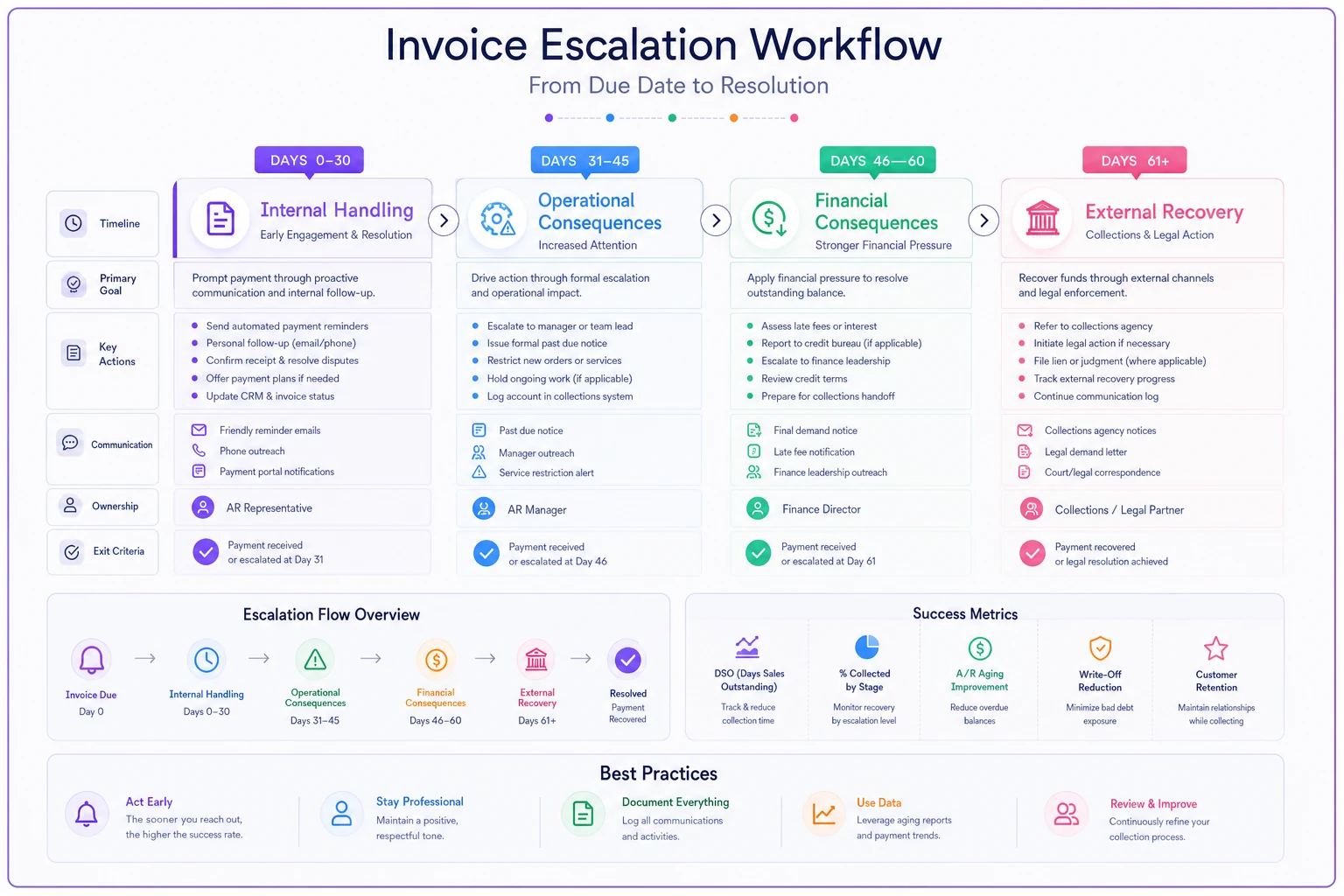
The visual makes it clear when to pause automation and when to make consequences explicit.
Hidden triggers that tell you when to abandon automation
Some situations scream for human intervention, but most automated systems miss the signals.
Pattern breaks: A client who always pays within 10 days suddenly hits 30? That's not a reminder problem—something changed in their business.
Partial payments: Anyone who sends partial payment is trying to communicate something. Maybe they're disputing part of the invoice, maybe cash is tight, maybe they're testing if you'll accept less.
Multiple opens without action: If someone opens your reminder email five times without paying, they're not ignoring you—they're stuck on something.
Out-of-office responses: Your automation better catch these and pause the sequence, or you'll be sending increasingly aggressive reminders to someone on medical leave.
A marketing agency built triggers around these signals. When their system detected multiple opens without payment, it automatically generated a task for someone to call with: "I noticed you've looked at the invoice several times—is there something I can clarify?" Recovery rate for those accounts hit 89%.
Industry payment rhythms you're probably fighting against
Construction pays on draw schedules. Restaurants pay after weekend deposits. Law firms pay on specific cycles. Fighting these patterns is like swimming upstream.
Construction: Time reminders for the 10th and 25th—common draw dates. Never chase payment the last week of the month when everyone's scrambling for progress billing.
Professional services: Many firms run AP on the 15th and 30th. Your reminder hitting on the 13th or 28th gets included. Hitting on the 17th waits two weeks.
Healthcare: They're waiting 45-90 days for insurance payments. They understand delays but have zero tolerance for excuses. Be direct, skip the friendly fluff.
Retail/Restaurants: Monday and Tuesday mornings, after weekend deposits but before the lunch rush. Never during service hours.
Creative agencies: They're juggling client payments too. Acknowledge it: "I know you're probably waiting on client payments—can we figure out a timeline that works?"
Working against these rhythms guarantees frustration. One HVAC company shifted their entire reminder schedule to align with property management payment cycles. Instead of reminding on the 1st (when property managers are collecting rent), they remind on the 8th (when rent's been processed). Collection speed improved by 12 days on average.
The psychology of making payment feel easy versus feeling mandatory
Urgency without ease creates resentment. Ease without urgency creates procrastination. The balance determines whether invoices get paid or get pushed to next week's pile.
Making payment easy means removing every possible friction point:
-
Direct payment links (no portal logins)
-
Multiple payment methods accepted
-
All information in one place
-
Clear amount and due date
-
No hunting for invoice numbers
But ease alone doesn't drive action. You need productive pressure—not threats, but natural consequences that make delaying payment more inconvenient than just handling it.
A staffing agency tested two approaches. Version A made payment extremely easy (one-click from email) but had soft language about timing. Version B required portal login but clearly stated service suspension dates. Version A collected faster initially but had more long-tail delays. Version B had slower initial response but better total recovery.
The winner? They combined both—ultra-easy payment with clear operational consequences. Recovery improved across the board.
Tools and tech stack for scalable reminder sequences
Excel and calendar reminders stop working around 20 active invoices. After that, you need actual systems, but most small businesses either overspend on enterprise platforms or underinvest in basic tools that can't handle complexity.
The minimum viable stack needs:
-
Conditional logic (if-then rules based on client behavior)
-
Multi-channel capability (email + SMS at minimum)
-
Response tracking (opens, clicks, replies)
-
Human handoff triggers
-
Payment pattern learning
Modern platforms use AI automation to recognize patterns humans miss. A plumbing company's system noticed that commercial clients who normally paid quickly would delay payment right before renewing annual contracts—they were using payment timing as negotiation leverage. The system automatically flagged these accounts for human outreach before they hit the standard reminder sequence.
Pause automation when projects are active to avoid embarrassing reminders while work is underway.
Integration is where the real efficiency comes from. When your reminder system talks to your operations platform, you avoid embarrassments like demanding payment while delivering service. One consultancy had reminders pause automatically when projects were active, resume when deliverables were complete, and adjust tone based on project satisfaction scores.
The cost of good automation pays for itself quickly. That plumbing company spent $400/month on their operational platform but recovered an extra $18,000 in the first quarter just from better reminder timing and escalation.
Recovery patterns from real optimization efforts
A commercial printer with around $120K in monthly revenue was writing off close to $8,000 monthly in bad debt. Not because clients couldn't pay—because their reminder sequence was completely misaligned with how their clients actually processed invoices.
Their original sequence sent reminders every Monday for four weeks, then gave up. No SMS, no phone calls, just weekly emails with increasing frustration. Recovery rate sat around 71%.
The rebuild started with analyzing their client base. Three segments emerged:
| Segment | Payment Behavior | Optimal Approach |
|---|---|---|
| Agencies | Paid like clockwork but needed specific documentation | Reminders with full backup documentation, timed for billing cycles |
| Small businesses | Paid quickly when reminded at the right time | Tuesday afternoon emails, Thursday morning SMS, quick escalation |
| Corporate | Complex approval chains | Longer grace period, multiple contact points, patience with process |
The automated invoice reminders cadence now matched reality instead of fighting it. Emails hit when people were actually processing payments. SMS caught attention without annoying. Escalation happened gradually with clear warning.
Results after 90 days:
-
Recovery rate hit 86%
-
Write-offs dropped to under $3,000 monthly
-
Average payment time decreased by 8 days
-
Zero clients lost over collections disputes
The entire system runs mostly automated until specific triggers demand human attention. Their AR person spends time on complex recovery conversations instead of sending routine reminders.
The compound effect of getting payment recovery right
Every business thinks their late payment problems are unique. The contractor blames construction draw schedules. The consultant blames enterprise procurement processes. The agency blames client payment delays. They're all right, and they're all missing the point.
Payment recovery isn't about forcing clients into your preferred timeline. It's about understanding their patterns and building systems that work with their reality while protecting your cash flow. It's knowing when automated reminders work and when human connection is necessary. It's escalating strategically rather than emotionally.
Get your automated invoice reminders cadence right and late payments transform from a chronic stress into a manageable operational task. Cash flow becomes predictable. Client relationships stay intact. Your team stops wasting time on routine follow-ups and focuses on exception handling.
The businesses thriving despite economic uncertainty aren't necessarily better at sales or service delivery. They're better at the unglamorous work of systematic payment recovery. They've built processes that respect both their need for payment and their clients' operational reality.
Start with timing. Test different days and times for your industry. Add SMS for invoices over your threshold. Build escalation rules that create urgency without destroying relationships. Know when to let automation handle it and when to pick up the phone.
Stop treating payment reminders like an afterthought. They're the bridge between work completed and revenue collected. Build that bridge thoughtfully, and cash flow problems become largely optional.
Ready to streamline your billing process?
Join 5,000+ businesses using Billoly to reduce billing delays, automate payments, and grow revenue efficiently.