

Most people treat the invoice as a receipt. It isn't. It's the last piece of communication in a project, and it's often the only document a client reads word-for-word before deciding whether to pay you now, later, or "when I get around to it." That decision happens in seconds, and it's driven far more by how the invoice feels than by what it costs.
The frustrating part is that the usual fix people reach for—offering a 2% early-pay discount—leaks margin every single time. You don't need to buy speed. You can design for it. Below is a practical breakdown of the wording, layout, and small nudges that reliably shorten payment times, plus some A/B tests you can actually run without a data team.
Start with the mistake almost everyone makes: passive due dates
Open your last invoice and look at how the due date is phrased. Odds are it says something like:
> Terms: Net 30 That's technically correct and psychologically useless. "Net 30" is jargon. A surprising number of clients—especially in trades, retail, and non-finance industries—read it as a vague suggestion rather than a deadline. Even people who know what it means don't feel any urgency, because there's no actual date attached.
Compare it to:
> Please pay by Thursday, March 14. Same terms. Completely different response. A specific weekday date does two things: it removes the mental math ("30 days from… when exactly?"), and it triggers what behavioral folks call the deadline effect. People act on concrete dates far more than relative ones. In real operations, this single swap tends to pull a chunk of your "pays around week five" clients back into week three or four.
The pattern that keeps coming up: businesses that write out an explicit calendar date—not "Net 30," not "due upon receipt"—get fewer "oh sorry, I forgot" replies. The forgetting was never the real problem. The vagueness was.
Where the "pay" button goes matters more than its color
Everyone obsesses over button color. It barely moves anything. What actually moves payment behavior is position and repetition.
Stop chasing payments and start automating your billing.
Billoly empowers you to create, send, and track invoices effortlessly while maintaining professional client relationships.
- Customizable invoice templates
- Automated payment reminders
- Real-time payment tracking
No credit card required
A typical invoice buries the payment link at the bottom, after the line items, notes, and terms. By the time the client scrolls there, they've already made a decision. The layout that works better puts a clear payment action near the top, right under the total, and then again at the bottom for people who scroll to review details first.
-
Put the total near the top, not just the bottom. People want to know the number before they read anything else. Making them hunt for it creates friction and mild irritation—two things you never want attached to a payment moment.
-
Isolate the amount due. If the total is crammed between tax lines and subtotals, it loses weight. Give it white space. A number with room to breathe reads as more official and more final.
-
Make the payment link look like an action, not a footnote. "Click here to pay" as tiny underlined text gets ignored. A visible, obvious button gets clicked.
Some clients pay on impulse the moment they see the amount looks reasonable. Others need to scan line items to confirm the work matches what they expected. You want a payment path for both types. One button assumes everyone behaves the same way, and they don't.
The wording that reduces "let me check with accounting" delays
A lot of late payments aren't refusals—they're stalls. And a big source of stalls is the client not having everything they need to approve payment quickly. If they have to email you for a PO number, a breakdown, or clarification on a line item, you've just added days.
The fix is anticipatory wording. Answer the questions before they're asked.
Instead of a bare line item like:
> Consulting — $2,400
Write:
> Strategy consulting, 12 hours @ $200 (Feb 3–Feb 21, per SOW dated Jan 15) — $2,400
This isn't just clarity for clarity's sake. When an invoice looks complete and self-justifying, the person approving it doesn't feel the need to escalate or double-check. You're removing their excuse to sit on it. The same principle applies whether you're presenting reimbursables and tax items or mixing hourly, fixed, and reimbursable fees on one invoice—every ambiguity is a delay waiting to happen.
One more wording nudge that quietly works: social proof of norms. A short line like:
> Most clients pay within 5 business days of receiving this invoice. This tells the reader what "normal" behavior looks like. People tend to conform to a stated norm, especially when it's framed matter-of-factly rather than as pressure. It's not manipulative—it's just describing the default, and the default becomes the expectation.
A comparison: what different wording actually signals
The exact same invoice can send wildly different signals depending on phrasing. Here's a breakdown of common lines and what clients tend to read into them:
| What you write | What the client hears | Effect on payment speed |
|---|---|---|
| "Net 30" | "Sometime in the next month-ish" | Slow, vague |
| "Due by Friday, March 8" | "There's a real deadline" | Faster |
| "Due upon receipt" | "Pushy, but no real date" | Mixed—often ignored |
| "Thank you! Please pay by [date]" | "Friendly, professional, clear" | Faster + better relationship |
| "Late fees apply after 30 days" | "Adversarial" (before you've even been paid) | Neutral to negative on first invoice |
| "A 1.5% monthly fee applies to balances past [date]" | "Fair, standard, defined" | Neutral to slightly faster |
The takeaway isn't that late-fee language is bad—it's that tone and timing matter. Leading with penalties on a first invoice sets an adversarial frame before trust exists. Leading with a friendly, specific date does the opposite while still being firm.
The subject line is part of the invoice
For emailed invoices, the subject line gets read before the invoice itself, and it heavily influences whether the email gets opened today or buried. Generic subject lines like "Invoice" or "Invoice #0047" get lost.
Better versions carry information and a soft deadline:
-
Invoice #0047 — $2,400 due March 14 -
Your February invoice (due Fri) — quick approve?
Putting the amount and date in the subject line means the client processes the key facts even if they don't open it right away. It also makes the email searchable later, which matters more than people think—a good chunk of "I never got your invoice" replies come from clients who genuinely can't find it in their inbox.
A/B tests you can actually run
You don't need special software to test this. If you send more than a handful of invoices a month, you can split them and compare. The key is changing one thing at a time, otherwise you won't know what moved the needle.
-
Pick one variable. Due-date wording is the highest-impact place to start.
-
Split your next batch of invoices in half. Group A keeps your current wording; Group B gets the specific calendar date.
-
Track days-to-payment for each invoice, not just whether it got paid. Speed is the metric, not total collected.
-
Run it for at least 20–30 invoices per group so a couple of slow payers don't skew everything.
-
Compare the median, not the average. One client who pays on day 60 will wreck your average and tell you nothing useful.
-
Keep the winner, then test the next variable (subject line, button placement, the social-proof line).
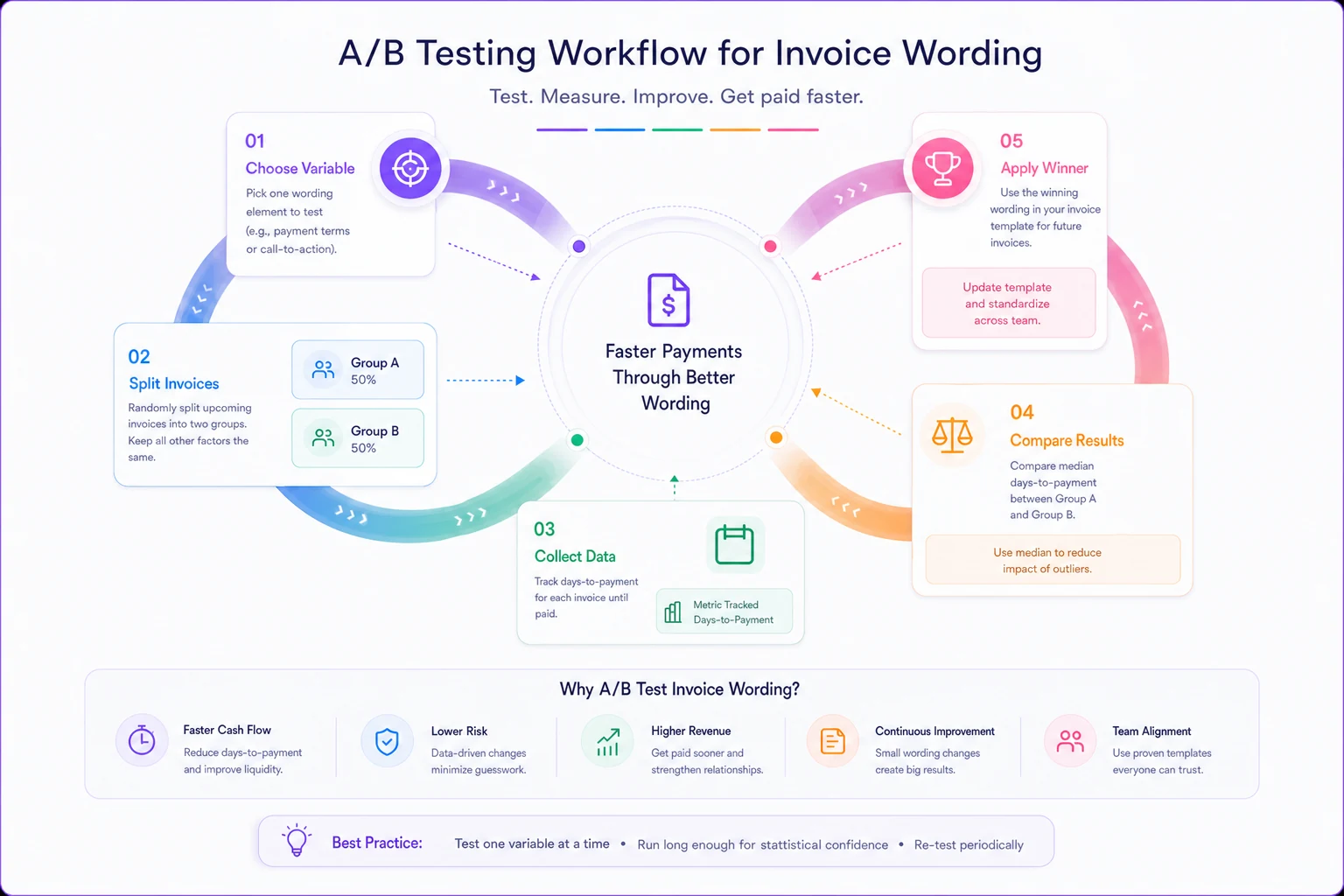
The reason median matters: in most small portfolios, payment times aren't evenly distributed. You'll have a cluster of fast payers and a long tail of slow ones. The median tells you what your typical client does. If your median drops from 22 days to 15 after a wording change, that's real progress—even if your worst client still drags.
A real scenario
A freelance brand designer—solo, roughly 8–12 invoices a month, project fees between $1,500 and $6,000—was averaging somewhere around 34 days to get paid, with a few clients regularly hitting 50+.
She changed three things, one at a time, over about two months:
-
Swapped "Net 30" for an explicit weekday date ("Due by Wednesday, [date]").
-
Moved the total and payment link to the top of the invoice, repeated at the bottom.
-
Added the subject line format with amount + due date.
By the end, her median payment time landed somewhere around 18–20 days. Not every client sped up—two chronic late-payers barely budged—but the bulk of the middle shifted forward by roughly two weeks. No discounts offered, no relationships strained. The only cost was the twenty minutes it took to rewrite her template.
That "middle shifting forward" is the pattern worth holding onto. You're rarely going to fix your worst client with wording. What you can do is move the reliable-but-slow majority, and that's where most of your locked-up cash actually sits.
When these nudges aren't the right lever
Psychology tweaks work on clients who intend to pay but are slow, disorganized, or unhurried. They do very little for two other groups:
-
Clients with genuine cash-flow problems. No amount of clever wording pays an invoice from an empty account. Those situations need payment plans and concession conversations, not a better button.
-
Structural late-payers with rigid AP cycles. Large clients who pay on fixed 45- or 60-day cycles won't budge because your subject line is punchy. For them, the lever is your payment terms and onboarding setup, not the invoice copy.
So before you spend energy A/B testing wording, be honest about which bucket your slow payers fall into. If your whole portfolio is enterprise clients on rigid cycles, your time is better spent on terms negotiation. If your slow payers are small businesses and individuals who just forgot, these nudges are exactly the right tool.
Small workflow note
Rewriting one invoice by hand is easy. Keeping the good version consistent across every invoice, every month—that's where most people quietly slip back to old habits. The practical move is to bake the winning wording, layout, and subject-line format directly into your invoice template so you never have to think about it again, and so a rushed late-night invoice looks exactly as sharp as a careful one.
Save the specific-date logic and top-of-invoice layout in your billing template so the behavioral wins persist without extra work.
If you're using a billing platform, this is where saved templates and default terms earn their keep: set the specific-date logic, the top-of-invoice total, and the standard payment link once, and every future invoice inherits the version that gets you paid faster. The goal isn't to automate judgment—it's to make sure the small psychological wins don't quietly decay the moment you get busy.
The short version
Payment speed is mostly a design and language problem, not a pricing problem. Specific dates beat "Net 30." Totals and payment links belong near the top. Self-justifying line items kill "let me check" stalls. A stated norm nudges people toward paying on time. And every one of these is testable against your own client base without spending a dollar.
Try one change on your next batch of invoices, track the median days-to-payment, and let the numbers tell you what your clients actually respond to. You'll likely find that getting paid faster had far less to do with your fees and far more to do with a handful of words and where you put them.
Payment speed is mostly a design and language problem, not a pricing problem. Specific dates beat "Net 30." Totals and payment links belong near the top. Self-justifying line items kill "let me check" stalls. A stated norm nudges people toward paying on time. And every one of these is testable against your own client base without spending a dollar.
Try one change on your next batch of invoices, track the median days-to-payment, and let the numbers tell you what your clients actually respond to. You'll likely find that getting paid faster had far less to do with your fees and far more to do with a handful of words and where you put them.
Ready to streamline your billing process?
Join 5,000+ businesses using Billoly to reduce billing delays, automate payments, and grow revenue efficiently.