



Most contractors don't switch invoice software because they want to. They switch because a general contractor rejected their pay application for the third time over a formatting issue, or because retainage got tracked in a spreadsheet that nobody updated, and $18k sat uncollected for eight months after project closeout.
The problem with shopping for contractor invoice software is that almost every tool claims to handle construction. Then you get into a demo and find out "progress billing" means they let you send a 50% deposit invoice. That's not progress billing. That's a deposit. If you're a drywall sub submitting monthly draws against a schedule of values, or a GC managing five jobs with retainage held at different percentages, generic invoicing will quietly cost you money every month.
This guide is for people who already know what AIA billing is and are now trying to figure out which vendor to actually pay for. Skip the definitions — let's talk about what separates software that fits construction workflows from software that just looks like it does.
The five features that separate real construction billing from generic invoicing
You can usually tell within the first ten minutes of a demo whether a tool was built for construction or just had construction features bolted onto a generic invoicing engine. The difference shows up in how these five things behave.
1. Progress billing against a schedule of values Real progress billing means you set up a schedule of values (SOV) once, then bill against percent-complete each period. The system should carry forward previous billing, calculate this-period work, and track the balance to finish automatically. If you're retyping line items every month or manually calculating "previously billed," the tool isn't doing progress billing — it's doing regular invoicing with extra steps.
2. Retainage (submit-and-hold) Retainage is where generic tools fall apart hardest. You need the system to:
-
Withhold a set percentage (usually 5% or 10%) per invoice automatically
-
Track accumulated retainage across the life of the job
-
Let you bill retainage separately at closeout without re-creating the whole invoice
-
Show retainage receivable as its own line in aging
A typical failure looks like this: a plumbing sub bills 12 monthly draws, holds 10% each time, and never has a single running total of what's owed back. At closeout they think they're owed around $22k but can't prove the math cleanly, so collection drags for weeks. Retainage tracking isn't a nice-to-have — it's often the most profitable receivable on your books, and the one most likely to slip.
3. AIA / G702–G703 support (or a clean equivalent) If you bill commercial GCs, you'll eventually get asked for G702 (the application and certificate) and G703 (the continuation sheet). Some tools generate AIA-style documents natively. Others produce a "compatible" format that GCs sometimes reject.
Ask specifically: does your output get accepted by GCs and their architects without manual reformatting? "AIA-style" and "AIA-accepted" are not the same thing, and the gap between them is measured in rejected pay apps.
4. Lien-waiver workflows Conditional vs. unconditional, progress vs. final — these need to be tied to payment status, not sent blindly. The pattern that burns subs: sending an unconditional waiver before the check clears. Good software links the waiver type to whether payment has actually been received, and keeps a record of what was signed and when.
5. Estimate → invoice conversion with job costing Your estimate should become your SOV, which should become your invoices, which should feed job costing. When those are four disconnected documents, margin erosion hides in the gaps. You want to open a job and see estimated vs. billed vs. actual cost without exporting anything.
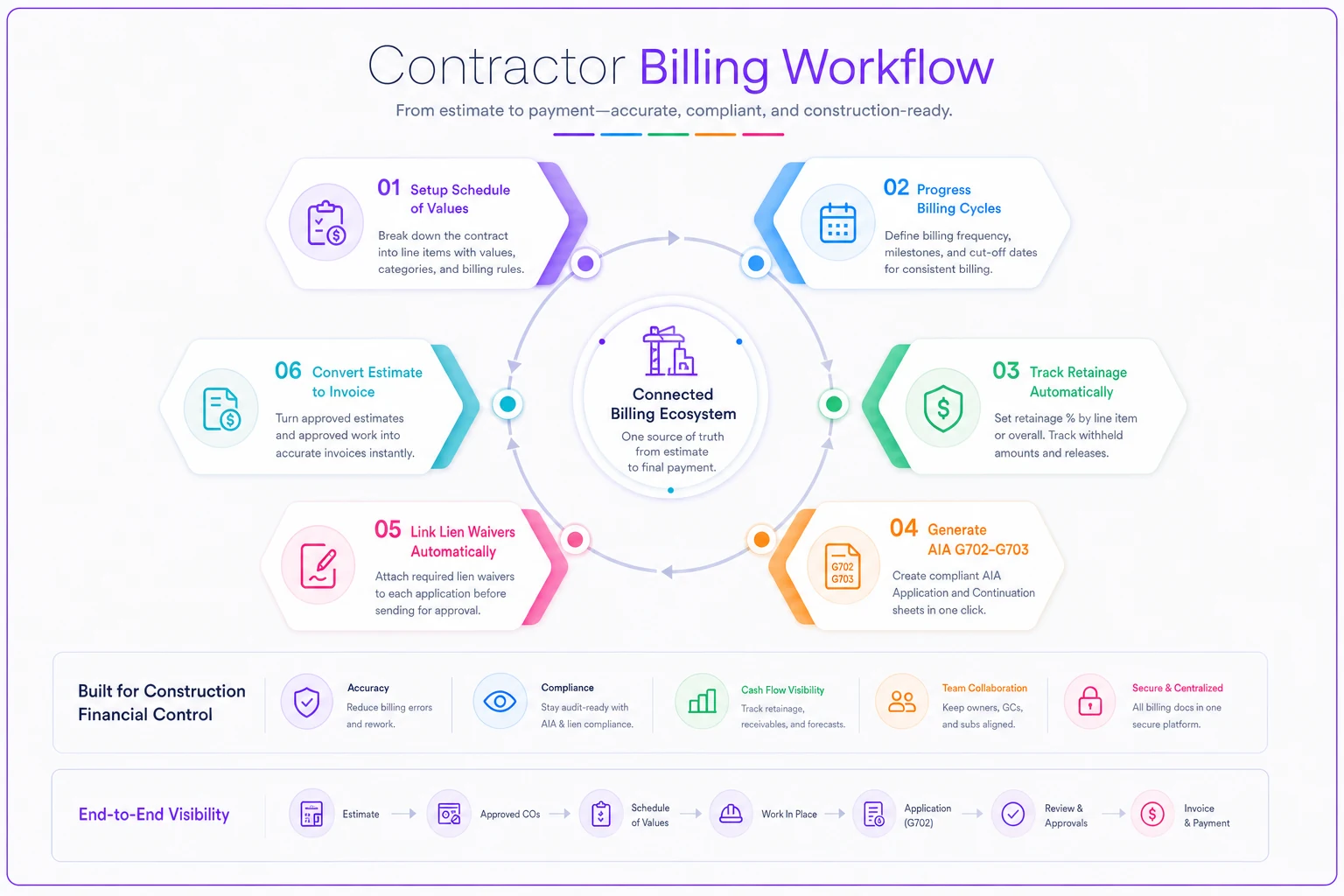
Here's a quick workflow visualization.
Integrations: the part people underestimate until month two
A tool can nail every construction feature and still make your life miserable if it doesn't connect cleanly to the rest of your stack. The integrations that matter most:
Stop chasing payments and start automating your billing.
Billoly empowers you to create, send, and track invoices effortlessly while maintaining professional client relationships.
- Customizable invoice templates
- Automated payment reminders
- Real-time payment tracking
No credit card required
QuickBooks (or your accounting system). Non-negotiable for most firms. But "integrates with QuickBooks" ranges from a real two-way sync to a CSV export you run manually. Ask whether retainage, job costing, and customer records map correctly — retainage especially tends to sync into the wrong account and create reconciliation headaches at close.
Project management. If your field team uses a PM platform, you want percent-complete and change orders flowing into billing without double entry. A change order approved in the field that never makes it onto an invoice is just unbilled work.
Payments. Getting paid faster matters more in construction than almost any other trade, because your cash is tied up in materials and labor you've already fronted. Offering ACH and card options on the invoice itself shortens the gap between "approved" and "deposited." If you want to think through which payment rails actually make sense for your margins, the payment-method strategy guide for SMBs breaks down low-cost fallbacks worth building in.
During demos, ask how integration errors are surfaced — a silent failed sync is worse than no sync at all.
One pattern worth flagging: the more integrations a tool has, the more places things can silently break. A sync that fails quietly is worse than no sync at all. During evaluation, ask what happens when a sync fails — does it alert someone, or just drop the record?
Pricing models and what they actually cost you
Construction billing tools price in a few different ways, and the sticker number rarely tells the whole story.
| Pricing model | Typical range | Watch out for |
|---|---|---|
| Per-user / month | ~$20–$60 per user | Field users you didn't plan to add |
| Flat tier / month | ~$50–$300 flat | Feature gating — AIA often sits in a higher tier |
| Per-project or per-invoice | varies | Costs spike on high-volume months |
| Payment processing fees | ~2.5%–3.5% card, flat ACH | This often dwarfs the subscription cost |
The hidden cost most buyers miss is processing fees. If you run roughly $80k/month through card payments, a one-point difference in processing rate is close to $800/month — far more than most subscription tiers. Weight that accordingly.
Also worth checking: AIA/G702 support often gets locked behind the top pricing tier. If that's your core need, you're not really comparing the advertised base price anymore.
An evaluation matrix you can actually use
Scoring vendors on gut feeling after three demos is how firms end up with the wrong tool. Build a weighted matrix instead. Here's a starting point — adjust the weights to your situation. A GC holding retainage across many jobs weights retainage higher; a small trade billing simple draws weights ease-of-use higher.
| Criterion | Suggested weight | Score 1–5 | Notes |
|---|---|---|---|
| Progress billing / SOV | 20% | Must carry forward automatically | |
| Retainage tracking | 18% | Running totals + separate closeout billing | |
| AIA / G702–G703 | 15% | GC-accepted, not just "style" | |
| QuickBooks sync quality | 12% | Two-way? Retainage mapping? | |
| Lien-waiver workflow | 10% | Tied to payment status | |
| Payments / speed to cash | 10% | Fee structure matters | |
| Ease of use / field adoption | 8% | Will your PMs actually use it? | |
| Support & onboarding | 7% | Response time during migration |
Multiply each score by its weight, total it, and the gaps between finalists usually become obvious fast. The matrix also forces you to admit which features you're actually going to use versus which ones sounded impressive in the demo.
A realistic implementation timeline
Switching billing systems mid-project is nerve-wracking, and it should be approached carefully — but it's not a six-month ordeal if you plan it. A workable sequence for a small-to-midsize firm:
-
Week 1 — Chart of accounts and job list cleanup. Clean your data before migration. Garbage in, garbage out, and this is the step everyone rushes.
-
Week 1–2 — Set up SOV templates and retainage defaults. Configure your standard withholding percentages and AIA templates once.
-
Week 2 — Connect QuickBooks / PM / payments. Run a test invoice end-to-end and reconcile it manually to confirm the sync is correct.
-
Week 3 — Migrate open jobs. Move active jobs with their billed-to-date and retainage balances. Don't try to migrate ancient closed jobs; archive those.
-
Week 3–4 — Run parallel for one billing cycle. Bill one cycle in both the old and new system, compare, fix discrepancies.
-
Week 4+ — Cut over. Go live once a full cycle reconciles cleanly.
Most firms are fully operational in three to four weeks. The ones that struggle are almost always the ones that skipped the parallel cycle.
Migration tips that prevent painful cleanup
The migration itself is where data integrity falls apart if you're not careful. A few things worth doing:
-
Migrate billed-to-date and retainage balances, not full invoice history. You rarely need every old line item; you need accurate running totals on active jobs.
-
Reconcile retainage receivable to the penny before cutover. This is the number most likely to be wrong, and the one that costs you real money if it is.
-
Keep the old system read-only for a year. Don't delete it. You'll need it for the occasional dispute or audit lookback.
-
Export your data and confirm you can re-import it. Before you commit, make sure your records aren't trapped. A vendor that makes export hard is telling you something.
A vendor that makes export hard is telling you something.
Vendor questions and red flags
Bring these to every demo. The answers tell you more than the sales pitch.
Questions to ask:
-
"Show me a G702/G703 that one of your customers' GCs actually accepted."
-
"How does retainage sync into QuickBooks — which account does it hit?"
-
"What happens when an integration sync fails?"
-
"Can I bill retainage at closeout without rebuilding the invoice?"
-
"How do I export all my data if I leave?"
-
"Is AIA support in the tier you just quoted me?"
Red flags:
-
"Progress billing" that's really just deposit invoicing
-
Vague answers about retainage ("you can add it as a line item" — no)
-
AIA output described as "compatible" without a real example
-
No parallel-run support during onboarding
-
Export locked behind support tickets or extra fees
-
Pricing that balloons once you add field users or payment volume
A vendor that answers the retainage and AIA questions confidently and specifically is usually built for construction. One that deflects is usually not.
A short ROI example
Consider a mid-sized electrical sub running around 15 active jobs, billing roughly $400k/month in draws.
Before: SOVs in Excel, retainage tracked by hand, AIA docs formatted manually. Pay apps got rejected maybe two or three times a month for formatting, each delaying a draw by 2–4 weeks. Retainage at closeout regularly slipped 60–90 days past due because nobody had a running total. The office manager spent close to a full day per billing cycle just assembling and reformatting applications.
After switching to a construction-fit tool: Rejected pay apps dropped to nearly zero. Retainage got tracked automatically and billed cleanly at closeout, pulling roughly $20k–$30k of previously-slow receivables forward by a month or more. Billing prep dropped from a full day to a couple of hours.
The subscription cost was somewhere around $150–$250/month. The faster retainage recovery and reduced rejected-draw delays were worth far more than that in cash-flow terms — and that's before counting the office manager's time. Run those numbers against your own billing volume and it usually becomes a pretty easy decision.
If you want to go deeper on how billing clarity itself speeds payment, the breakdown on designing a billing experience that speeds payment pairs well with the tooling decisions here. And if you're making this change during a tight cash stretch, the invoicing and cash-flow moves worth making now covers adjacent levers.
When a dedicated tool makes sense — and when it doesn't
When it makes sense: You bill GCs that require AIA. You hold retainage across multiple jobs. You run enough active work that spreadsheet tracking has already caused one near-miss. If any of those are true, generic invoicing is actively costing you money.
When it's overkill: You're a one-person trade doing residential cash jobs with simple deposit-and-final billing, no retainage, no AIA. A dedicated construction tool is more structure than you need.
Who should hold off: Firms with messy underlying data. If your job list and chart of accounts are a disaster, migrating into a new tool just moves the mess. Clean up first, then shop.
The right contractor invoice software isn't the one with the longest feature list — it's the one that matches how you actually bill, syncs cleanly to your accounting, and doesn't let retainage disappear. Score vendors against your real workflow, run one parallel cycle before you commit, and push hard on the retainage and AIA questions until you get specific answers. The firms that do this end up with faster draws, cleaner closeouts, and a lot less month-end stress.
Ready to streamline your billing process?
Join 5,000+ businesses using Billoly to reduce billing delays, automate payments, and grow revenue efficiently.