



Most small businesses don't have an invoice schema. They have an accident. Whatever field happened to exist in the invoicing tool, whatever note someone typed into the description line, whatever the bookkeeper decided to call "misc" that quarter — that's the schema. And it works fine until the day two systems disagree about what an invoice actually contains, and suddenly you're spending a Saturday afternoon matching bank deposits to invoice numbers that don't line up.
A billing data contract is just an agreement — written down, enforced, versioned — about exactly what data every invoice must carry, what each field means, and how that data flows into the places it needs to go. For a small business or freelancer, this sounds like corporate overkill. It isn't. The businesses that skip it pay for it later in reconciliation hours, tax-season scrambles, and the quiet margin leak of invoices nobody can cleanly match to payments.
This isn't about one field or one fix. It's about treating your invoice data as a system with rules, so the system doesn't quietly rot as you grow.
Why invoice data drifts in the first place
Here's the pattern: a business starts with one person doing everything. That person is the schema. They know "PROJ-" means a project invoice and "RET-" means a retainer, they know which clients get net-30 and which get net-15, they know the "notes" field sometimes holds the PO number and sometimes holds a reminder to themselves.
Then a second person joins. Or you switch invoicing tools. Or bookkeeping goes to a part-time contractor. None of that tribal knowledge transfers, because it was never written down. The new person invents their own conventions. Now you have two schemas living in one dataset, and neither is documented.
A typical example: a small design studio had three people issuing invoices. One put the project name in the line-item description. One put it in a custom "reference" field. One put it in the invoice title. When tax season came and the accountant tried to group revenue by project, the data was unmatchable without manually reviewing every single invoice. Around 180 invoices, two people, most of a weekend.
The drift isn't a competence problem. It's the natural consequence of having no contract. Data standards don't maintain themselves — if the rule lives only in someone's head, it disappears the moment that person is busy, on vacation, or replaced.
What a canonical invoice schema actually contains
A canonical schema is the single source of truth for what an invoice is at your company. Not what your tool happens to export — what you've decided every invoice must carry, named consistently, defined precisely.
Stop chasing payments and start automating your billing.
Billoly empowers you to create, send, and track invoices effortlessly while maintaining professional client relationships.
- Customizable invoice templates
- Automated payment reminders
- Real-time payment tracking
No credit card required
The trap is thinking the schema is just the fields on the printed invoice. It's broader than that. It includes internal fields the client never sees but your accounting and reconciliation depend on. Here's a realistic baseline for a service business:
| Field | What it means | Why it matters downstream |
|---|---|---|
invoice_id | Unique, never reused, sequential or structured | Primary key for every reconciliation; gaps signal missing records |
client_id | Stable internal client reference, not the display name | Client names change; the ID doesn't |
issuedate / duedate | Explicit dates, fixed format | Drives aging reports and cash forecasts |
currency | ISO code, always present even if domestic | Prevents silent assumptions in multi-currency work |
line_items[] | Structured: description, qty, unit, rate, tax code | The part that breaks most when freehand text is allowed |
tax_code per line | Not a blended total — per-line classification | Lets accountants map to the right tax treatment |
payment_terms | Coded value (net-15, net-30, etc.) not prose | Machine-readable; feeds automation and reminders |
project_ref | How this ties to work performed | The field everyone invents differently |
status | Draft / sent / partial / paid / void | Needs defined transitions, not loose labels |
schema_version | Which version of the contract produced this record | The field almost nobody includes, and the most important one for scale |
That last row is the one people skip and later wish they hadn't. More on it below.
The discipline here isn't adding fields — it's deciding what each one means and refusing to let the meaning float. "Amount" is useless if half your invoices store it tax-inclusive and half tax-exclusive. The definition is the contract. The field name is just the label on the jar.
If you want a deeper walkthrough of building the minimal version of this without over-engineering it, the piece on invoice data governance and minimal schema design covers the starting-small approach that pairs well with everything here.
Why you need a version number on your schema
Your schema will change. You'll add a field for a new tax jurisdiction. You'll split "notes" into "clientnotes" and "internalnotes" because the old blob got messy. You'll rename something. Every one of those changes creates a fault line between old records and new ones.
Without versioning, those fault lines are invisible. An invoice from eighteen months ago that stored tax differently than today's invoices looks identical in your export. Nobody flags it. It just quietly produces a wrong number when someone sums the column.
A schema_version field solves this by stamping every record with the rules it was created under. When a report looks off, you can ask: were these records on v1 or v3? When you migrate data, you know exactly which transformation each batch needs. When an accountant asks why older invoices behave differently, you have an answer instead of a shrug.
A simple versioning policy doesn't need to be complicated:
-
Major version — breaking changes. A field's meaning changed, a field was removed, or a value format changed. Old records can't be read the same way as new ones.
-
Minor version — additive changes. A new optional field, a new allowed status value. Old records are still valid, just missing the new thing.
-
Document each version in one place
what changed, when, and why.
The "why" matters more than it looks. Six months later, nobody remembers why tax_code got split into two fields, and someone "helpfully" merges them back, reintroducing the exact problem the change solved. The version log is your institutional memory.
The change-control process that keeps the schema trustworthy
A schema is only as reliable as the process guarding it. If anyone can add a field or redefine a meaning on a whim, you're back to accidental drift — just with extra steps.
Change control for a small business can be lightweight, but it has to be real. Here's a process that works at the 2–15 person scale:
-
Proposal. Someone writes down the change in plain language
what field, what's changing, what problem it solves. One paragraph. No form fatigue.
-
Impact check. Who consumes this field downstream? The bookkeeper? A reporting spreadsheet? A payment integration? List every consumer before touching anything. This single step prevents most breakage.
-
Stakeholder review. The people who actually depend on the data get a say — typically whoever owns billing, whoever owns the books, and whoever owns any system the data flows into.
-
Decide version bump. Major or minor, based on the rules above.
-
Update the schema doc and version log in the same commit as the change. Not later. Later never comes.
-
Communicate and migrate. If old records need transforming, that's a planned task, not a surprise discovery three weeks later.
The mistake people make is treating steps 2 and 3 as bureaucratic. They're not. The impact check and the stakeholder review are the entire point — they're where you catch the reporting spreadsheet that silently depends on a field you were about to rename. Skip them and you learn about the dependency when a month-end report breaks.
When this is overkill
If you're a solo freelancer issuing a dozen invoices a month and doing your own books, you don't need a six-step process. You need the discipline, not the ceremony: a documented schema, a version number, and a note whenever something changes. The full process earns its keep once more than one person touches the data or more than one system consumes it.
Here's a simple diagram of that change-control workflow.
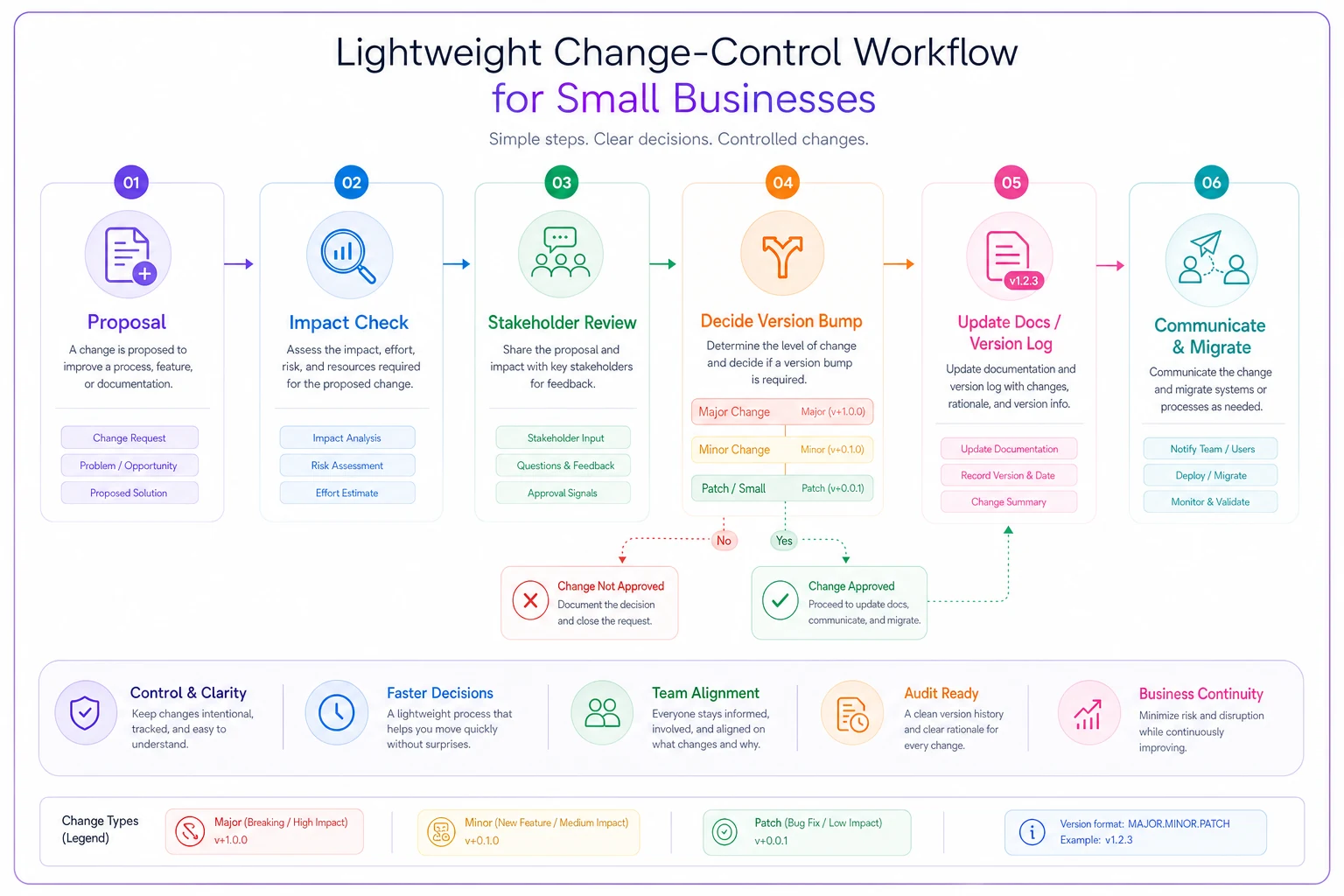
Keep the written proposal to one short paragraph to avoid form fatigue and make reviews fast.
The full process earns its keep once more than one person touches the data or more than one system consumes it.
Export and version templates: where reconciliation actually lives or dies
Your invoices might be perfectly structured internally and still cause reconciliation pain, because the export is where your data meets everyone else's systems — your accountant's software, your bank reconciliation, your reporting tools. The export format is a contract too.
A versioned export template locks down exactly what columns appear, in what order, with what formatting, under a given schema version. When your accountant builds their import mapping against export-v2, that mapping keeps working until you deliberately ship export-v3 and tell them. No silent column reordering. No mystery blank field that used to hold data.
-
Column drift — someone exports with a slightly different setting and the accountant's import mapping fails or, worse, loads data into the wrong columns without erroring.
-
Format inconsistency — dates as MM/DD in one export and DD/MM in another, amounts with and without currency symbols. Classic sources of silent corruption.
-
Encoding and delimiters — a client name with a comma blows up a naive CSV. Happens more than you'd think.
-
Missing version context — nobody can tell which schema produced a given file, so troubleshooting becomes guesswork.
The export template should name its version right in the file or filename, so anyone receiving it knows which contract it honors. This connects directly to how your whole billing stack fits together — the billing system architecture and integration patterns discussion covers how exports sit between your invoicing and your books without creating the usual handoff friction.
The stakeholder sign-off checklist
Before any schema version or export template goes live, the people who depend on the data should sign off. Not a meeting — a checklist. Cheap insurance against expensive surprises.
-
- [ ] Billing owner confirms every required field is captured at invoice creation
-
- [ ] Bookkeeper/accountant confirms the export maps cleanly to their chart of accounts and tax treatment
-
- [ ] Anyone running reports confirms their spreadsheets/dashboards still reference valid fields
-
- [ ] Payment/integration owner confirms downstream systems accept the new format
-
- [ ] Version log updated with change, date, reason, and version number
-
- [ ] Export template re-versioned if column structure or formatting changed
-
- [ ] Migration plan documented for existing records, if the change is breaking
-
- [ ] Old version archived, not deleted, so historical records stay interpretable
Each checkbox represents a system that would otherwise break silently. The bookkeeper checkbox alone catches the single most common and most expensive failure: a change that looks harmless on the invoice but mangles the tax mapping on the books.
A real scenario
A small marketing consultancy — four people, mix of retainer and project work — was spending roughly 6–8 hours every month on reconciliation. Not because volume was high; they ran maybe 60–80 invoices a month. The problem was that each consultant had drifted into their own conventions over two years. Project references lived in three different fields. Two of them stored reimbursable expenses as separate line items, one folded them into the project total. Tax codes were inconsistent on the retainer invoices.
Every month the bookkeeper had to interpret before she could reconcile. And a few invoices each cycle simply couldn't be matched cleanly to payments without emailing someone.
They wrote a canonical schema over an afternoon. Pinned down field meanings, standardized the project reference, split reimbursables into a defined structure, versioned it as v1, and built one export template everyone used. The change-control process was a shared doc and a quick group message before any change.
Reconciliation time dropped to under two hours within a couple of months — most of the remaining time was actual review, not detective work. Nothing sophisticated happened. They just stopped producing data that required interpretation. The margin leak from invoices nobody could categorize cleanly went away too, which was worth more than the hours.
What changes as you grow
At one person, the schema lives in your head and that's survivable. At three to five, it has to be written down or it fragments. At ten-plus, or the moment you add a second system that consumes invoice data, the change-control process and versioning stop being nice-to-haves and start being the thing that keeps month-end from becoming a fire drill.
The businesses that struggle aren't usually the ones with complex billing. They're the ones whose data meaning was never pinned down, so complexity accumulated as inconsistency. A plumber with net-30 terms and clean, consistent fields reconciles faster than a consultancy with freehand descriptions and three competing conventions.
Good invoicing tools help — they let you enforce required fields, lock down status transitions, and produce consistent exports so the schema can't silently drift every time someone's in a hurry. But the tool enforces the contract; it doesn't write it. The thinking — what each field means, what changes require review, who signs off — is yours. That's the part worth getting right, because it's the part that doesn't come in any software's default settings.
Start with the schema. Put a version number on it. Decide who has to agree before it changes. Everything downstream — your books, your reports, your tax prep, your Saturday afternoons — depends on that one upstream decision being made on purpose instead of by accident.
Ready to streamline your billing process?
Join 5,000+ businesses using Billoly to reduce billing delays, automate payments, and grow revenue efficiently.