


Most small businesses don't get burned by billing automation because the automation is bad. They get burned because nobody decided where it should stop. The reminders fire, the invoices generate, the late fees stack, the card retries run — and then one day a client calls furious because they got dunned three times for an invoice they already paid, and the payment just hadn't reconciled yet.
That's not a software failure. That's a governance failure.
Billing automation governance for small business is really about drawing lines. Which decisions can a rule handle on its own, which ones need a person to glance at before anything goes out, and which ones should stop the whole conveyor belt until someone signs off. Get those lines right and automation quietly saves you ten hours a week. Get them wrong and you're spending those same ten hours cleaning up messes the automation created faster than you could've made them yourself.
This is the part nobody talks about. Everyone shows you how to automate reminders or how to auto-charge a card. Almost nobody tells you how to decide what should never be automated in the first place.
The real problem: automation removes friction, including the useful kind
Friction gets a bad rap. In a billing system, some friction is exactly what keeps you from making an expensive mistake.
When you were sending invoices by hand, you had a hundred tiny checkpoints you never even noticed. You'd glance at the amount before hitting send. You'd remember that this particular client always pays late but always pays, so you'd hold off on the nasty second reminder. You'd catch that a $12,000 invoice looked wrong because your usual invoices to that client run around $3k.
Automation strips all of that out. It does exactly what it's told, at scale, without the human pause. And that's fantastic for the 90% of transactions that are routine — and dangerous for the 10% that aren't.
The pattern you see over and over: a business automates everything at once because it's exciting, hits one bad edge case, gets scared, and turns most of it back off. Now they've got the worst of both worlds — the setup complexity of automation and the manual labor of doing it themselves anyway.
The fix isn't automating more or less. It's automating deliberately, with clear rules about where a human stays in the loop.
A simple test for what to automate vs. keep human
Before any billing step gets automated, run it through three questions. This is the core of the whole framework.
Stop chasing payments and start automating your billing.
Billoly empowers you to create, send, and track invoices effortlessly while maintaining professional client relationships.
- Customizable invoice templates
- Automated payment reminders
- Real-time payment tracking
No credit card required
-
Is the decision reversible cheaply? If the automation does the wrong thing, how hard is it to undo? Sending a friendly reminder to someone who already paid is annoying but reversible. Reporting a client to collections or charging a card incorrectly is expensive to walk back.
-
Is the input reliable? Automation is only as good as the data feeding it. If your payment reconciliation lags by two days, then any automation that acts on "unpaid" status within that window is acting on bad data.
-
Does the outcome affect the relationship? Some billing actions are transactional. Others carry emotional weight — final notices, service suspension, fee escalation. Anything that can make a client angry deserves a human glance.
Here's how those questions sort common billing tasks:
| Billing task | Reversible? | Input reliable? | Relationship risk | Recommendation |
|---|---|---|---|---|
| Generate recurring invoice | Yes | Usually | Low | Fully automate |
| Send first payment reminder | Yes | Medium | Low | Automate |
| Apply small late fee (under ~$25) | Mostly | Medium | Medium | Automate with cap |
| Send "final notice" language | Hard | Medium | High | Human approve |
| Auto-charge saved card | No | Medium | High | Automate small, review large |
| Escalate to collections | No | Must be certain | Very high | Human only |
| Issue refund or credit | No | Varies | High | Human only |
| Reconcile payment to invoice | Yes | Depends on feed | Low | Automate + exception queue |
The middle column is where most businesses get sloppy. They assume payment data is real-time and clean. In real operations, it almost never is. Bank feeds delay, clients pay to the wrong account, partial payments don't map cleanly, and someone Venmos you instead of clicking the invoice link. Any automation that assumes perfect input will eventually act on imperfect input.
The exception queue is the whole point
If there's one concept that separates billing automation that works from billing automation that blows up, it's the exception queue.
The idea is boring and that's exactly why people skip it. An exception queue is just a holding area for anything the automation isn't sure about. Instead of forcing every transaction down one of two paths — process it or reject it — you add a third path: flag it and wait for a human.
-
A payment amount doesn't match any open invoice
-
A client is flagged as "do not auto-escalate" but hits an escalation trigger
-
An invoice exceeds a dollar threshold you set (say, anything over $5k)
-
A card charge fails more than twice
-
A credit or refund is requested
-
Two invoices for the same client have nearly identical amounts and dates (likely a duplicate)
The thing most people miss: the exception queue should have stuff in it.
An empty queue usually means your rules are too loose and edge cases are slipping through as if they were normal.
A queue with somewhere around 5–10% of your transaction volume flowing through it is healthy. If it's sitting at 40%, your automation isn't earning its keep and you need to tighten the routine paths.
Think of the exception queue as where your human judgment gets concentrated. Instead of eyeballing all 200 invoices this month, you're eyeballing the 12 weird ones. That's the actual productivity win — not eliminating human review, but aiming it.
Visual workflow: automation flags edge cases, items route to an exception queue, a human reviews, then resolves or routes back to automation.
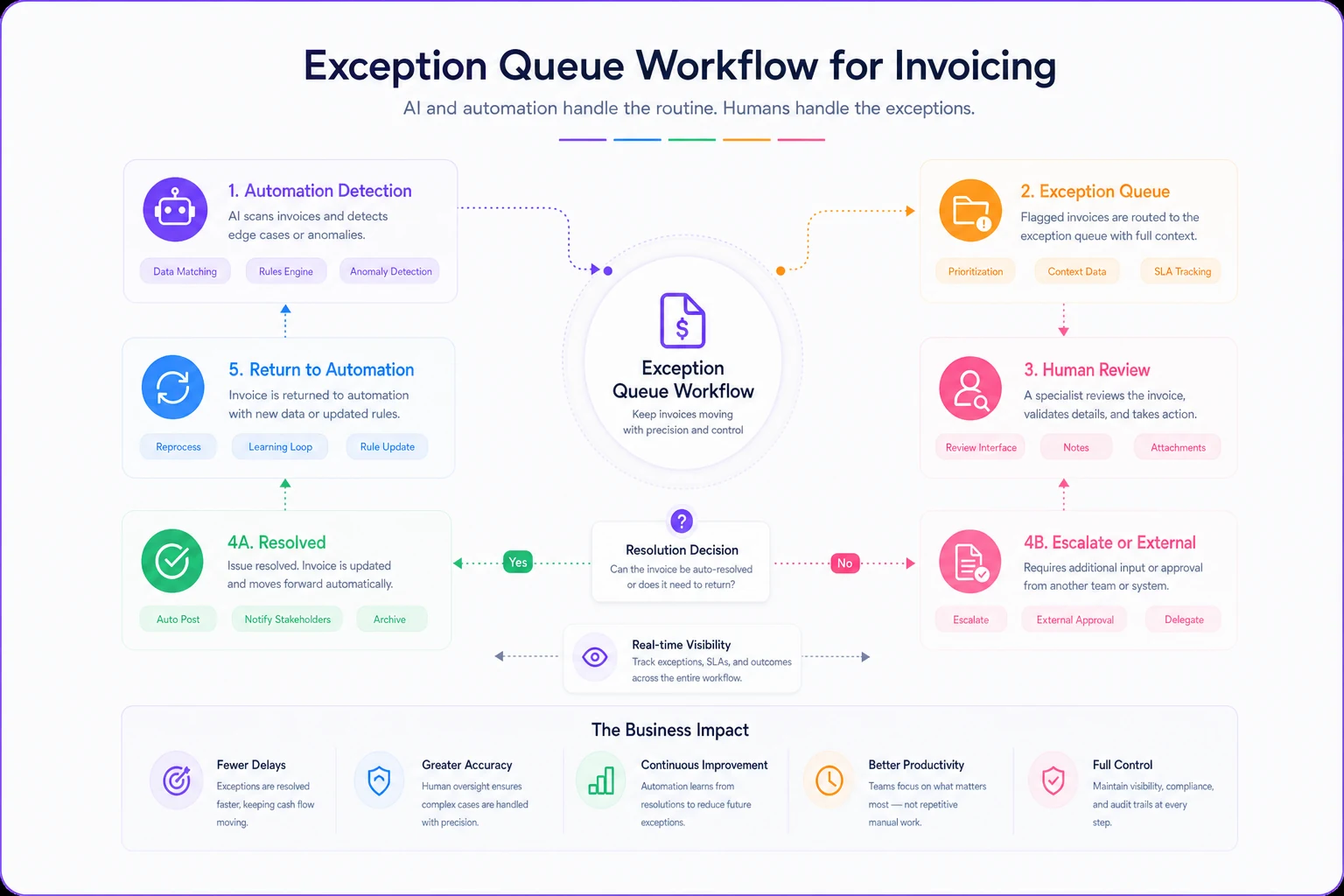
If you're building the system, the queue is where your human judgment gets concentrated and where the automation proves its value.
A sample rulebook you can adapt
Here's a starter rulebook for a solo or small-team service business doing maybe 40–150 invoices a month. Adjust the thresholds to your numbers.
Invoicing rules
-
Recurring invoices under $5k generate and send automatically on schedule.
-
Invoices $5k and above generate as drafts and route to the queue for a human to send.
-
Any invoice more than 20% higher than the client's trailing average flags for review, regardless of amount.
Reminder rules
-
First reminder
automatic, 3 days after due date, friendly tone.
-
Second reminder
automatic, 10 days after due date, firmer.
-
Third contact ("final notice" language)
never automatic — routes to queue.
-
Clients tagged "VIP" or "handle personally" skip the automatic sequence entirely.
Payment and reconciliation rules
-
Exact-match payments auto-reconcile and close the invoice.
-
Partial payments auto-apply but keep the invoice open and flag it.
-
Overpayments and unmatched payments go straight to the queue.
-
No reminder fires on any invoice with a payment received in the last 72 hours, even if it's not fully reconciled. (This single rule prevents most "you dunned me after I paid" complaints.)
Fee and escalation rules
-
Late fees under $25 apply automatically, once per invoice, capped.
-
Any collections referral requires manual approval — no exceptions.
-
Service suspension for non-payment requires manual approval.
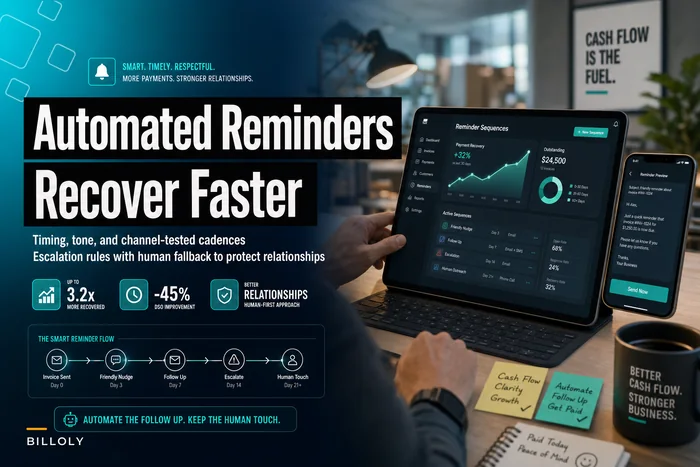
If you already run a reminder cadence, it's worth cross-checking these rules against your existing timing and tone so nothing contradicts. The logic behind good escalation timing is covered in more depth in our writeup on automated reminder sequences that increase recovery, and it pairs directly with the governance rules here.
The escalation runbook: what a human does when the queue lights up
Rules tell the system when to stop. A runbook tells the human what to do next. Without one, the exception queue just becomes a pile of anxiety nobody wants to open.
Keep it simple. For each type of exception, you want three things: what triggered it, what to check, and what the possible actions are.
Example — unmatched payment lands in the queue:
-
Check if the amount matches any open invoice within ±$5 (bank fees, rounding).
-
Check the client's other open invoices for a plausible match.
-
If matched, apply it and close the invoice.
-
If it's a client with no open invoice, flag as prepayment/credit and note it.
-
If you can't identify the source within two business days, email the likely client to confirm.
Example — invoice flagged for being unusually high:
-
Pull the underlying line items or timesheet.
-
Confirm the amount against the scope or contract.
-
If correct, release and send.
-
If wrong, correct before it ever reaches the client.
Example — client hits an escalation trigger but is tagged sensitive:
-
Do not send anything automatically.
-
Review recent communication — is there an open dispute or a promised payment?
-
Decide
personal email, phone call, or hold.
The point of the runbook is that anyone on your team can clear the queue the same way you would. As you grow past yourself, this is what keeps billing consistent when the person doing it changes. If you're building out roles and handoffs across a small team, it's worth reading alongside this — our operational invoicing playbook for small teams goes deep on who owns which trigger.
The KPIs that actually tell you if governance is working
You can't govern what you don't watch. But you don't need a dashboard with forty metrics. You need a handful that reveal whether your automation is helping or quietly hurting.
Watch these:
-
Exception queue size and age. How many items sit in the queue, and how long? A growing backlog means either your rules are too aggressive or nobody has time to clear it.
-
Reconciliation lag. Average days between payment received and payment applied. If this creeps up, your "don't remind recently-paid clients" logic starts failing.
-
False escalation rate. How often did a reminder or fee go out on an invoice that was actually paid or disputed? This should be near zero. If it isn't, something upstream is broken.
-
Auto-clear rate. Percentage of invoices that go start-to-finish with no human touch. Higher is generally better — unless it's climbing alongside your false escalation rate, which means you're automating over problems.
-
Days sales outstanding (DSO). The classic. If governance is working, automation should nudge this down without a spike in complaints.
The relationship between these numbers is where the real insight lives. A high auto-clear rate looks great in isolation. But if false escalations are also rising, you've just automated your mistakes at scale. Always read the pair together.
A real scenario: what changed after adding governance
A two-person marketing studio running roughly 60–80 invoices a month had automated everything — invoicing, all three reminder tiers, late fees, the works — after getting sick of chasing payments manually.
For a while it worked. Then the complaints started. Clients who'd paid by check got hit with automatic late fees before the check cleared. One retainer client got a "final notice" email over a $400 balance that was actually a billing error on the studio's side. They lost that client — worth around $2,400 a month — largely over how it was handled, not the money itself.
They didn't abandon automation. They added governance. Recurring invoices under $5k kept auto-sending. But final-notice language moved to manual approval, late fees got a 72-hour grace on any client with a recent payment, and every unmatched payment started routing to a small exception queue that one of them cleared each morning — maybe ten minutes of work.
Over the next couple of months, false escalations dropped to almost nothing. DSO stayed roughly where it had been, around 22 days. The queue held about 6–9 items at any given time, all cleared same-day. The owner said it felt like finally trusting the system again — the automation handled the boring 90% and they only touched the weird 10%.
That's the whole goal. Not less automation. Governed automation.
When heavy governance is a bad idea
This framework isn't free. Every rule and queue adds a little overhead, and there's a point where you're over-engineering.
If you send fewer than 15 invoices a month, most of this is overkill. Just review everything by hand — you have the time, and you'll catch problems faster than any rule would. Automation with light governance makes sense somewhere in the range where manual review starts eating real hours but you're not yet drowning.
Heavy governance is also a bad idea if your billing is genuinely simple and low-risk. A business with flat monthly subscriptions to long-term clients and near-perfect payment data doesn't need an elaborate exception queue. The edge cases barely exist. Adding one just creates a queue nobody checks.
And nobody should build governance rules they won't actually maintain. A rulebook that's out of date is worse than no rulebook, because it gives false confidence. If you're not going to review your thresholds every few months as your client mix and invoice sizes change, keep it minimal.
Where this fits as you grow
The nice thing about setting these lines early is that they scale with you. When you're solo, the exception queue is a mental note and a five-minute morning check. When you add a bookkeeper or an ops person, the same rules and runbook let them handle billing exactly the way you would — no tribal knowledge required.
That handoff is where most billing systems break. The founder had all the judgment in their head, automated the routine stuff, and then hired someone who didn't know which clients to handle gently or which invoices always look weird but are actually fine. A written rulebook and runbook turn that judgment into something transferable.
Software helps here — the more your platform can auto-route exceptions, respect client tags, and hold reminders on recently-paid invoices, the less you're gluing rules together by hand. But the tooling is secondary. The decision of where the human stays in the loop is yours to make, and no software makes it for you. Start with the three-question test, build the smallest exception queue that catches your real edge cases, and expand only when the numbers tell you to.
Start with the three-question test, build the smallest exception queue that catches your real edge cases, and expand only when the numbers tell you to.
Ready to streamline your billing process?
Join 5,000+ businesses using Billoly to reduce billing delays, automate payments, and grow revenue efficiently.