

Most cash application advice stops at "match the payment to the invoice." That's not the hard part. The hard part is a $2,847.33 ACH deposit that's supposed to clear three invoices, except one had a short-pay credit, the remittance arrived in a separate email two days later, and the payer reference just says "PAYMENT 889102."
This is where cash application automation for small business actually lives — in the ugly middle ground between a bank CSV and your AR ledger. So instead of talking theory, let's build the rules, parsing logic, tolerance thresholds, and exception flows you'd actually configure. Real snippets, real numbers, real failure cases.
Start with the bank file, because that's where everything breaks
Every automation attempt that fails does so at the import step. People assume a bank CSV is clean. It isn't. Different banks export different column orders, inconsistent date formats, and payment descriptions that look like someone sat on the keyboard.
``
Date,Description,Amount,Running Bal
09/14/2025,"ACH CREDIT ACME CORP PMT*889102",2847.33,18422.10
09/15/2025,"DEPOSIT REMOTE CHK #4471",1200.00,19622.10
09/16/2025,"WIRE IN BRIGHTLINE LLC INV 20451 20452",5600.00,25222.10
09/16/2025,"ZELLE FROM J MARTINEZ",450.00,25672.10
``
Notice the problems already. The Acme payment references a reference number, not an invoice. The wire lists two invoices jammed into one description. The Zelle has a person's name but no invoice at all. The check deposit tells you nothing. The pattern worth noticing: across a lot of small-business bank feeds, roughly 60–70% of inbound payments carry some usable identifier in the description. The remaining 30–40% is where all your time goes. Your automation should chew through the easy 60% silently and route the rest to a queue — not try to be clever on everything.
Step 1: Normalize before you match
Before any matching logic runs, clean the file. A normalization pass should:
-
Standardize the date to ISO (
2025-09-14) -
Uppercase the description and strip punctuation noise
-
Extract the amount as a signed decimal (watch for parentheses meaning negatives)
-
Tag the payment channel (ACH, WIRE, CHECK, ZELLE) from keywords
-
Pull out candidate reference tokens (anything 4+ digits, invoice-like strings)
A simple normalization rule set, expressed plainly:
``
IF description CONTAINS "ACH"   THEN channel = ACH
IF description CONTAINS "WIRE"  THEN channel = WIRE
IF description CONTAINS "ZELLE" THEN channel = ZELLE
IF description CONTAINS "CHK" OR "CHECK" OR "DEPOSIT" THEN channel = CHECK

candidaterefs = REGEXALL(description, "\b\d{4,}\b")
candidateinv  = REGEXALL(description, "INV[ -]?\d+")
``
A quick visual of the normalization workflow:
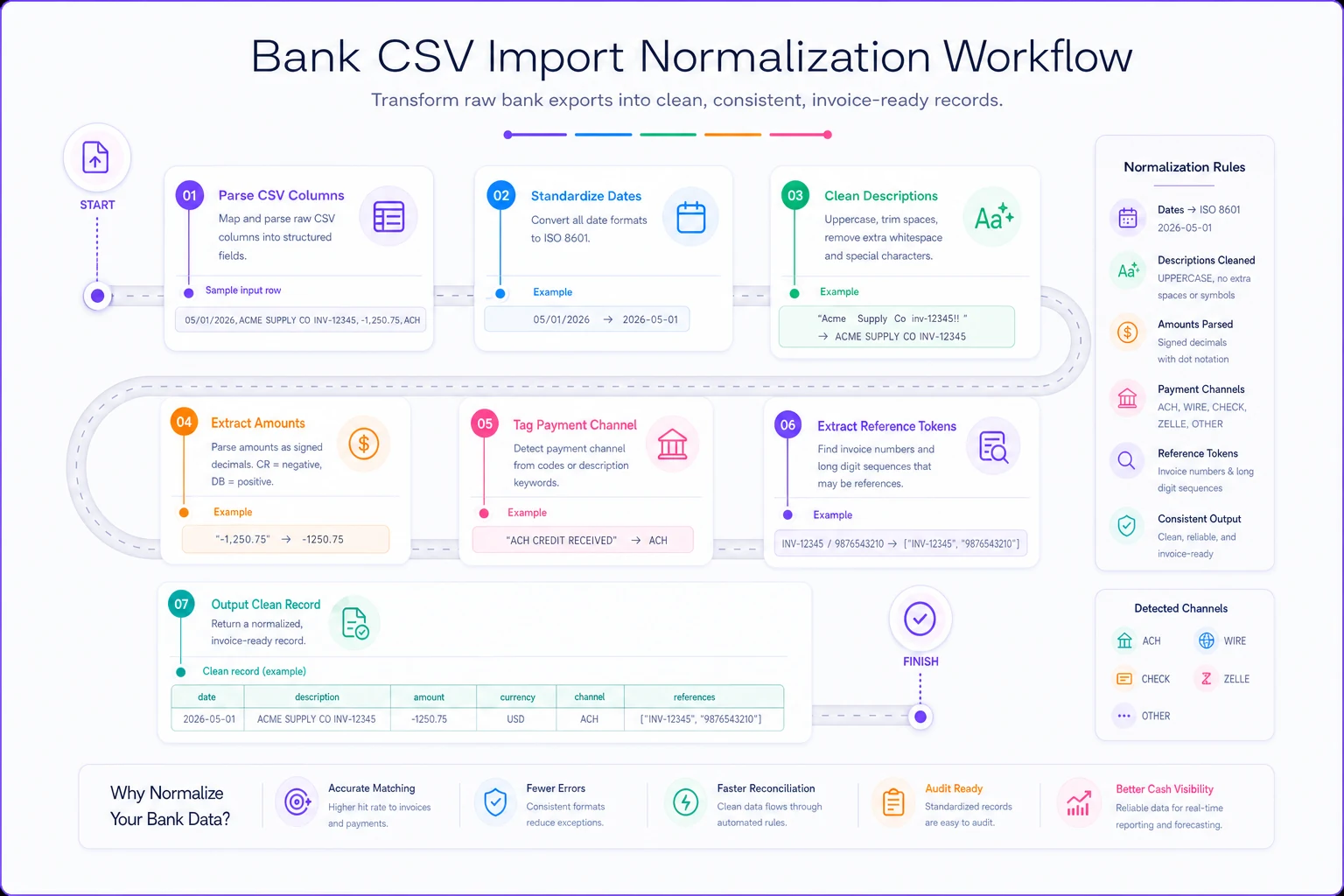
Run on the sample above, the wire row produces candidateinv = [20451, 20452] — that's gold. The Acme row produces candidaterefs = [889102], which is only useful if you cross-reference payment references to invoices somewhere (more on that below).
This is also where clean upstream data pays off. If your invoices already carry consistent, exportable identifiers, matching gets dramatically easier. That's the whole argument behind keeping a minimal, disciplined invoice schema — reconciliation pain usually traces back to inconsistent IDs long before it shows up in the bank feed.
Remittance parsing: the part nobody budgets time for
People consistently underestimate this piece. The bank file tells you money arrived. The remittance tells you what it's for — and it almost never lives in the bank file.
Stop chasing payments and start automating your billing.
Billoly empowers you to create, send, and track invoices effortlessly while maintaining professional client relationships.
- Customizable invoice templates
- Automated payment reminders
- Real-time payment tracking
No credit card required
-
A line on the bank description (best case)
-
A separate PDF or email from the customer
-
A spreadsheet attachment from a larger client's AP department
-
Nothing at all (you're guessing)
For the description-embedded case, you build parsing heuristics. For everything else, you need a fallback and a queue.
Heuristics that actually work
A few parsing rules handle most real remittance text. Order them by confidence, highest first:
| Rule | Pattern | Confidence | Example match |
|---|---|---|---|
| Explicit invoice tag | INV + digits | High | INV 20451 |
| Multi-invoice list | two+ invoice tokens | High | 20451 20452 |
| Payment reference lookup | ref number in your mapping table | Medium-high | PMT*889102 |
| Customer name match | known payer name | Medium | BRIGHTLINE LLC |
| Amount-only match | exact amount = open invoice | Low-medium | $1,200.00 |
| Nothing usable | no tokens | Route to queue | REMOTE CHK #4471 |
The mistake most people make is treating all of these as equal and letting the system auto-post anything that matches. Don't. An amount-only match on $1,200.00 is dangerous if you have three open invoices at that amount. Confidence level should decide whether the system auto-applies or asks a human.
Confidence level should decide whether the system auto-applies or asks a human.
A worked parsing example
Take the Brightline wire: WIRE IN BRIGHTLINE LLC INV 20451 20452 for $5,600.00.
Parsing extracts two invoices and a payer name. Now check the open AR:
``
Open invoices for BRIGHTLINE LLC:
  INV 20451  $3,100.00
  INV 20452  $2,500.00
  Sum = $5,600.00  → exact match to payment
``
Two high-confidence identifiers and the sum ties out to the penny. This auto-applies with no human touch. Clean.
Now take Acme: ACH CREDIT ACME CORP PMT*889102 for $2,847.33. No invoice number. The reference 889102 only helps if you've been capturing payment references on your end — which most small businesses haven't. So this one checks the amount against Acme's open invoices and finds:
``
Open invoices for ACME CORP:
  INV 20388  $1,500.00
  INV 20390  $900.00
  INV 20393  $460.00
  Credit memo CM-204  -$12.67
  1500 + 900 + 460 - 12.67 = 2847.33  → ties out
``
That's a combination match with a credit applied. Satisfying when it works, but notice it required the system to try summing combinations and find one that matches within tolerance. That's computationally fine for a customer with 3–4 open invoices and a nightmare for one with 40. Which brings us to tolerances.
Matching tolerance thresholds: where you set the dial
Exact matches are easy. The real decision is what counts as "close enough" to auto-apply.
Three tolerance types matter:
``
automatchtolerance = MIN($5.00, 0.5% of invoice)
flagasshortpay     = payment < invoice AND diff > tolerance
flagasoverpay      = payment > invoice AND diff > tolerance
``
So a $2,000 invoice paid at $1,997.50 (a $2.50 FX or fee shave) auto-applies. The same invoice paid at $1,850 does not — that's a $150 short-pay that needs a human to decide if it's a dispute, an agreed discount, or a mistake.
Date tolerance. When remittance arrives separately from payment, you need a window to associate them. Two to three business days is reasonable. Beyond that, the remittance might belong to a different deposit entirely.
Combination depth. How many open invoices will the system try to sum together to match one payment? Cap it. Allowing unlimited combinations on a customer with 30 open invoices produces false matches that look right and aren't. A depth of 4–5 is a sane ceiling for most SMBs.
The short-pay trap
The single most expensive mistake in cash application is auto-applying short-pays to the wrong invoice just to make the numbers close. A customer sends $4,800 against $5,000 of invoices. The system, eager to clear things, applies it fully to the oldest invoices and marks a newer one unpaid. Three weeks later your collections person chases the newer invoice, the customer insists they paid, and you waste an afternoon reconstructing what the system guessed. That's why short-pays beyond tolerance should never auto-post. They go to the queue with the full context attached.
Exception-queue templates: designing the pile you'll actually clear
The exception queue isn't a failure of automation — it's the product of it. A good queue takes the 30% of weird payments and makes each one a 30-second decision instead of a 10-minute investigation.
Each exception item should arrive pre-loaded with:
-
The raw bank line (date, amount, full description)
-
The parsed channel and extracted tokens
-
The system's best-guess customer and why
-
Candidate invoices with amounts and aging
-
The specific reason it couldn't auto-apply
-
One-click actions
apply, split, short-pay, mark on-account, create dispute
Here's what a well-formed queue entry looks like in plain terms:
``
EXCEPTION #E-0442
Bank line:  2025-09-15  DEPOSIT REMOTE CHK #4471  $1,200.00
Channel:    CHECK
Tokens:     [4471]  (check number, not an invoice)
Best guess: UNKNOWN — no payer name, no invoice token
Reason:     No customer identified; amount matches 2 open invoices
Candidates:
   INV 20410  RIVERA DESIGN   $1,200.00   (18 days)
   INV 20377  COLE & ASSOC    $1,200.00   (41 days)
Action needed: choose payer
``
A human looks at that for a few seconds, knows Rivera pays by check, clicks apply, done. Without the pre-loaded candidates, they'd be searching the ledger for every open $1,200 invoice.
Exception categories to template
-
No customer identified — can't tell who paid
-
Multiple candidate matches — amount or name matches several invoices
-
Short-pay beyond tolerance — likely dispute or discount
-
Overpay / credit balance — needs on-account or refund decision
-
No remittance yet — payment landed, remittance pending
-
Combination required — needs a human to confirm the invoice grouping
Tagging every exception with one of these turns your queue into a diagnostic. If 40% of your exceptions are "no customer identified," the fix isn't better matching — it's getting customers to put invoice numbers on their payments.
Reconciliation controls so automation doesn't quietly drift
Automating application without controls is how small businesses end up with a ledger that balances but is quietly wrong. A few controls keep it honest.
Daily tie-out. Total applied + total in exception queue + total unidentified should equal total bank deposits for the day. If it doesn't, something got lost or double-applied. This is non-negotiable, and it's the same discipline that makes the monthly close go smoothly — the kind of field-level reconciliation checklist that keeps books and invoices in sync.
Application audit trail. Every auto-match should record which rule fired and at what confidence. When something turns out wrong, you want to know why the system did it so you can fix the rule, not just the transaction.
Reversal workflow. Mistakes happen. A clean one-step reversal that restores the invoice to open and kicks the payment back to the queue is essential. Without it, people "fix" things with manual journal entries that nobody can trace later.
Threshold review. Revisit your tolerance config quarterly. If you keep manually approving $8 short-pays that the system flags, raise the tolerance. If auto-matches are getting reversed, tighten it.
A realistic before-and-after
A small commercial landscaping outfit — about 85 active commercial clients, somewhere around 300–350 invoices a month — was doing cash application entirely by hand. One person spent most of two mornings a week downloading the bank CSV, hunting down invoices, and applying payments. Around 6–8 hours weekly.
Their situation was pretty typical: property management clients paid batched checks covering 5–10 invoices with a remittance stub, HOA clients short-paid by small amounts tied to service disputes, and a handful paid by Zelle with nothing but a first name.
After setting up normalization, confidence-tiered matching, a tolerance of the lesser of $10 or 1%, and a templated exception queue, the batched-check and clean-ACH payments — roughly two-thirds of volume — started clearing automatically. The weekly manual load dropped to around 2 hours, almost all of it in the exception queue on the genuinely ambiguous stuff.
The bigger win wasn't the hours, though those mattered. Short-pays stopped getting silently mis-applied, so their collections list finally reflected reality. Fewer "but I already paid that" phone calls.
When this makes sense — and when it doesn't
Worth automating when:
-
You're processing more than ~50–75 payments a month
-
A meaningful share of payments carry invoice references
-
You have recurring customers whose payment habits are learnable
-
Cash application is eating multiple hours a week
Probably not worth it yet when:
-
You get a handful of payments a month — just do it by hand
-
Nearly every payment arrives with zero identifying info (fix the upstream problem first)
-
Your invoice IDs are inconsistent across systems (clean that before automating, or you'll automate the mess)
Who should hold off entirely: if you can't yet produce a clean, consistent export of your open invoices with stable IDs, matching logic has nothing reliable to match against. Automation amplifies whatever discipline you already have. No discipline, no amplification worth having.
The honest summary
Cash application automation isn't about eliminating human judgment — it's about directing that judgment at the 30% of payments that genuinely need it, and letting rules clear the rest. The leverage is entirely in the setup: normalize the bank file first, tier your matches by confidence, set tolerances you can defend, and build an exception queue that pre-loads the context a human needs to decide in seconds.
Get those four pieces right and the ugly Friday-afternoon reconciliation grind turns into a short, predictable queue-clearing session. Get them wrong — especially the tolerances and the short-pay handling — and you've just built a faster way to make quiet mistakes.
Ready to streamline your billing process?
Join 5,000+ businesses using Billoly to reduce billing delays, automate payments, and grow revenue efficiently.