


The double entry problem doesn't announce itself. It shows up months later when your bookkeeper asks why "Consulting - Retainer" appears under three different account names, or why your books say you collected $18,400 last month but your bank deposits total $17,950. Somewhere between the invoice tool and the accounting ledger, data got copied by hand, mistyped, or routed to the wrong bucket.
Most small businesses don't have a bookkeeping problem. They have a field-mapping problem. The invoice system and the accounting system are speaking slightly different languages, and a human is quietly translating between them every week — usually badly, usually late at night.
This post is about the boring plumbing that makes the two systems agree: which invoice field lands in which ledger account, where the mismatches hide, and what a real monthly close looks like when you're not the one retyping numbers.
Start with the mapping, not the software
Before you connect anything, you need to know what's actually flowing between the two systems. When people skip this and rush to click "Connect to QuickBooks," they end up with a sync that runs perfectly and produces garbage.
An invoice carries more distinct pieces of data than most owners realize. Each one has to land somewhere specific on the accounting side. When it doesn't have a home, the integration either guesses or dumps everything into a catch-all account like "Uncategorized Income" — and that's where reconciliation goes to die.
Here's a mapping that works for a typical service business. Adjust the account names to match your chart of accounts, but keep the logic.
| Invoice field | Maps to (bookkeeping) | Common mistake |
|---|---|---|
| Line item: labor/services | Service Revenue (income) | Lumping all services into one account, so you can't see margins by type |
| Line item: reimbursable expense | Reimbursed Expenses (income) and the original expense account | Recording as income only, double-counting or hiding the cost |
| Sales tax collected | Sales Tax Payable (liability) | Booking tax as income — inflates revenue and creates a tax mess |
| Discount applied | Contra-revenue (reduces income) | Netting silently so the books show a lower price than the contract |
| Deposit / retainer received | Unearned Revenue (liability) | Recording as income before work is delivered |
| Processing fee (Stripe/Square) | Merchant Fees (expense) | Ignoring it, so deposits never match invoice totals |
| Invoice total vs. payment received | AR clearing account | Treating "invoiced" and "paid" as the same event |
That last row is the one that quietly breaks everything. An invoice being created and an invoice being paid are two separate accounting events. Collapse them into one and you lose the ability to track accounts receivable at all — you'll never be able to answer "who actually owes me money right now?"
Where the double entry actually creeps in
Double entry rarely happens because someone is careless. It happens because of gaps between tools that nobody officially owns.
Stop chasing payments and start automating your billing.
Billoly empowers you to create, send, and track invoices effortlessly while maintaining professional client relationships.
- Customizable invoice templates
- Automated payment reminders
- Real-time payment tracking
No credit card required
A typical setup: a freelancer sends invoices from one platform because it has decent templates and automated reminders. Payments come in through a processor. Then on Sunday they open their accounting software and manually enter each paid invoice as a deposit. Three systems, one human bridge, and the human is tired.
The failure points show up in a predictable order.
The rounding drift. The invoice says $2,500. The client pays, the processor takes 2.9% + $0.30, and $2,427.20 hits the bank. The freelancer records $2,500 as income and forgets the fee. Every transaction is now off by a small amount, and by month-end those small amounts add up to a $200–$400 gap nobody can explain.
The naming drift. The invoice says "Website Refresh - Phase 2." The accounting entry gets typed as "Web work." Next month it's "Website project." Three names, one client, zero ability to report on that revenue stream.
The timing drift. An invoice dated the 28th gets paid on the 3rd of the following month. Enter it as income in the wrong period and your monthly numbers wobble — which matters if you're making decisions off them, or if you're trying to maintain any kind of reliable cash flow picture.
The deposit and reimbursable trap
Two specific line-item types cause more reconciliation pain than everything else combined: deposits and reimbursables.
Deposits. When a client pays a $5,000 deposit on a $15,000 project, that $5,000 is not income yet — it's a liability. You owe them work. If your invoice integration maps the deposit straight to revenue, three things break: your revenue looks inflated, your tax picture gets distorted, and when the project finishes you have no clean way to draw down the deposit against the final invoice.
The correct flow: deposit hits Unearned Revenue. As you deliver and issue progress invoices, you move portions from Unearned Revenue into actual Service Revenue. Most owners skip this because it feels like extra steps — until an accountant charges them to unwind a year of misclassified deposits.
Reimbursables. Say you front $840 in materials for a client and bill it back on the invoice. That $840 needs to appear twice in your books, correctly: once as an expense when you paid the vendor, once as reimbursement income when the client pays you. Map it wrong and you either double-count the expense or make the reimbursement look like pure profit. Neither is true.
A reconciliation checklist you can actually run
Reconciliation isn't "does the number feel right." It's a specific sequence of matching. Run this at close, or weekly if your volume is high.
-
Bank deposits match paid invoices. Every deposit on the statement ties to one or more paid invoices. Unmatched deposits mean either a missing invoice or personal money that shouldn't be in the business account.
-
Invoice totals minus processing fees equal the actual deposit. If they don't, the fee wasn't recorded. This is the single most common gap.
-
Sales tax collected on invoices equals Sales Tax Payable. These two numbers should be identical every month. Any difference is a mapping error.
-
Deposits and retainers sit in Unearned Revenue, not income. Confirm nothing was prematurely counted as earned.
-
AR aging matches your open invoices. The invoices your system shows as unpaid should equal your accounting AR balance. Gaps here mean an invoice got marked paid in one system but not the other.
-
Nothing sitting in "Uncategorized Income." If anything landed there, your mapping has a hole. Fix the mapping, not just the individual transaction.
-
Refunds and credit memos are recorded on both sides. Refunds are the most-forgotten event because they're rare — and that's exactly why they slip through.
Pull the processor deposit report first — it often answers most fee and deposit mismatches quickly.
When your mapping is clean, this checklist takes maybe 20 minutes. When it isn't, it takes hours. That's the whole argument for fixing the mapping first.
Monthly close, step by step
A close is just a repeatable process to lock a period and trust the numbers. Here's a version built for a small stack — one invoicing tool, one processor, one accounting ledger.
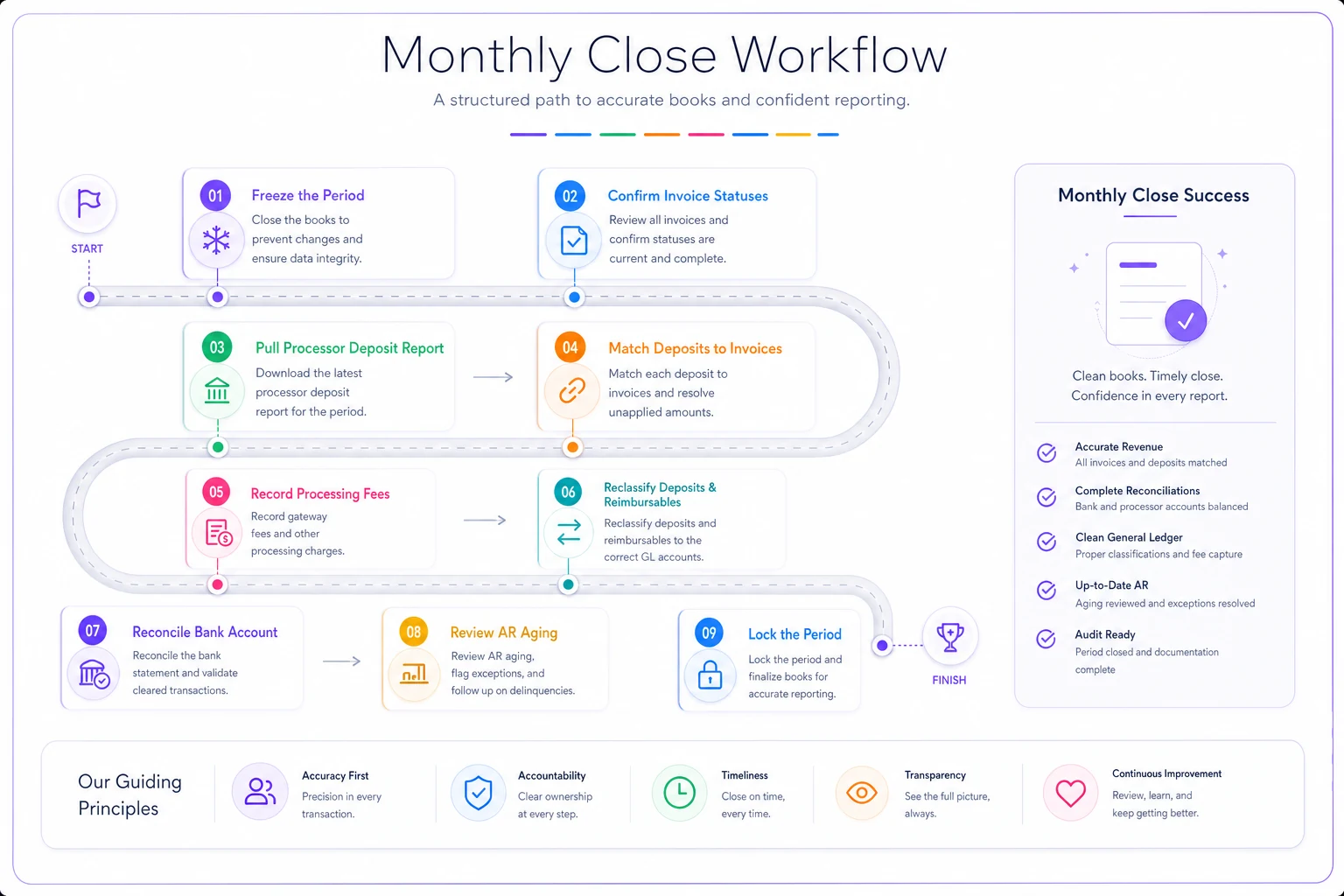
Here’s a simple workflow to follow each month.
-
Freeze the period. Stop editing invoices dated in the month you're closing. Late edits to old invoices are how "finished" months quietly change.
-
Confirm every invoice has a status. Paid, partially paid, or open. Anything in a vague state gets resolved now, not later.
-
Pull the deposit report from your processor. This is your source of truth for what actually hit the bank, net of fees.
-
Match deposits to invoices. Tie each deposit back to the invoice or invoices it paid. Flag anything that doesn't match.
-
Record processing fees. Book the difference between invoice totals and net deposits as merchant fees. Don't skip this even when the amounts seem small.
-
Reclassify deposits and reimbursables. Move retainers into Unearned Revenue; confirm reimbursables show both the expense and the income side.
-
Reconcile the bank account. Ending balance in the books equals the bank statement. Full stop.
-
Review AR aging. Check who still owes you and whether the open list matches both systems. This is also the moment to follow up on anything stale.
-
Lock the period. Once it ties out, close it so it can't be edited without leaving a trail.
The businesses that close cleanly do this the same way every month. The ones that dread close reinvent the process each time and rediscover the same errors.
When manual entry is actually fine
Not every business needs an integration. If you send five invoices a month, all similar, all paid the same way, typing them into your ledger takes ten minutes and gives you a mental check on every dollar. Automating that is solving a problem you don't have.
Manual entry stops making sense when any of these apply: you're sending more than roughly 20–30 invoices a month, you have multiple revenue types that need separate accounts, you take deposits or bill reimbursables regularly, or you've caught reconciliation errors more than once in a quarter. At that point the human bridge is the weakest link, and the cost isn't the time spent entering — it's the compounding errors you find months later.
The bad version: connecting an integration and never checking the mapping. Automation copies your logic faithfully. If the logic is wrong, you now generate wrong entries faster and with more confidence. A bad sync is worse than manual entry because it hides the errors behind a green checkmark.
Where automation earns its keep
Once the mapping is right, the value of connecting invoicing and bookkeeping isn't really speed — it's that the same number can only ever mean one thing. The invoice total, the tax, the fee, and the deposit each land in exactly one account, every time, without a person making an on-the-fly decision.
This is where an operational platform that handles invoicing with a clean structured export or a maintained bookkeeping connection actually helps. Not because it's clever, but because it removes the retyping step where drift is born. The processing fee gets recorded automatically. The deposit lands in the liability account. Sales tax never sneaks into revenue. Your reconciliation checklist shifts from "hunt for the error" to "confirm it ties" — which is a meaningfully different experience.
The goal isn't a hands-off system. It's a system where a human reviews and approves instead of transcribes. You still run the close. You still check the aging. You just stop being the error-prone bridge between two tools.
A quick real scenario
A two-person design studio was invoicing from one tool and hand-entering paid invoices into their accounting software every weekend. They sent around 40–50 invoices a month, took 50% deposits on most projects, and billed printing costs back to clients.
Their books were off by roughly $600–$900 most months. Once someone actually looked, the culprits were clear: processing fees never recorded, deposits booked straight to income, and printing reimbursements double-counted as an expense. Their close took most of a Saturday because they were essentially reconstructing what happened from scratch.
They fixed the mapping first — separate accounts for service revenue, reimbursed expenses, unearned revenue, sales tax, and merchant fees — then connected the two systems so paid invoices flowed through with those buckets already assigned. Close dropped to under an hour. The monthly gap fell to a few dollars of genuine rounding instead of hundreds in misclassification. Nothing dramatic happened to their revenue; they just finally trusted the number.
The part worth remembering
Integrating invoices with bookkeeping isn't really about connecting two apps. It's about deciding, once, where every piece of an invoice belongs — and then not letting a tired human make that call again at 11pm on a Sunday. Get the field mapping right, run the reconciliation checklist, and follow the same close steps every month. The tools matter far less than the logic underneath them.
Do the mapping work up front and the double entry problem doesn't get automated away — it stops existing.
Integrating invoices with bookkeeping isn't really about connecting two apps. It's about deciding, once, where every piece of an invoice belongs — and then not letting a tired human make that call again at 11pm on a Sunday. Get the field mapping right, run the reconciliation checklist, and follow the same close steps every month. The tools matter far less than the logic underneath them.
Do the mapping work up front and the double entry problem doesn't get automated away — it stops existing.
Ready to streamline your billing process?
Join 5,000+ businesses using Billoly to reduce billing delays, automate payments, and grow revenue efficiently.