



Most AR reporting dies somewhere between the accounting software export and the owner's inbox. The numbers exist. The aging report exists. But nobody looks at them until a payroll run feels tight, and by then you're reacting to a cash problem that started 45 days ago.
The gap isn't data. It's that AR data rarely turns into a decision anyone owns. You see Days Sales Outstanding creeping up, you nod, you tell yourself you'll "stay on top of collections," and then three invoices quietly drift past 60 days while you're buried in delivering the work.
An AR dashboard for a small business only earns its place if it does two things: show a tight set of numbers that actually predict cash problems, and connect each of those numbers to a person and an action when it moves off-target. A dashboard without a playbook is wallpaper. A playbook without a dashboard is guesswork. You need both, wired together.
This covers the whole system — what you measure, where it comes from, when it should trigger an alarm, and who does what when it does.
Why most AR dashboards are useless at the SMB level
The usual failure is overbuilding. Someone discovers their accounting tool can chart 40 metrics, so they chart 40 metrics. Now the owner is staring at gross margin, invoice volume, average deal size, collection effectiveness index, and nine aging buckets — and the one number that actually matters, "how much cash is late and getting later," is buried in row seven.
The opposite failure is worse and more common: no dashboard at all, just a monthly glance at the bank balance. The problem with that approach is the balance is a lagging confirmation of decisions made weeks earlier. By the time it looks thin, the slow-paying client has already been slow for a month.
In practice, the breakdown usually goes like this. A business under five people runs AR out of one person's head — usually the owner's. They "know" who owes what. That works until the client count passes roughly 25–30 active accounts, at which point memory stops reliably tracking which invoice is 38 days out versus 52. At that point the dashboard stops being optional. It's replacing a mental model that's already quietly failing.
A board-ready view has to resist both extremes. Fewer metrics, chosen because they surface a problem early enough to act, each tied to a threshold and an owner.
The minimal KPI set that actually predicts cash problems
You want a handful of numbers, not a wall. Here's the set that does real work at the SMB scale, what it tells you, and where it comes from.
Stop chasing payments and start automating your billing.
Billoly empowers you to create, send, and track invoices effortlessly while maintaining professional client relationships.
- Customizable invoice templates
- Automated payment reminders
- Real-time payment tracking
No credit card required
| KPI | What it tells you | Data source | Why it earns a slot |
|---|---|---|---|
| DSO (Days Sales Outstanding) | How long, on average, cash sits unpaid after billing | Invoices issued + payments received | The headline trend line — rising DSO is the earliest signal of slippage |
| % of AR past due (by $) | Share of outstanding money that's late | Aging report | Separates "waiting normally" from "actually late" |
| AR over 60 days ($) | The money most at risk of never arriving | Aging report | Recovery odds drop sharply past 60 days |
| Top 5 overdue accounts | Concentration of your problem | Aging + customer ledger | Usually 2–3 clients are 70%+ of the pain |
| Collection rate (trailing 30d) | How much of what's due you actually collected | Payments vs. amount due | Confirms whether your process is working or just busy |
| Billing-to-cash cycle time | Days from work delivered → invoice sent → paid | Invoice timestamps + payment dates | Exposes your own delays, not just the client's |
That last one matters more than most owners expect. When cash is slow, the instinct is to blame clients. But a chunk of the delay is often self-inflicted — work finished on the 3rd, invoice sent on the 19th. You can't fix a client's payment speed, but you can fix your own lag from delivery to invoice. Measuring the billing-to-cash cycle makes that visible.
A quick note on what not to put on the board view: invoice count, average invoice value, and total revenue belong on an operational report somewhere, but they don't help a leader decide what to do about cash this week. Keep them off the dashboard that drives action.
Setting alert thresholds that trigger before it hurts
A KPI without a threshold is a number you'll ignore. The whole point is to decide in advance what level is normal and what level demands action — before you're negotiating with yourself in the moment.
Thresholds should be relative to your own baseline, not some industry benchmark you read somewhere. If your terms are Net 30 and your real-world DSO usually runs around 38–42 days, then 42 is your normal, not 30. Set the alarm off the reality, not the aspiration.
-
Green (watch) DSO within ~5 days of your baseline, past-due AR under 15%, nothing over 60 days above a set dollar floor.
-
Yellow (act) DSO 6–12 days above baseline, past-due AR 15–25%, or any single account over 60 days above a threshold you care about (say, anything over $1,500).
-
Red (escalate) DSO more than 12 days above baseline, past-due AR above 25%, or over-60 balances crossing a dollar line that would actually strain payroll or rent.
The mistake people make is setting thresholds as percentages only. A client who owes you $400 at 70 days and a client who owes you $9,000 at 70 days are not the same emergency. Always pair the percentage trigger with a dollar floor, so a single large late invoice can trip the alarm on its own even if the overall percentage looks fine.
One more thing worth flagging: thresholds should be checked weekly, not monthly. Monthly review means a problem that starts in week one gets three weeks of runway before anyone looks. A weekly check on six numbers takes under ten minutes once it's set up.
The governance playbook: who acts, and how
This is the part that separates a dashboard from a decision system. Every threshold needs a named owner and a defined response. In a solo business, "owner" is you wearing different hats — but writing it down still forces the discipline of treating collections as a scheduled task rather than a mood.
As the team grows, the roles split. Here's how responsibility typically distributes as headcount increases — worth reading alongside the full accounts receivable maturity roadmap from solo to 50-person teams, which walks through what changes at each stage.
Solo / freelancer (1 person): You own everything. The playbook is a calendar commitment: dashboard check every Monday, first reminders go out same day, personal outreach on anything yellow.
-
Whoever handles bookkeeping owns the dashboard and weekly refresh.
-
The owner owns red-level escalations and the "do we pause work for this client" calls.
-
A named person owns yellow-level outreach so it doesn't fall through.
-
Dedicated AR or finance person owns green and yellow entirely.
-
Owner or manager only touches red and policy decisions.
-
Account managers get looped in when a late client is also an active-work client, because collections and the relationship can't be managed in separate silos.
What breaks at scale isn't the math — it's the handoff. When the person who notices the late invoice isn't the person who owns the client relationship, those accounts sit in a no-man's-land where everyone assumes someone else is handling it. The playbook exists specifically to kill that ambiguity.
Assign a backup owner for each named responsibility so tasks don't stall when someone is out.
The playbook exists specifically to kill that ambiguity.
Trigger playbook: what happens when a KPI goes off-target
Define the response per trigger, in writing, before you need it. Here's a concrete version you can adapt.
Here's a simple workflow that matches the trigger playbook.
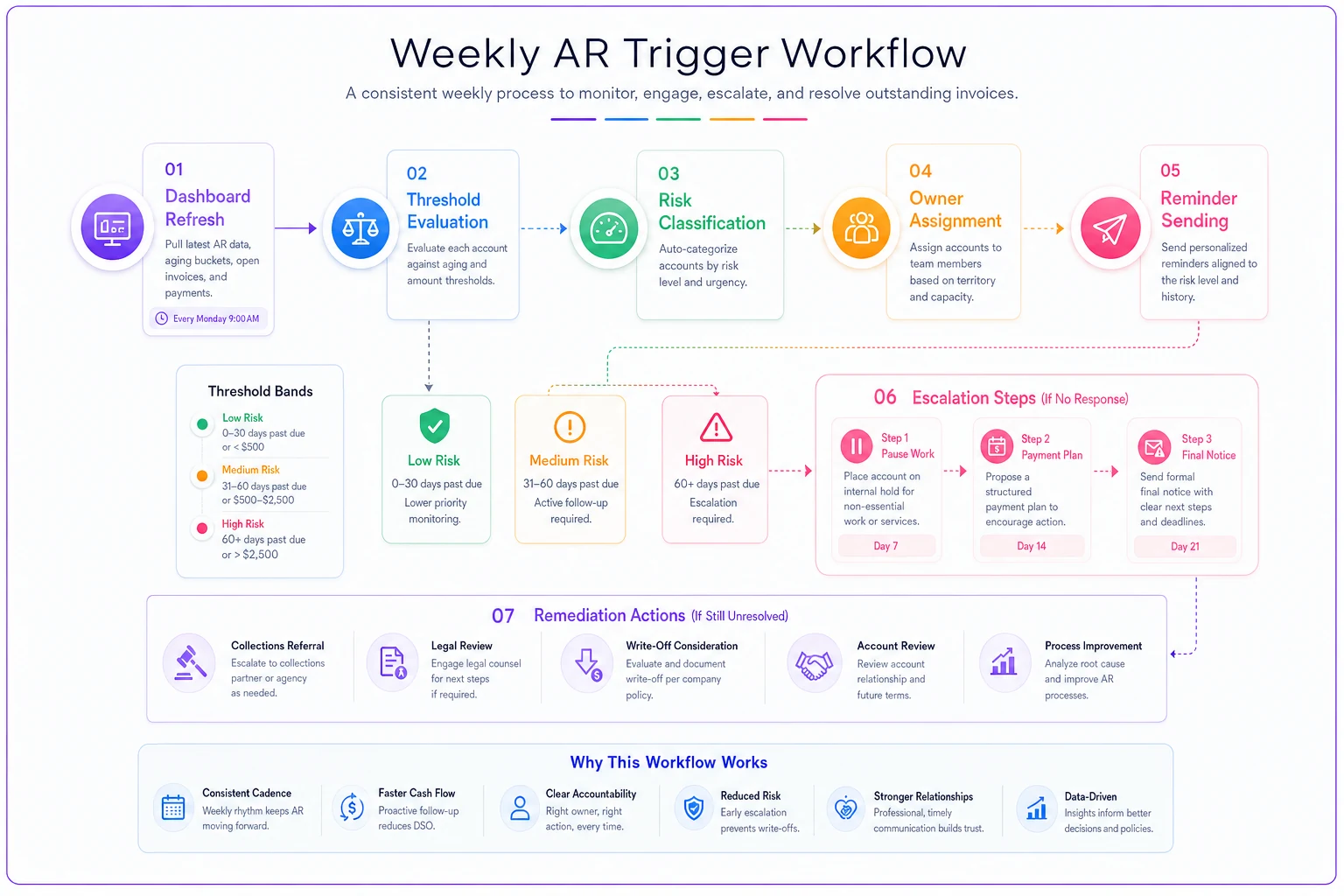
When DSO crosses into yellow:
-
Pull the top 5 overdue accounts — the increase is almost always concentrated.
-
Confirm reminders actually went out. Half the time, "slow payment" is really "we forgot to send the second notice."
-
Owner of yellow outreach makes direct contact on the largest offenders within 48 hours.
When past-due AR crosses 25% (red):
-
Freeze new credit terms for the worst offenders — move them to deposit-first or partial-upfront.
-
Owner reviews whether any ongoing work should pause until a payment lands.
-
Flag anything over 60 days for a formal escalation path (final notice, payment plan offer, or handoff).
When a single large account trips the dollar floor:
-
This one gets a human, not an automated reminder. Large late balances with a client you want to keep need a conversation, not a drip sequence.
-
Account owner and finance coordinate so the client hears one consistent message, not two.
The checklist below is the weekly ritual that keeps all of this alive:
-
- [ ] Refresh the dashboard — DSO, past-due %, over-60 balance, top 5 overdue
-
- [ ] Compare each against its threshold; note any color changes since last week
-
- [ ] Confirm every scheduled reminder actually went out
-
- [ ] Assign an owner to every yellow and red item (name, not "someone")
-
- [ ] Log what action was taken on last week's flagged accounts
-
- [ ] Update the forecast if a large expected payment slipped
That second-to-last item — logging last week's actions — is the one most people skip, and it's the one that makes the system improve over time. Without it, you keep re-discovering the same slow payers from scratch.
Remediation steps when things are already off
Sometimes you inherit a mess rather than catch it early. The dashboard goes red because the situation was red long before you built the dashboard. Remediation is different from monitoring — you're digging out, not maintaining.
Start by triaging the over-60 bucket by dollar value and recoverability, not by age alone. A $6,000 invoice at 75 days from a client still actively working with you is far more recoverable than a $6,000 invoice at 75 days from a client who's gone quiet. Sort your effort toward where the money and the odds both point.
Then separate "won't pay" from "disorganized." A surprising share of aged AR at the small-business level isn't refusal — it's a client whose own process lost your invoice, routed it to the wrong person, or is waiting on an internal approval they never mentioned. A single clarifying call resolves more of these than people expect. The ones that genuinely won't pay need a different track entirely.
The deeper fix is upstream. If your dashboard keeps going red for the same reasons, the problem isn't collections — it's your terms, your onboarding, or your billing timing. That's a governance question, and it's worth thinking through the automation and human-in-the-loop boundaries described in this decision framework for billing automation scope and KPIs. Deciding what gets automated versus what needs a human is exactly the kind of rule that stops you from firing robotic reminders at a $9,000 client you're trying to keep.
Where software quietly carries the load
None of this requires a dedicated dashboard tool. Plenty of owners run a version of this in a spreadsheet with weekly discipline, and that's genuinely fine at low volume. The spreadsheet approach breaks for one specific reason: the refresh is manual, so it only happens when someone remembers. The week you're slammed is exactly the week the dashboard doesn't get updated — which is exactly the week something slips through.
Where an operational platform earns its place is in removing that manual refresh. When your invoicing, payments, and aging data live in one system, the dashboard stays current without anyone exporting anything, and threshold alerts can fire automatically — a yellow DSO or a tripped dollar floor surfacing on its own instead of waiting for a human to notice.
AI automation handles the routine layer: sending scheduled reminders, flagging the account that just crossed 60 days, keeping the top-5 overdue list accurate in real time. That frees the actual people for the part that needs judgment — the conversation with the large late client, the decision to pause work, the call on whether to offer a payment plan. The point isn't to replace the playbook with automation. It's to let the system handle the watching and the routine nudges so the people running the business only get pulled in when something genuinely needs a decision.
A real scenario
A small design studio, four people, running Net 30 terms with around 30 active clients. No dashboard — just the accounting software's aging report, checked maybe once a month. DSO was sitting around 52 days against 30-day terms, and somewhere between $18k and $22k was perpetually stuck past 60 days. Nobody owned collections; it got done when the owner felt nervous about cash.
They built the minimal version: six KPIs, checked every Monday, thresholds set off their real baseline, and a named owner for yellow outreach. Nothing fancy — the bookkeeper refreshed it, the owner handled reds.
The first month mostly surfaced how bad the billing lag was. Work was finishing a week or two before invoices went out, which alone was adding days to the cycle. Fixing that — invoicing within 48 hours of delivery — pulled DSO down before they even touched client behavior. Over about a quarter, DSO settled into the low 40s and the over-60 bucket dropped by more than half. Not because they got tougher on clients, but because the problem stopped being invisible and somebody owned the response every single week.
A board-ready AR dashboard isn't about having more charts. It's about picking the few numbers that predict a cash problem early, deciding in advance what level means "act," and naming who acts when it does. The dashboard shows you the slip. The playbook decides who moves. The remediation steps dig you out when you catch it late. Get those three working together and AR stops being the thing you react to when payroll feels tight, and becomes something you manage on a schedule — ten minutes on a Monday, before any of it turns into a real problem.
Ready to streamline your billing process?
Join 5,000+ businesses using Billoly to reduce billing delays, automate payments, and grow revenue efficiently.