


Most advice on reimbursables stops at "keep your receipts and submit them promptly." Which, fine, but that skips everything that actually slows payment down — what to name the file, how to word the invoice line, what to do when a receipt is gone, how to handle a hotel bill in euros when your card charged you in dollars, and what email to send when the client goes quiet on day 12.
This is the part-two toolkit. If you want the strategic framing on formatting and submission timelines, the companion piece on how to invoice reimbursable expenses so clients approve fast covers that. Here we're going straight to the copy‑paste artifacts. Grab what you need, adapt the numbers, move on.
Invoice snippets you can paste today
There are two ways clients want to see reimbursables, and they rarely tell you which one until you guess wrong. Some want expenses folded into the main service invoice as a separate section. Others — especially anyone with a procurement team — want a standalone expense invoice they can route through a different approval path.
Have both ready.
``
REIMBURSABLE EXPENSES (pass-through, at cost, no markup)
---------------------------------------------------------
Date        Description                    Receipt Ref     Amount
2025-03-04  Airfare SFO-AUS (coach)        R-0412          $318.40
2025-03-04  Checked bag                    R-0412          $35.00
2025-03-05  Hotel, 2 nights @ $149         R-0417          $298.00
2025-03-05  Rideshare, airport->client     R-0418          $41.26
---------------------------------------------------------
Subtotal, reimbursables                                    $692.66
(Receipts attached as separate PDF: EXP-ACME-2025-03.pdf)
``
``
EXPENSE REIMBURSEMENT INVOICE
Invoice #: EXP-2025-0087
PO Reference: PO-ACME-44812
SOW Reference: SOW-ACME-2024-11 (Section 6, Expenses)
Approver: j.ramirez@acmeco.com
Billing Period: 2025-03-01 to 2025-03-15
Terms: Net 15 from receipt
Notes: All expenses pre-approved per SOW; receipts attached, indexed on cover sheet.
``
Worth noting: the "no markup" line on the inline version prevents a surprisingly common back‑and‑forth. When AP can't tell whether you've padded a travel cost, they hold it for review. Stating the policy on the invoice itself kills the question before it's asked.
The expense template + PDF cover sheet
The biggest reason expense reimbursements get bounced isn't the amount — it's that receipts arrive as a messy pile with no index. AP opens a 14‑page PDF, can't match page 7 to line item 9, and emails you back. That round trip costs you a week.
Stop chasing payments and start automating your billing.
Billoly empowers you to create, send, and track invoices effortlessly while maintaining professional client relationships.
- Customizable invoice templates
- Automated payment reminders
- Real-time payment tracking
No credit card required
Fix it with a two‑part structure: a spreadsheet as your working ledger, and a PDF cover sheet as the index AP actually reads.
Expense template columns (Excel/CSV):
| Column | Example | Why it's there |
|---|---|---|
| Line # | 7 | Matches receipt label |
| Date | 2025-03-05 | Sort + period validation |
| Category | Lodging | Policy matching |
| Description | Hotel, 2 nights | Human context |
| Vendor | Hampton Inn Austin | AP vendor records |
| Currency | USD | Multi-currency flag |
| Amount (orig) | 298.00 | As charged |
| Amount (billed) | 298.00 | After conversion |
| Receipt Ref | R-0417 | Links to file |
| PO / SOW | PO-44812 | AP matching |
| Billable? | Y | Filter for invoice |
Export filtered to "Billable = Y" and you've got your invoice section in thirty seconds.
``
RECEIPT INDEX — EXP-2025-0087 — Acme Co.
Page  Line#  Date        Vendor              Amount    Receipt Ref
2     1      2025-03-04  United Airlines     $318.40   R-0412
3     2      2025-03-04  United (bag)         $35.00   R-0412
4     3      2025-03-05  Hampton Inn         $298.00   R-0417
5     4      2025-03-05  Lyft                 $41.26   R-0418
------------------------------------------------------------------
Total receipts: 4     |     Total billed: $692.66
``
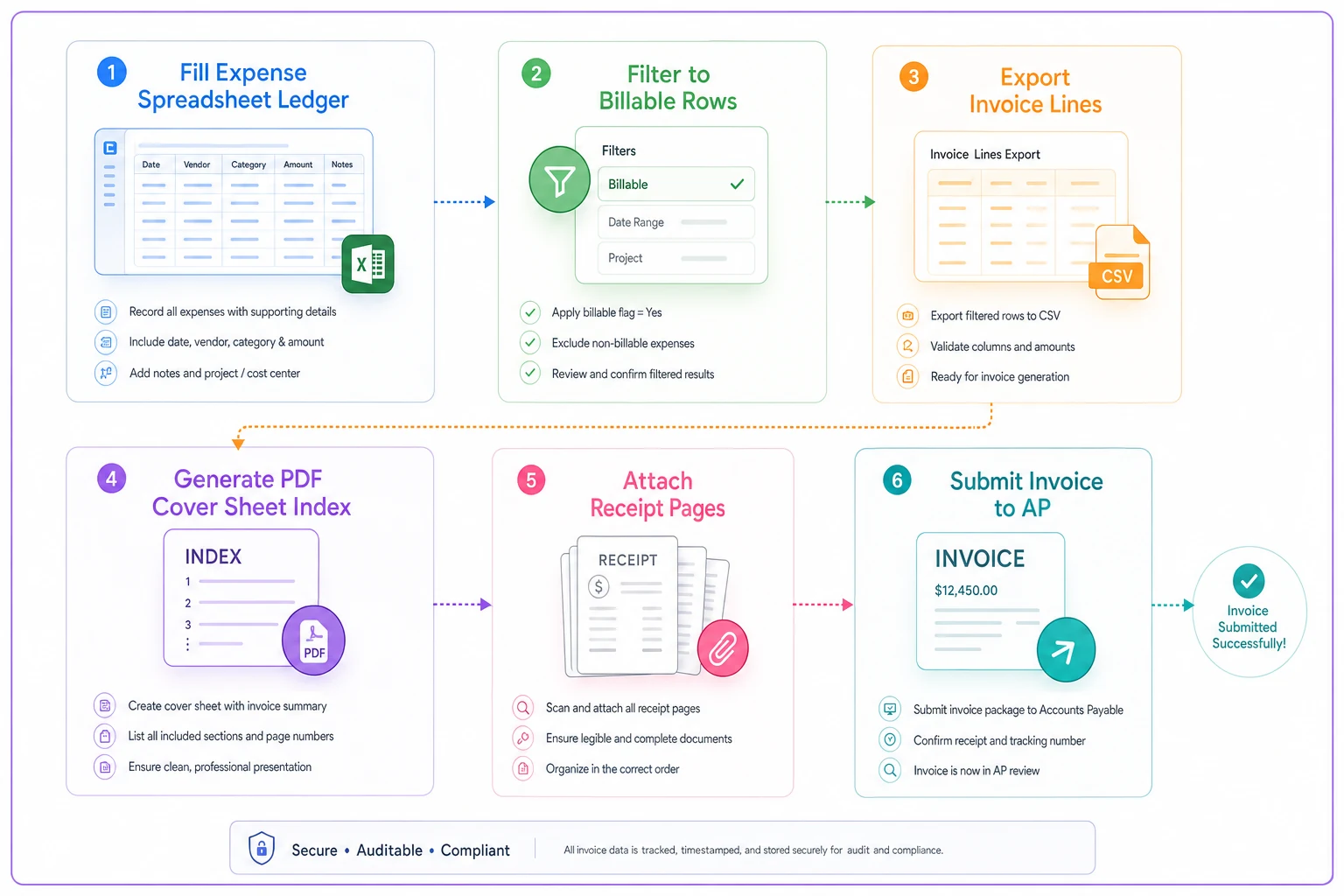
The person approving your expenses is scanning for mismatches, not reading carefully. Give them a page that says "everything reconciles" and you've done most of their job for them.
Filename conventions (with actual regex)
Loose filenames are where reimbursement systems quietly rot. IMG_4821.jpg tells nobody anything. Six months later at tax time, you can't find the hotel receipt from the March trip.
Pick a convention and stick to it. A workable pattern:
``
EXP-[CLIENT]-[YYYY-MM]-[LINE#]-[VENDOR].pdf

Examples:
EXP-ACME-2025-03-04-HAMPTON.pdf
EXP-ACME-2025-03-07-LYFT.pdf
``
Regex to validate a single‑receipt filename:
``
^EXP-[A-Z]{3,6}-\d{4}-\d{2}-\d{2}-[A-Z]{2,12}\.pdf$
``
Regex for a multi‑receipt batch PDF (one file holding several receipts for a period):
``
^EXP-[A-Z]{3,6}-\d{4}-\d{2}-BATCH\.pdf$

Example match: EXP-ACME-2025-03-BATCH.pdf
``
Name the file at the moment of capture to avoid batch‑renaming errors later.
If you run any kind of automated inbox or folder sort, these two patterns let you route single receipts and batch submissions differently without opening anything. And if a file doesn't match either pattern, it gets flagged before it reaches a client — which is exactly where you want to catch the error.
One thing worth flagging: businesses that get reimbursed fastest almost always name the file at the moment of capture, not at month‑end. Batch renaming 40 receipts on the 30th is where typos and skipped files happen.
Mobile capture: per‑receipt checklist
Phone photos are fine for reimbursement — until the one that matters is blurry or cut off. Run this check at the moment of capture, not later:
-
[ ] All four edges of the receipt visible
-
[ ] Total, date, and vendor name legible (zoom in to confirm)
-
[ ] Tax/VAT line captured if present
-
[ ] For cards
last 4 digits visible (proves which card paid)
-
[ ] Renamed to convention immediately
-
[ ] For foreign currency
note the amount your card actually charged (screenshot the bank app)
That last point prevents more disputes than anything else. When a client asks why your €149 hotel shows as $163.12, the screenshot of your bank charge ends the conversation immediately.
Worked multi‑currency example (with the part everyone skips)
Most people get this wrong: they convert using the day's mid‑market rate from a currency site, but their card charged a different amount because of the issuer's rate plus a foreign transaction fee. The client reimburses the lower number, and you eat the difference.
-
Mid‑market rate that day
roughly 1 EUR = 1.085 USD → €149 ≈ $161.67
-
Your card actually charged
$163.12 (issuer rate + 3% FX fee)
If the client's policy caps reimbursement at mid‑market rates (some large ones do), you'll know up front and can decide whether to absorb the ~$1.50 or push back. Either way, you're not discovering a shortfall three weeks later. For the broader cross‑border field setup, the earlier piece on international invoicing covers VAT/GST fields in depth — worth reading if you bill overseas clients regularly.
``
Lodging, Berlin (€149.00)
  Card charge in USD: $163.12
  Source: Chase statement, txn 2025-03-05
  (Includes 3% foreign transaction fee)
Billed amount: $163.12
``
VAT/GST note: If you're reclaiming VAT separately, don't bury it in the billed total. Show the net and the VAT as distinct lines so the client — or their accountant — can handle recovery correctly. Reimbursing gross when VAT is recoverable creates a reconciliation headache that nobody wants to untangle.
The SOW clause that prevents 90% of expense disputes
Most expense fights trace back to the engagement being vague about what's reimbursable. A short clause, agreed before work starts, ends almost all of it.
``
EXPENSES. Client shall reimburse Consultant for reasonable,
pre-approved, out-of-pocket expenses incurred in performance
of the Services, at cost with no markup. Reimbursable expenses
include travel, lodging, and project-specific materials.
Expenses exceeding $[250] per item require prior written
approval. Consultant will submit itemized expenses with
receipts within [15] days of the billing period. Client will
reimburse approved expenses within [15] days of submission.
Foreign-currency expenses will be billed at the actual amount
charged to Consultant, inclusive of transaction fees.
``
That last sentence is the one people forget. It's also the one that quietly protects your margin on international work.
Three email templates
Three quick email templates to paste depending on stage.
``
Subject: Expense reimbursement — EXP-2025-0087 — Acme (Net 15)

Hi Jordan,

Attached is the expense reimbursement for March 1–15, totaling
$692.66. Receipts are indexed on page 1 of the PDF, and each
line matches a receipt reference.

This is per SOW Section 6 (PO-44812), all at cost with no markup.
Let me know if anything needs adjustment — happy to resend.

Thanks,
[Name]
``
``
Subject: Quick check — EXP-2025-0087 ($692.66)

Hi Jordan,

Just checking this expense submission from last week landed okay.
Anything you need from me to move it through approval?

Appreciate it,
[Name]
``
``
Subject: Approval needed — EXP-2025-0087, outstanding since [date]

Hi Jordan,

The March expense reimbursement ($692.66) has been pending for
two weeks. Per our SOW, approved expenses are due within 15 days
of submission. Could you confirm status, or let me know who else
should review so we can close this out?

Copying [sponsor] for visibility.

Thanks,
[Name]
``
The escalation references the SOW term, not emotion. "Per our agreement" moves things. "I really need this" doesn't.
Missing‑receipt attestation
Lost a receipt? Don't just drop the line and hope nobody notices. A short signed attestation keeps the expense claimable and audit‑safe:
``
MISSING RECEIPT ATTESTATION

I, [Name], attest that on [date] I incurred a business expense
of [amount] for [description] from [vendor], paid via
[card ending XXXX / cash]. A receipt is unavailable because
[reason]. This expense is accurate and was incurred in the
performance of services for [Client] under [PO/SOW].

Signature:    Date: _
``
Most clients accept these for small amounts, often under $75. Above that, expect a request for a card statement line instead.
Batching, cards, and mileage
Batching rules (numeric thresholds):
-
Submit monthly if total expenses run under ~$500/month
-
Submit bi‑weekly once you're above ~$500 — better for cash flow, and the receipts are fresher
-
Submit any single expense over ~$1,000 on its own, same week — big items get scrutinized, don't let them age
Corporate card vs personal card:
| Field | Corporate / business card | Personal card |
|---|---|---|
| Reimbursement needed? | No (company paid) | Yes |
| Proof required | Statement reconciliation | Receipt + card last-4 |
| FX handling | Company absorbs | You bill actual charge |
| Best for | Predictable recurring costs | Occasional, one-off |
Clean rule: anything you'll bill back to a client, put on a personal or dedicated card so the paper trail is yours. Mixing client‑billable expenses onto a shared corporate card is where reconciliation goes sideways every time.
``
Date        From          To              Miles   Rate    Amount   Purpose
2025-03-04  Office        Acme HQ         42      0.67    $28.14   Kickoff mtg
2025-03-11  Office        Acme HQ         42      0.67    $28.14   Review
---------------------------------------------------------------------------
                                          84              $56.28
``
Check the current standard mileage rate each year — it changes — and note it on the log so there's no ambiguity at reimbursement time.
Metadata mapping for AP matching
If your client's AP system auto‑matches, give it what it needs to match on the first pass. The fields that matter:
-
PO number → invoice — the primary match key; wrong or missing PO is the #1 auto‑reject
-
SOW reference — ties the expense to an approved engagement
-
Approver email — routes it without a human guessing who signs off
-
Billing period — prevents duplicate‑period rejections
-
Invoice total = sum of receipt total — mismatches here trigger manual review every time
Put all five in a consistent spot on every submission and your reimbursements stop landing in the "needs review" queue.
All five of these fields are things you control at the time of submission. None of them require chasing anyone down. That's the point — getting the packaging right once means the client's AP system does the matching automatically instead of parking your invoice for a human to sort out.
Pre‑submission QA checklist
Run this before you hit send. Two minutes here saves a week of email back-and-forth:
-
[ ] Every line item has a matching receipt reference
-
[ ] Receipt total = invoice total (to the cent)
-
[ ] Cover sheet index included and accurate
-
[ ] Filenames match convention; regex validates
-
[ ] FX amounts match card charges, with source noted
-
[ ] PO / SOW / approver email present
-
[ ] Any item over threshold has pre‑approval on file
-
[ ] Missing receipts covered by attestation
-
[ ] VAT/GST shown separately where recoverable
-
[ ] File under client's size limit (compress if needed)
Run this before you hit send. Two minutes here saves a week of email back-and-forth:
A real scenario
A two‑person design studio did a lot of on‑site client work, with reimbursements running somewhere around $1,200–$1,800 a month. The problem wasn't the amounts — it was that roughly a third of their submissions bounced back for a missing receipt or a currency mismatch, each taking another week to fix and resubmit. Effective pay time on expenses was stretching past 40 days.
They changed three things: named files at capture using a fixed convention, added a one‑page receipt index to every submission, and started billing foreign charges at the actual card amount with a statement screenshot attached. Nothing sophisticated about it.
Within two billing cycles, bounce‑backs dropped to almost none and expense payment time came down to around 18 days — basically matching their net terms. The expenses hadn't changed. The packaging had.
Metrics worth tracking
A few numbers tell you whether your expense process is actually healthy:
| Metric | What it tells you | Target |
|---|---|---|
| Expense bounce‑back rate | % of submissions sent back for correction | Under 5% |
| Days‑to‑reimbursement | Submission to payment, averaged | Inside your net terms |
| FX shortfall | Dollars lost to conversion gaps per quarter | Trending to zero |
| Missing‑receipt rate | % of lines needing an attestation | As low as possible |
| Submission lag | Days between expense date and submission | Under 7 days |
If bounce‑backs and FX shortfall are both near zero and days‑to‑reimbursement sits inside your terms, the system's working. When one starts creeping up, it almost always traces back to one of the templates above being skipped.
The whole point of a toolkit like this is that getting reimbursed shouldn't require re‑inventing the format every month. Set the conventions once, keep the files handy, and the only thing left to think about is the work itself.
The whole point of a toolkit like this is that getting reimbursed shouldn't require re‑inventing the format every month. Set the conventions once, keep the files handy, and the only thing left to think about is the work itself.
Ready to streamline your billing process?
Join 5,000+ businesses using Billoly to reduce billing delays, automate payments, and grow revenue efficiently.