



The IRS just reversed course on 1099-K reporting thresholds again. According to recent IRS guidance, the threshold for third-party payment processors is jumping back up to $20,000 and 200 transactions for 2026, after years of confusion around a planned $600 threshold that never fully materialized.
Most freelancers and small business owners are breathing a sigh of relief. Fewer forms, less paperwork, simpler taxes.
Except that's not really how this plays out.
The operational gap nobody talks about
Over the past three years, while everyone panicked about the lower threshold, thousands of businesses started properly tracking their payment processor income for the first time. And what they found was ugly: massive discrepancies between what their invoicing systems showed and what payment platforms actually reported.
A graphic designer I talked to last month discovered her Stripe deposits were $14,000 higher than her invoice records for 2025. The culprit? Client tips, processing fee reversals, partial refunds that never got recorded, and several direct payment links she'd completely forgotten about.
She's not alone. Payment platforms have gotten increasingly sophisticated while most small business invoicing systems are still running on 2015 logic. The result is a reconciliation mess that the 1099-K threshold change just made more dangerous, not less.
Why the higher threshold makes tracking harder, not easier
When the threshold was supposed to drop to $600, every business had to pay attention. Now with the reversal to $20,000, businesses under that number might receive zero documentation from payment processors while still owing taxes on every dollar of income.
Stop chasing payments and start automating your billing.
Billoly empowers you to create, send, and track invoices effortlessly while maintaining professional client relationships.
- Customizable invoice templates
- Automated payment reminders
- Real-time payment tracking
No credit card required
The new 1099-K form makes this worse. As reported by Sovos, the updated form now includes fields for cash tips and tipped-occupation codes. These aren't just new boxes — they represent entirely new data streams that most invoicing systems can't capture.
Think about what happens operationally: your client adds a 20% tip through your payment link. That tip hits your bank account but never appears on your invoice. Come tax time, you're digging through twelve months of transaction history trying to match deposits to invoices.
Or worse — you process a partial refund in November for work completed in March. Your payment processor records the net amount, your invoicing system shows the full original amount, and your accountant has no idea which number is right.
The five updates that actually matter
1. Build invoice-to-deposit mapping before you need it
Most businesses track invoices. Most businesses track deposits. Almost nobody systematically tracks the connection between them.
Start adding a payment reference field to every invoice that captures the exact transaction ID from your payment processor. When a client pays invoice #1047 through PayPal, that PayPal transaction ID needs to live somewhere in your records — not in your head, not buried in email, but in an exportable field tied to that specific invoice.
This gets complicated fast with multiple payment methods. A single invoice might get paid partially through Venmo, partially through bank transfer, with the remainder on a credit card. Each payment method generates different documentation, different timing, and different fee structures.
2. Create separate tracking for tips, fees, and adjustments
Payment processors love to bundle everything into one deposit. Your $1,000 invoice becomes a $973.47 deposit after processing fees, or $1,200 after a client tip, or $650 after a partial refund gets netted out from last month.
These adjustments need their own tracking, separate from your core invoicing. Create categories for:
-
Processing fees (by platform)
-
Tips and gratuities
-
Refunds and reversals
-
Currency conversion adjustments
-
Platform-specific holds and releases
The goal isn't perfect accounting — that's your accountant's job. The goal is having enough documentation to reconstruct what happened when the IRS asks questions eighteen months from now.
3. Implement client TIN collection at intake, not invoice
The updated 1099-K requirements mean payment processors need more verified information earlier. But waiting until invoice time to collect Tax Identification Numbers creates friction that slows deals down.
Move TIN collection into your client intake process. Make it part of your initial agreement, not a surprise requirement when someone's trying to pay. For service businesses, this means updating your onboarding flow. For product sellers, it means adding fields to checkout before the first transaction.
The businesses that struggle most here are the ones with irregular clients — event photographers, project-based consultants, emergency service providers. They need a lightweight way to capture this without adding friction to time-sensitive transactions.
4. Establish monthly reconciliation between platforms and invoices
Annual reconciliation is effectively dead as a strategy. By the time you find discrepancies in February, you've lost the context needed to fix them.
Pick the 5th of each month to run a simple check:
-
Export last month's invoices marked as paid
-
Export last month's deposits from each payment platform
-
Look for gaps over $100
You're not doing full accounting here. You're looking for obvious problems: missing invoices, duplicate payments, mysterious deposits, processing errors. Finding these monthly turns a tax nightmare into a five-minute correction.
Run the check platform-by-platform starting with your primary processor to catch date-range mismatches early.
5. Build an audit trail that survives platform changes
Payment platforms change their export formats constantly. The CSV you download from Square today won't match the one from six months ago. Your invoicing software might switch providers. Your bank might update their systems.
Your audit trail needs to be platform-agnostic. That means:
-
PDF copies of final invoices, not just database entries
-
Screenshot documentation of payment confirmations
-
Downloaded statements from payment processors monthly
-
Email confirmations saved outside your inbox
This feels like overkill until you're trying to prove income for a loan, dealing with a payment dispute, or responding to an audit notice.
The reconciliation workflow that actually works
Here's what this looks like for a business processing roughly $8,000–$15,000 monthly through mixed payment channels:
Visualizing the steps can make the process easier to follow.
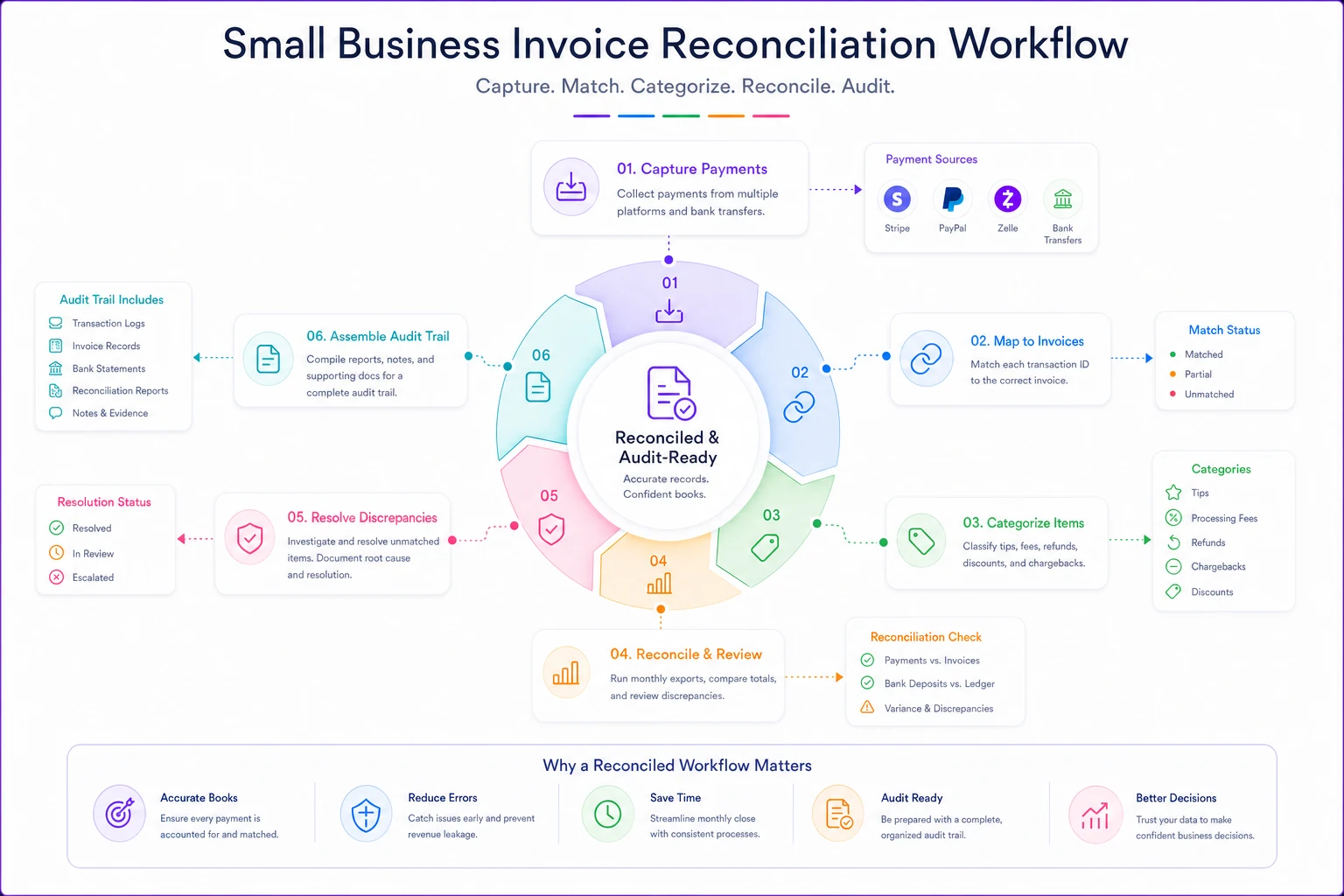
Week 1: Client pays $2,400 invoice through Stripe. You note the Stripe transaction ID on the invoice, mark it paid, and export both the invoice PDF and Stripe receipt.
Week 2: Three smaller clients pay through Zelle totaling $3,200. No transaction IDs, but you screenshot the Zelle confirmations and attach them to each invoice record.
Week 3: Regular client sends $4,000 through ACH for two invoices. You record the bank reference number and link both invoices to the single deposit.
Month-end: You export everything, match deposits to invoices, and find a $340 discrepancy. Turns out a client added a tip through your payment link that never got recorded. You create a "tips received" entry and document it for taxes.
Quarter-end: Your bookkeeper gets organized records showing exactly which deposits match which invoices, with supporting documentation for every variance.
That workflow eliminates the year-end scramble and makes 1099-K reconciliation close to automatic.
The platform consolidation decision
Most small businesses use too many payment platforms. Each one adds complexity: different fee structures, different reporting formats, different reconciliation requirements.
| Payment Method | Real Cost Beyond Fees | Reconciliation Burden |
|---|---|---|
| Stripe/Square | Clean API exports | Medium - automated but needs monitoring |
| PayPal/Venmo | Messy transaction descriptions | High - lots of manual matching |
| Zelle/Bank Transfer | No fees but no documentation | Very high - purely manual |
| Cash/Check | Hidden time cost | Highest - easy to forget |
| Crypto | Tax complexity | Nightmare - multiple basis tracking |
For most service businesses, two platforms is the ceiling: one primary processor for standard invoices and one backup for edge cases. Every platform you add beyond that multiplies reconciliation work in ways that aren't obvious until you're buried in it.
Building systematic payment tracking into operations
Manual reconciliation doesn't scale. Once you're handling more than 20–30 transactions monthly, the time cost starts outpacing the benefit. This is where operational software stops being optional.
The core problem is that payment data lives in one system, invoice data lives in another, and tax reporting needs both combined. AI-powered operational platforms can close this gap by automatically matching transactions to invoices based on amounts, dates, and client information — so instead of manually copying transaction IDs, the system recognizes patterns and builds the connections for you.
The automation handles the tedious parts: downloading statements, matching amounts to invoices, flagging discrepancies, organizing documentation. You still review and approve, but you're not doing data entry. For a business running 100+ transactions a month, that shift cuts reconciliation from hours to minutes while actually improving accuracy.
The conversation you need to have with your accountant
Your accountant probably doesn't know about half your payment channels. They see bank deposits and assume those reflect your income. They don't see the Venmo payments, the direct tips, the platform-specific adjustments.
Schedule a planning session before December to cover:
-
Every platform you accept payments through
-
How you're currently tracking invoice-to-payment matching
-
What documentation you're keeping and what you're not
-
Which reports they actually need for accurate filing
-
How to handle the new tip and reimbursement reporting fields
Most accountants would rather help you build proper tracking now than untangle a mess during tax season. The 1099-K changes give you a solid reason to have this conversation before it becomes urgent.
The real lesson from the threshold reversal
The 1099-K threshold chaos made one thing clear: payment processing and invoice tracking aren't separate operations anymore. They're one integrated workflow that determines your tax liability, your cash flow visibility, and your audit readiness.
Whether the threshold sits at $600 or $20,000 doesn't change the underlying need for reconciliation. The businesses that build systematic tracking now will be in good shape regardless of what the IRS does next. The ones assuming the higher threshold means less work are setting themselves up for an expensive surprise.
Start with one change: every invoice needs to document how it got paid. Build from there, and tax season becomes boring instead of stressful — which is exactly where you want to be.
Ready to streamline your billing process?
Join 5,000+ businesses using Billoly to reduce billing delays, automate payments, and grow revenue efficiently.