



Most small business owners work their receivables backwards. They open the aging report, spot the oldest invoice at the top, and start there. Feels logical. The problem is that the oldest invoice is often the least worth your time — it belongs to the client who was always going to be difficult, the amount is small, and the odds of collecting dropped weeks ago.
Meanwhile a 40-day-old invoice from a client who pays every time, worth four figures, sits ignored because it hasn't crossed some mental "old enough to worry about" line yet.
A good aging report tells you when invoices are late. It doesn't tell you which ones to work first. That gap is where a triage matrix comes in — a way to score every open invoice by three things at once and get a prescribed action instead of a gut feeling. This is the part of the "prioritize collections aging report" conversation that almost nobody actually spells out.
Why the plain aging report leads you astray
The standard aging report buckets everything into 0–30, 31–60, 61–90, and 90+. It's a snapshot of time, nothing else. Two invoices sitting in the 31–60 column look identical on paper even when one is nearly guaranteed to pay and the other is circling the drain.
In practice, this plays out in a predictable and painful way. An owner spends an hour drafting a careful email to the client who owes $380 and went quiet three months ago — a client who, realistically, is gone. That same hour could have been a two-minute call to a reliable client who simply forgot, sitting on a $2,800 invoice that would have cleared the same day.
The aging report isn't wrong. It's just one dimension. Collections is a three-dimension problem:
-
How old is it (aging bucket)
-
How much does this client matter (client value)
-
How likely are we to actually get paid (probability of payment)
Score all three, and the list reorders itself in a way that maps to actual cash flow, not to calendar dates.
The three axes, defined so you can actually score them
Each axis needs to be quick to assign. If scoring an invoice takes more than fifteen seconds, nobody keeps it up.
Stop chasing payments and start automating your billing.
Billoly empowers you to create, send, and track invoices effortlessly while maintaining professional client relationships.
- Customizable invoice templates
- Automated payment reminders
- Real-time payment tracking
No credit card required
Aging bucket — use your existing report. 0–30, 31–60, 61–90, 90+. No changes needed here.
Client value — not just invoice size. This is the relationship's worth over the next year or so. A client who sends you roughly $1,500 a month is high value even when the current open invoice is $600. Rate it Low / Medium / High. A rough cut:
-
High — recurring work, referrals, or annual spend north of ~$10k
-
Medium — occasional repeat client, decent one-off projects
-
Low — one-time job, no repeat signals, or a client you'd happily fire
Probability of payment — this is the one people skip, and it's the most useful. It's your honest read on whether the money is actually coming. Signals that raise it: they've responded to your emails, they've paid you before, no dispute exists. Signals that lower it: silence, a disputed line item, a change in their business, invoices that keep "getting lost." Rate it High / Medium / Low.
One thing worth noting: probability-of-payment changes as you work an account. A dead-silent client who suddenly replies "sorry, sending Friday" jumps from Low to High in one message. Re-score when new information arrives.
The triage matrix
Cross the three axes and you get a priority tier with a prescribed action. This keeps the valuable invoices near the top even when they're not the oldest.
| Aging | Client Value | Prob. of Payment | Tier | Prescribed action |
|---|---|---|---|---|
| Any | High | High | P1 – Protect | Personal call/text same day. Warm tone. Never let a good client feel hunted. |
| 31–90 | High | Medium | P1 – Protect | Direct call, offer to resolve any blocker on the spot. |
| 31–60 | Medium | High | P2 – Nudge | Friendly reminder, expect payment without friction. |
| 61–90 | Medium | Medium | P2 – Nudge | Firmer email + phone follow-up. Confirm they received the invoice. |
| 61–90 | High | Low | P2 – Investigate | Something's wrong. Call to find the real reason before escalating. |
| 90+ | Medium/High | Medium | P3 – Push | Written notice, payment plan offer, set a hard date. |
| 90+ | Low | Low | P4 – Decide | Send final notice, then either write off or hand to collections. Stop spending live hours. |
| 90+ | Low | Medium | P4 – Decide | One firm email with a deadline. If no response, drop to P4 write-off review. |
The single most important row is that last one. Low-value, low-probability, 90+ invoices are where most owners burn their energy. They feel urgent because they're old and unpaid. They're actually the lowest-return work on your desk. Send a final notice and move on.
How the reorder looks in practice
Take a small design studio with six open invoices on a Monday morning. Sorted by age, oldest first, the work list looks like this:
-
$410 — 104 days — one-time client, went silent
-
$2,900 — 47 days — retainer client, always pays
-
$780 — 62 days — repeat client, disputed one line
-
$180 — 58 days — one-off, no reply to two emails
-
$3,400 — 38 days — biggest client, just replied "processing it"
-
$650 — 33 days — new client, first invoice
Worked top-down, you'd start with the $410 zombie and burn twenty minutes on a client who's basically gone.
Run it through the matrix and the order flips:
-
$3,400 (P1) — high value, high probability, just needs a light touch. A one-line reply keeps it moving.
-
$2,900 (P1) — retainer client, protect the relationship, quick confirmation.
-
$780 (P2 – Investigate) — good repeat client but a dispute is blocking it. Resolve the line item and this clears.
-
$650 (P2) — new client, worth setting the right tone with a friendly nudge.
-
$180 (P4) — small, silent, low value. One firm email, then let it go.
-
$410 (P4) — oldest but deadest. Final notice, write-off review.
Same six invoices, completely different afternoon. You've moved roughly $6,300 of high-probability money to the front and pushed the ~$590 of long-shot money to a low-effort track. That's the whole point of learning to prioritize collections from an aging report instead of reading it top to bottom.
The weekly triage process
You don't need software to start. You need a repeatable fifteen-minute habit. Here's the sequence:
-
Pull the aging report at the same time each week — Monday morning works because it sets the week's calls.
-
Tag client value on each open invoice (L/M/H). This rarely changes, so most weeks you're just copying last week's tags.
-
Set probability of payment (L/M/H) based on the latest contact. This is the column you actually update week to week.
-
Assign the tier using the matrix. P1s first, always.
-
Do the P1 and P2 actions the same day. These are your money. Don't let them wait.
-
Batch the P3 and P4 actions. Written notices and deadline emails — not live conversations. Fire them off in one sitting.
-
Note the next action date on anything unresolved so it surfaces again next week.
The discipline that matters most: P1 work happens first and it happens live. The instinct to knock out "quick easy ones" first — the small stragglers — is exactly backwards. Those small ones are usually P4s that don't deserve prime attention.
A quick visual of this weekly triage process can make the steps easier to follow.
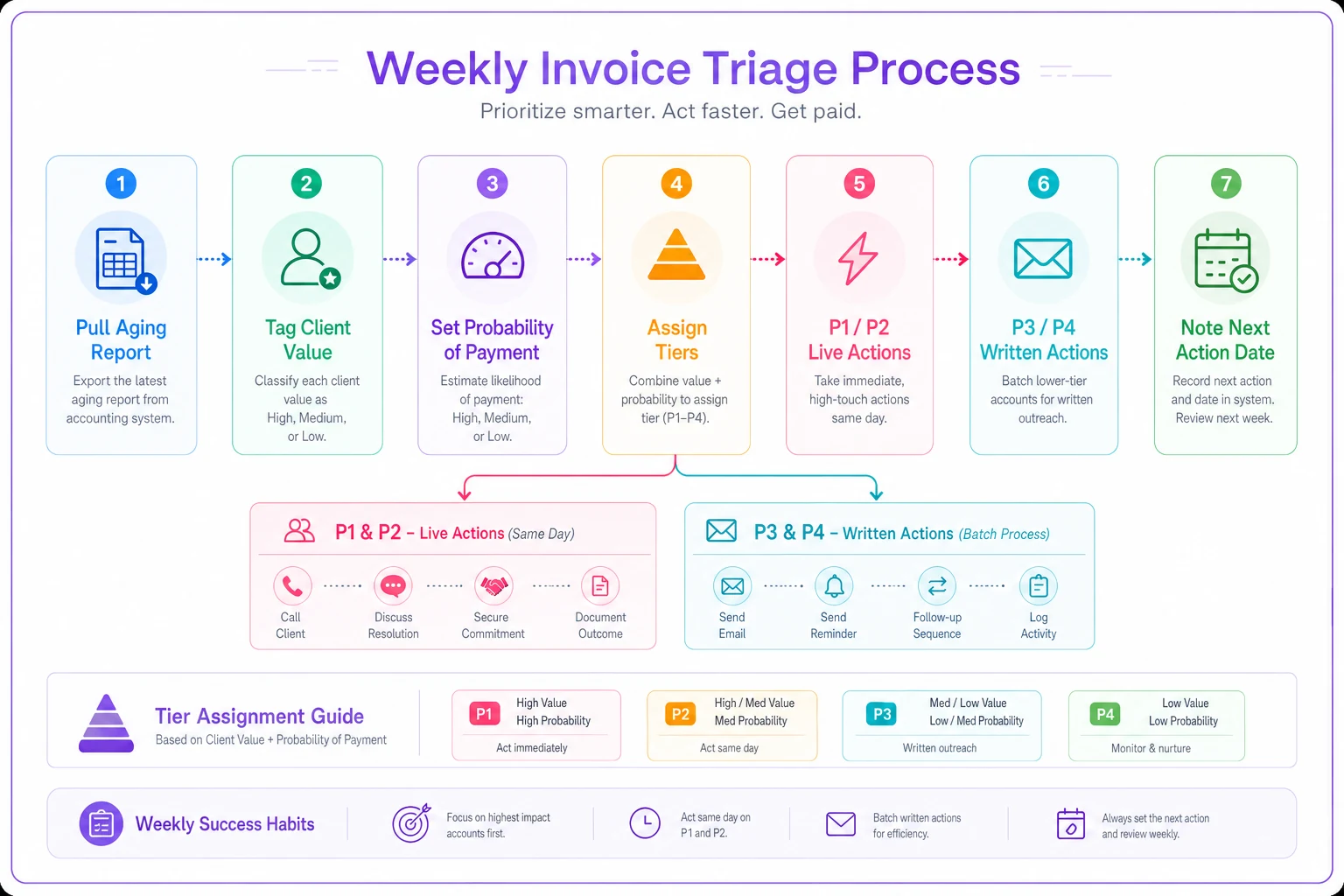
Use this as a checklist while you score each week.
A simple report layout for a small portfolio
For a portfolio under about 40 open invoices, you don't need anything fancy. A single tab with these columns covers everything:
-
Client / Invoice # / Amount
-
Days overdue (auto-calculated from due date)
-
Value (L/M/H)
-
Prob. (L/M/H)
-
Tier (P1–P4, ideally a formula off Value + Prob + Days)
-
Last contact (date + one-word status
replied / silent / disputed / promised)
-
Next action + Next action date
Sort by Tier, then by Amount within tier. That single sort gives you the exact order to work the list.
The "Last contact" note is what stops you from re-sending a reminder to someone who replied yesterday — a small mistake that quietly annoys good clients. A one-line summary block at the top helps if you want a second view: total outstanding, total in P1, total in P4/write-off review. When the P4 pile grows, that's your signal to tighten terms upfront rather than chase harder on the back end.
When this matrix makes sense — and when it doesn't
It makes sense when you've got more open invoices than you can personally call in a morning, and when your clients genuinely differ in value. A freelancer with four steady retainer clients and the occasional one-off is the ideal case. The matrix keeps you from over-chasing the people who actually fund your business.
It's overkill when you have three total clients who all pay on time. Don't build a scoring system for a problem you don't have. A calendar reminder is enough.
It's a bad idea to run it rigidly if you treat the tiers as permission to ignore people. P4 doesn't mean "abandon." It means stop spending live hours and switch to automated final notices. The moment a P4 client replies with a real plan, they can jump tiers. The matrix guides effort; it isn't a verdict.
Who should skip it entirely: businesses where nearly every invoice is the same size, same client type, and same payment behavior. If there's no real variance across the three axes, a plain reminder cadence works fine.
A quick note on where tools help
Once a portfolio grows past 40 or 50 open invoices, hand-scoring gets tedious and people quietly stop doing it. This is where an operational platform earns its keep — pulling due dates automatically, calculating aging, and letting the probability and value tags travel with each client record so you're not retyping them every week.
The P4 track especially benefits from light automation: final notices and deadline reminders can go out on schedule while you spend your live time on P1s. The scoring judgment stays yours. The repetitive busywork doesn't have to.
That said, you don't need any of that to start. A spreadsheet and the matrix above will already reorder your week around the money that's actually coming.
The shift worth making
The plain aging report answers a question that doesn't help you much: how late is everything? The triage matrix answers the one that does: what do I work first, and what do I stop wasting time on?
Tag every open invoice with a value rating and an honest probability read, cross them with the age bucket, and let the tiers tell you where to spend your morning. You'll collect more of the money that's actually coming, protect the clients who fund your business, and stop pouring energy into invoices that were never going to pay. That's the real difference between reading an aging report and using one to prioritize collections.
The plain aging report answers a question that doesn't help you much: how late is everything? The triage matrix answers the one that does: what do I work first, and what do I stop wasting time on?
Tag every open invoice with a value rating and an honest probability read, cross them with the age bucket, and let the tiers tell you where to spend your morning. You'll collect more of the money that's actually coming, protect the clients who fund your business, and stop pouring energy into invoices that were never going to pay. That's the real difference between reading an aging report and using one to prioritize collections.
Ready to streamline your billing process?
Join 5,000+ businesses using Billoly to reduce billing delays, automate payments, and grow revenue efficiently.