



The scariest moment in switching invoicing platforms isn't picking the new tool. It's the week you actually flip the switch. That's when a client pays into the old account, an autopay card doesn't carry over, a recurring invoice fires twice, or three invoices vanish somewhere between export and import.
Most migration advice treats this like a data project — export the CSV, map the fields, done. But if you're a freelancer or small business, your invoicing platform isn't just a database. It's the thing that collects your money. The real risk isn't losing data. It's losing cash flow continuity. And that risk shows up in ways a data checklist never catches.
This is a revenue-first playbook. The ordering principle is simple: protect in-flight payments first, protect the client experience second, protect data cleanliness third. Everything below follows that priority.
The in-flight payments problem nobody plans for
What breaks most migrations is that money is always in motion. When you cut over, you don't have a clean "zero state." You have:
-
Invoices sent but not yet paid
-
Autopay/recurring charges scheduled to run
-
Payments in transit (ACH clears in a few days, not instantly)
-
Partial payments applied to the old system
-
Clients with saved payment methods tokenized to your old processor
That last one matters more than people realize. When you change platforms, you often change payment processors too. Saved cards don't transfer. Tokens are tied to the processor, not to you. So every client on autopay has to re-enter their card — and if you don't manage that transition, your most reliable recurring revenue just quietly stops.
A typical example looks like this: a bookkeeping freelancer with around 40 recurring monthly clients switches platforms over a weekend. Monday, the new system is live and beautiful. The problem shows up on the 1st, when roughly 28 autopay charges that used to run silently just… don't. She didn't lose data. She lost the tokens. It took about three weeks of individual emails to re-collect cards, and two clients churned during the friction.
That's the failure mode this checklist is designed against.
Start with a pre-migration audit (but not the kind you think)
Most audits count records. A revenue-first audit maps money states. Before you touch anything, inventory where your cash actually is.
Stop chasing payments and start automating your billing.
Billoly empowers you to create, send, and track invoices effortlessly while maintaining professional client relationships.
- Customizable invoice templates
- Automated payment reminders
- Real-time payment tracking
No credit card required
Pull these four lists from your current platform:
-
Open receivables — every invoice sent and unpaid, with amount, due date, and client. This is money you cannot afford to lose track of.
-
Scheduled/recurring charges — anything set to auto-fire in the next 60 days.
-
Stored payment methods — how many clients have saved cards or ACH mandates, and which processor holds them.
-
In-transit payments — anything initiated but not yet settled (ACH, pending deposits).
Then add a context layer most people skip: note which clients are sensitive. The ones who pay large amounts, the ones who are historically slow, the ones on net-60 terms, the ones who've disputed before. These are the accounts where a migration hiccup turns into a real revenue hole.
One pattern worth flagging: freelancers almost always underestimate how many clients are on silent autopay. You don't think about those charges because they just work. That's exactly why they're dangerous during a cutover — invisible until they fail.
Field mapping: where the quiet data corruption hides
Field mapping sounds boring, and that's the trap. The money-losing errors aren't the fields that fail to import — those are obvious. The dangerous ones are the fields that import wrong but look fine.
The usual suspects:
| Source field | Common mapping failure | Revenue impact |
|---|---|---|
| Invoice status | "Partially paid" imports as "unpaid" | You re-bill clients who already paid part |
| Payment terms | Net-30 defaults to Net-15 (or due-on-receipt) | Reminder timing breaks; clients get nagged early |
| Tax lines | Tax folded into subtotal instead of separate line | Reconciliation and reporting break silently |
| Currency | Multi-currency invoices default to home currency | Amounts off by exchange rate, totals wrong |
| Credit balances | Credits don't import at all | You bill clients who have money on account |
| Invoice numbers | Numbering sequence restarts | Duplicate numbers, audit confusion |
Credit balances are the sneakiest one. If a client overpaid or has a deposit sitting on account and that balance doesn't migrate, your new system thinks they owe full freight. You send an invoice, they reply "I already have a credit with you," and now you look disorganized to exactly the client you least wanted to annoy.
The fix isn't glamorous: map fields explicitly, never trust defaults, and reconcile the totals after import. Sum of open receivables in the old system should match the new one to the dollar. If it's off by even a little, something mapped wrong — find it before you go live, not after.
Run a test migration against a frozen snapshot
Never test-migrate against a live, changing dataset. Export a snapshot, note the timestamp, and migrate that into a sandbox or test account in the new platform.
Then validate against a short list — not by eyeballing, by checking specific things:
-
Do total open receivables match exactly?
-
Do a sample of 10–15 invoices show the right status, amount, tax, and terms?
-
Did recurring schedules carry their next-run dates correctly?
-
Do credit balances and partial payments show up?
-
Did invoice numbering continue from the right place?
Pick your sample deliberately. Include at least one partially-paid invoice, one multi-currency invoice if you have them, one credit-balance client, and your two largest open receivables.
Pick your sample deliberately. Include at least one partially-paid invoice, one multi-currency invoice if you have them, one credit-balance client, and your two largest open receivables. Those edge cases reveal more than 100 clean, simple invoices ever will.
A small agency doing this test caught that every invoice marked "approved — awaiting payment" had imported as "draft." If they'd gone live, those invoices wouldn't have appeared in the new system's collections view at all. Around $14k in receivables would have just sat invisible. The test migration cost them an afternoon. Skipping it would have cost them a month of chasing.
The client communication layer (this is where revenue actually leaks)
Data can be perfect and you'll still lose money if clients don't know what's happening. The migration moment is confusing from their side: new invoice design, maybe a new payment link, possibly a new "pay to" name on their statement.
A client who gets an unexpected-looking invoice from an unfamiliar system is a client who pauses. And paused payments are slowed cash flow.
What needs to go out, and when:
-
Before cutover (about a week ahead) a short heads-up to recurring/autopay clients. Tell them they'll need to re-enter payment details, when, and why it's a 2-minute thing. Frame it as an upgrade, not an apology.
-
At cutover for clients with open invoices, confirm where to pay now. If the payment link changed, say so plainly. Include the invoice number so there's zero ambiguity.
-
After cutover a quick confirmation to anyone who re-authorized autopay, so they know they're set and won't get double-charged.
Keep these short. The goal isn't a polished announcement — it's removing the three-second hesitation that turns "paid today" into "paid eventually, after I figure out if this is legit."
One detail that prevents a real headache: tell clients explicitly to ignore any payment reminder that references the old system. During the overlap window, stray automated reminders from the old platform are common, and they make you look like you're double-billing.
Sequencing the cutover so no payment falls in the gap
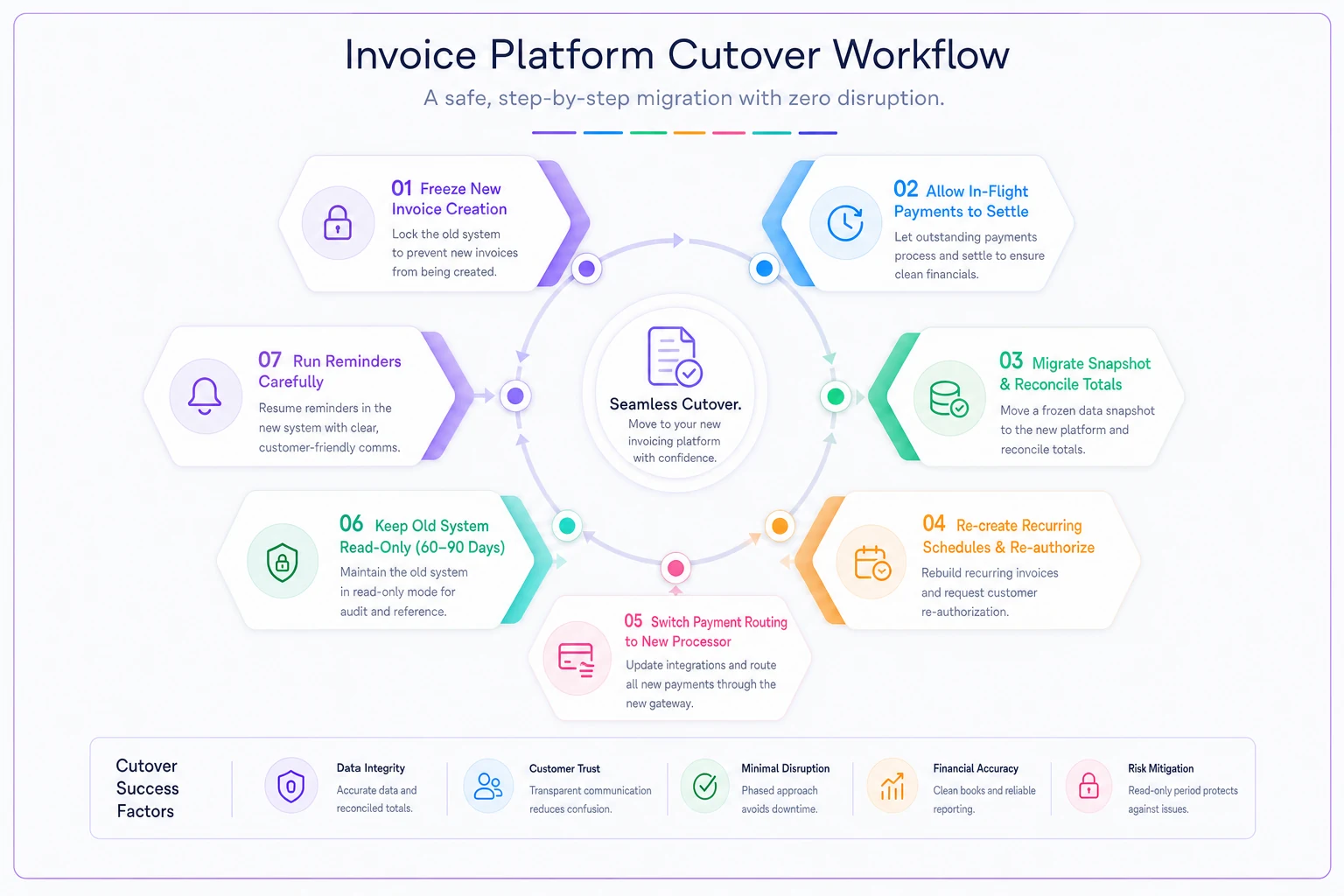
The actual go-live isn't a single moment. It's a window, and the order of operations protects your money.
A sequence that keeps revenue continuous:
-
Freeze new invoice creation in the old system. Stop making new invoices there. Existing ones stay payable for now.
-
Let in-flight payments settle. Give ACH and pending payments their few days to clear into the old account before you cut payment routing.
-
Migrate the snapshot and reconcile totals (see above).
-
Re-create recurring schedules and request re-authorization from autopay clients. Don't assume — confirm each one is active in the new system.
-
Switch payment routing. New invoices and payment links now point to the new processor.
-
Keep the old system in read-only mode for 60–90 days. You'll need it to reference historical invoices, confirm what settled where, and handle any late payer who still pays the old link.
-
Run both reminder systems carefully — ideally, turn off automated reminders in the old system entirely so clients don't get crossed signals.
Visual overview of this sequence:
The read-only overlap is the part people cut to save a monthly subscription fee. Don't. The $20–40 you save by canceling early is nothing against the cost of a client paying an old, dead link and you not noticing for two weeks.
Have a rollback plan before you need one
Every migration should have a defined "we're backing out" trigger. Not a vague feeling — a specific condition. Something like: if reconciled totals don't match within 24 hours, or if more than a handful of autopay re-authorizations fail, we pause and revert new-invoice creation to the old system.
Rollback is only possible if you kept the old system live and read-only, and if you haven't yet canceled the old processor. That's why the sequence above keeps everything warm. A rollback isn't failure — it's the reason you can attempt the migration at all without betting your entire receivables cycle on it going perfectly.
Write the rollback steps down before go-live, when you're calm. Decisions made mid-panic on a Monday morning are worse than decisions made in advance.
When this makes sense — and when to wait
Good time to migrate: right after a billing cycle closes, when open receivables are at their lowest. For most service businesses that's a few days after month-end, once that month's invoices have mostly settled. Fewer in-flight payments means a smaller, safer gap.
Bad time to migrate: mid-cycle, during your busiest invoicing week, or right before a large project milestone payment is due. Moving platforms the week a $20k milestone invoice is supposed to pay is asking for exactly the confusion you can't afford.
Who should probably not DIY this: if you have heavy multi-currency billing, dozens of active autopay mandates, or integrations wired into your bookkeeping, the mapping and reconciliation complexity jumps fast. That doesn't mean don't migrate — it means budget more time for the test migration and reconciliation, and don't do it over a single weekend.
A real scenario
A two-person marketing studio was moving off an old invoicing tool that no longer supported the payment methods their clients wanted. They had around 30 active clients, roughly 11 on monthly autopay, and about $22k in open receivables at any given time.
Their first instinct was the classic weekend rip-and-replace. Instead, they ran a frozen-snapshot test migration first and caught two things: partial payments were importing as unpaid, and none of the autopay clients' stored methods would carry over. They scheduled the real cutover for three days after month-end when receivables were down to about $8k, emailed autopay clients a week ahead, and kept the old system read-only for 60 days.
The result wasn't dramatic, which is exactly the point. No double charges, no lost invoices, and about 9 of 11 autopay clients re-authorized within the first few days — the last two after a single nudge. Nobody churned. The whole thing was, in the best possible way, boring.
Bringing it together
Switching invoicing platforms without downtime isn't really a technical challenge — it's a sequencing challenge. The businesses that get burned aren't the ones with messy data. They're the ones who treated money as if it would politely stand still while they swapped systems.
Protect in-flight payments first. Map the money states, not just the records. Test against a frozen snapshot. Over-communicate with the handful of clients who matter most. Keep the old system warm until you're certain. Do it in that order and the cutover becomes what it should be: invisible to your clients and, more importantly, invisible to your bank balance.
Protect in-flight payments first. Map the money states, not just the records. Test against a frozen snapshot. Over-communicate with the handful of clients who matter most. Keep the old system warm until you're certain. Do it in that order and the cutover becomes what it should be: invisible to your clients and, more importantly, invisible to your bank balance.
Ready to streamline your billing process?
Join 5,000+ businesses using Billoly to reduce billing delays, automate payments, and grow revenue efficiently.